


In the Profile tab you maintain everything that goes beyond the contractual framework — an employee’s skills and background. Skills are rated on a scale and are searchable, so that you can find exactly the right person for a project. On top of that come appraisal meetings and training, which let you document review meetings and professional development.
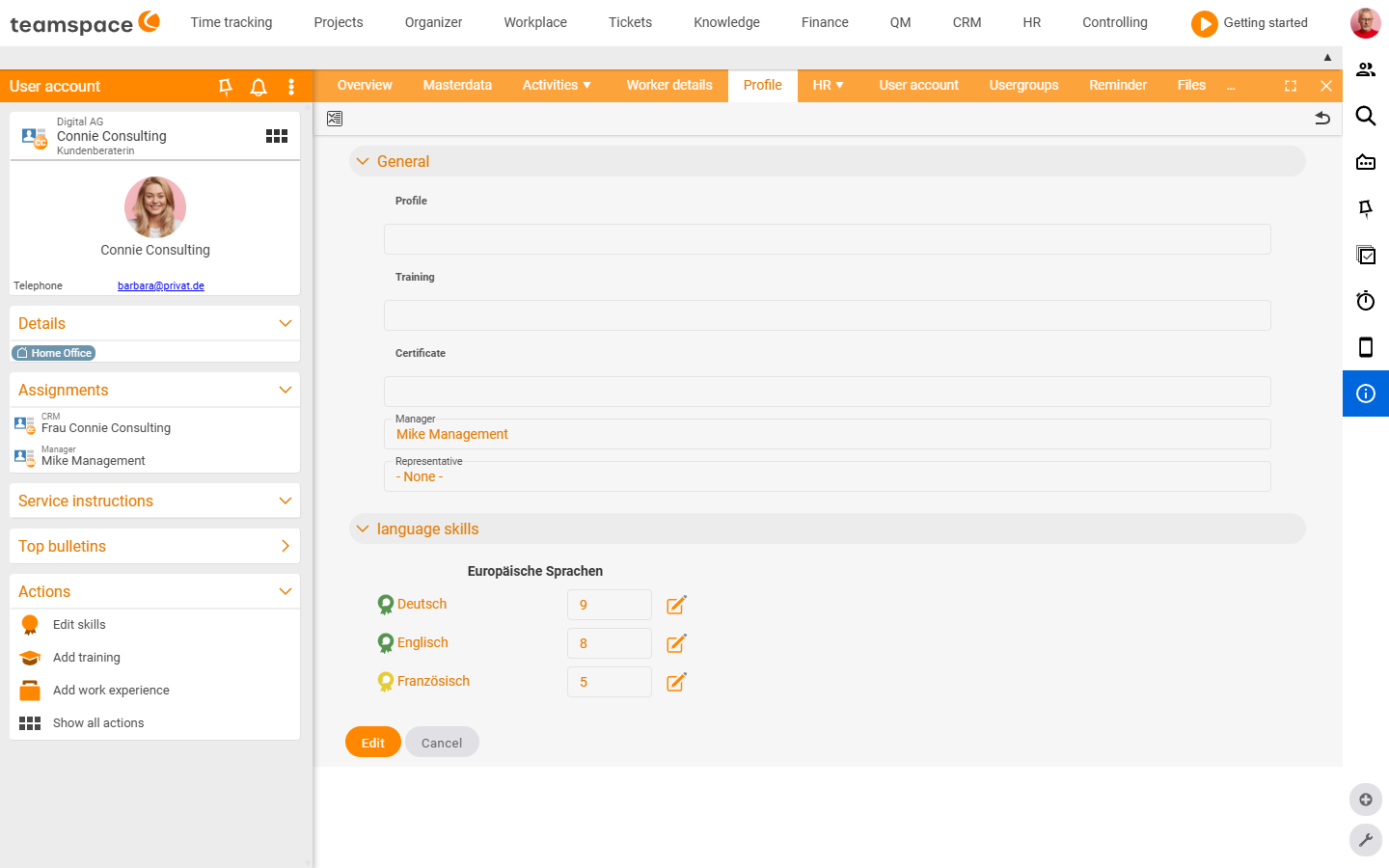
The profile
At the very top of the Profile tab there is a free-text field with formatting. Via Edit you set bold, italic and headings — here you can freely add a short profile or description. Below it follow the skills as well as Education and Work experience as line-by-line entries (school, university, previous employers).
Maintaining skills
Skills are organised into categories — typically language, professional, social and programming skills, depending on what your configuration allows.
This is how you add a skill:
- Open the employee profile and go to the
Profiletab. - On the left in the
Actionssection, clickEdit skill— all skills configured for your tenant appear. - For each relevant skill, set the rating on a scale from 0 to 9 — how good is the employee at it?
- Save.
Which skill types are available at all is something you control in the configuration. If you do not need Programming languages, you switch them off. If you need your own category for Machine licences or Forklift licence, you create it — exactly what matters for your business.
ℹ Info: If a selection list is empty, the field is not shown at all — the system recognises that there is nothing to select. So enter the values in the configuration first.
Finding employees by skill
The scale has a knock-on effect: in the employee search you filter specifically for colleagues with particular abilities — who needs French from level 6, who holds the forklift licence. This way you quickly find the person with the right skill for a project. This mapping also feeds capacity planning when you schedule employees by qualification.
Documenting appraisal meetings
You document appraisal meetings chronologically — both the planning and the actual meeting. You can store files, assessments and documents to build a complete history of the meetings. Appraisal meetings can be planned in the calendar; afterwards you file the results in the employee folders.
Recording training
With training you document employees’ professional development — both completed and planned training and further qualification measures. Thanks to attached documents you always have access to certificates and other relevant records.
Common problems
A skill I want to set does not appear in the profile.
Which skill types are available is governed by the configuration. If you need your own category (e.g. Machine licences or Forklift licence), create it there — then it appears in the profile.
I enabled a skill type, but it still does not appear. If the selection list is empty, the field is not shown — the system recognises that there is nothing to select. Enter the values in the configuration first.
How do I find exactly the colleague with the right qualification?
Filter by skill and minimum level in the employee search — for example “French from level 6” or “forklift licence”. The prerequisite is that the rating on the 0–9 scale is maintained.
Common questions & needs
| You want to … | How to |
|---|---|
| Set a language skill for an employee | Profile → Edit skill → set the rating on the 0–9 scale. |
| Create your own skill category | Define the skill types in the configuration – then it appears in the profile. |
| Find the right expert for a project | Filter by skill and minimum level in the employee search. |
| Store a certificate permanently | Record the training in the Training area and attach the certificate as a file. |
| Document an annual review | Plan an appointment in the calendar, file the outcome as an appraisal meeting with a document attachment. |