


Cost accounting (German Kosten- und Leistungsrechnung, KLR) is a company’s internal accounting. It answers one question: What do we actually make money with – and what not? Unlike financial accounting, it is voluntary and you can design it freely. It does not look at the company as a whole but at projects, customers and areas.
In teamspace, cost accounting is a by-product of everyday work. Hours, expenses, documents and postings are recorded here anyway. teamspace assigns every amount to a cost category, a cost centre and a cost object by rule. The result is up-to-date contribution margins – without Excel and without waiting for month-end closing.
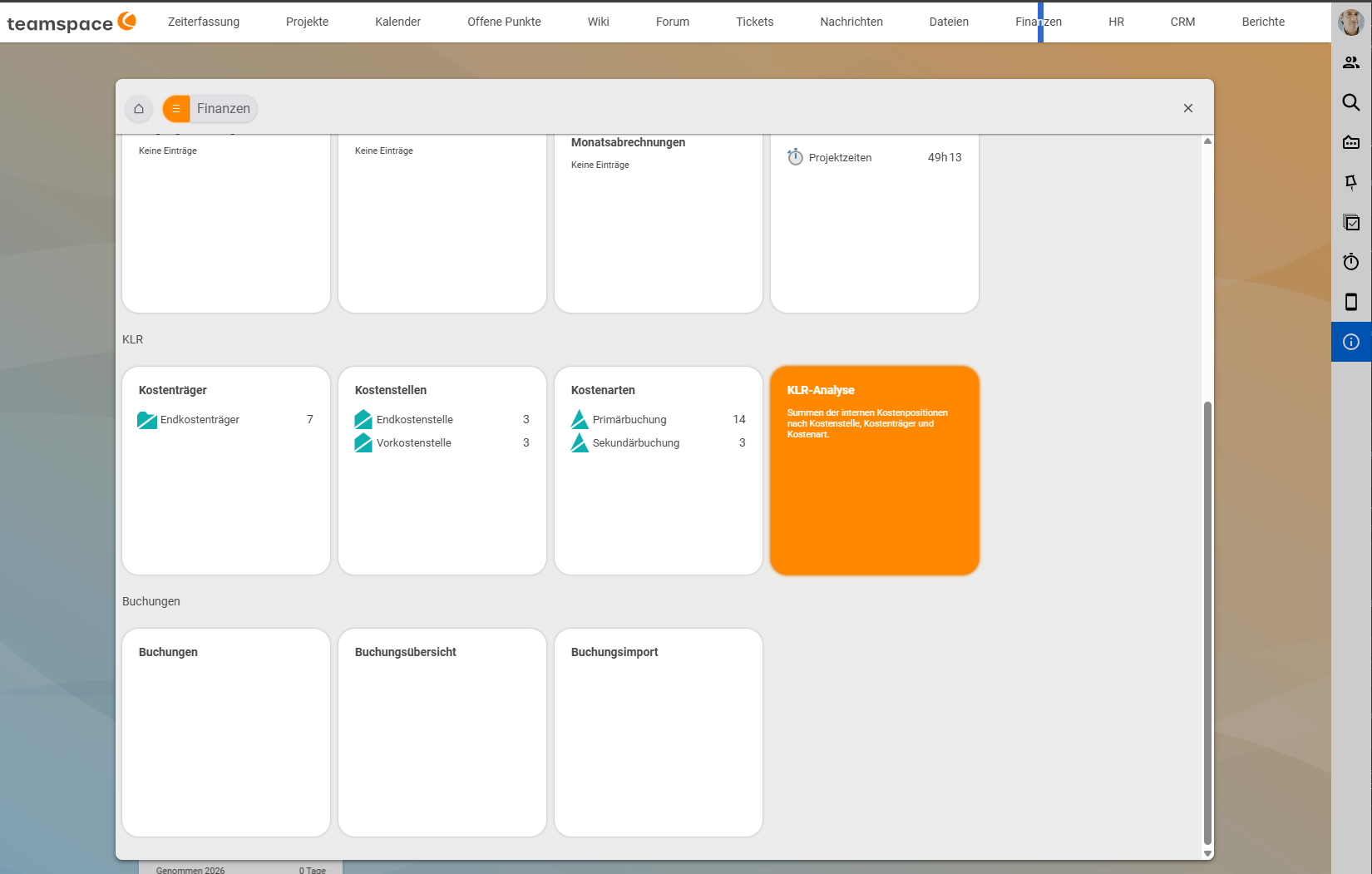
You find cost accounting in the Finance menu: the Cost accounting area holds the tiles Cost objects, Cost centres, Cost categories and Cost accounting analysis; the same entries are available as menu items.
What, where, what for: the three dimensions
At its core, every cost accounting system is built the same way. Every euro is viewed from three angles:
| Question | Dimension | Examples |
|---|---|---|
| What? | Cost category: what kind of cost or revenue | personnel costs, travel costs, external services, licence, fee revenue |
| Where? | Cost centre: in which area of responsibility | consulting, development, marketing, administration |
| What for? | Cost object: for which product or service | for service providers almost always the project or the contract |
Example: A hotel bill of €180 carries the cost category travel costs, the cost centre consulting (where the consultant is employed) and the cost object P-2026-018 Restructuring Müller GmbH (the project she was travelling for).
Once you have understood “cost category, cost centre, cost object = what, where, what for”, you understand the rest of this topic. The types and fields of the three objects are explained in Cost centres and cost objects: types and structure.
Cost accounting is not bookkeeping
Cost accounting does not replace financial accounting. Financial accounting stays with your tax adviser or in your financial accounting system; the documents go there via the DATEV interface. Cost accounting is the steering view that runs alongside. It may also contain things that do not appear in financial accounting, such as an imputed entrepreneur’s salary.
| External accounting (financial accounting) | Internal accounting (cost accounting) | |
|---|---|---|
| For whom? | tax office, banks, shareholders | management, heads of areas and project managers |
| Rules | required by law (German Commercial Code, tax law) | voluntary, freely designed |
| Result | balance sheet, profit and loss account | contribution margins, costing, plan/actual |
| Looks at | the company as a whole | projects, customers, areas |
Why a company car looks different in financial accounting and in cost accounting is shown in Cost, expense, expenditure: cost accounting vs. financial accounting.
Why service providers need their own kind of cost accounting
Classic cost accounting comes from the factory: unit costs, bills of materials, inventory valuation. A service provider does not sell units but the time and skills of its employees.
| Manufacturing | Service provider | |
|---|---|---|
| Largest cost block | material, machines | personnel: 60 to 80% of total costs |
| The “product” | unit, batch, series | project, contract, ticket – a one-off every time |
| Unit of quantity | unit, kg, machine hour | person hour |
| Steering metric | unit costs, inventory turnover | utilisation, daily rate, project margin |
| Inventory | raw materials, semi-finished and finished goods | none: an hour not sold is lost for good |
| Overheads | mark-ups on material and production | administration, IT, sales, management, distributed by hours, headcount or revenue |
This gives you three levers that need to be visible: the margin per project, customer and area, the utilisation per employee and team, and pricing – whether the calculated daily rates are actually achieved.
How teamspace implements cost accounting
Four sources feed cost accounting
Everything that creates costs or revenue in teamspace comes from exactly one of four sources. These postings are called primary postings because they come from outside:
| Source | What it delivers |
|---|---|
| Time bookings | personnel costs: hours × internal cost rate. The rates are stored per period, so a pay rise does not distort past months. |
| Cost elements | expenses, commissions, material: project-related costs without a supplier invoice |
| Documents | revenue (outgoing invoices) and external services (incoming invoices), including cancellations and credit notes – per line item |
| General postings | everything else: imputed costs (entrepreneur’s salary, interest, depreciation), accruals, corrections, salaries |
Rules pre-fill the fields
Nobody has to record anything extra for cost accounting. Cost category, cost centre and cost object are pre-filled by rule when you record: the cost category from the element (category, expense type, article), the cost centre from the person, the cost object from the project. Anyone with the right can override any value. See Define rules for default values and Check and override cost accounting fields when recording.
Secondary postings distribute further
What is passed on internally are secondary postings. They use their own cost categories in class 9000, so every list shows what came from outside and what was distributed internally:
- Reposting: a single amount is moved manually from one cost centre to another or from one cost object to another. See Repost an amount.
- Allocation: a rule distributes the costs of a service cost centre (e.g. IT) or of a pool regularly and automatically. See Set up an allocation rule.
- Salary cost centre: time bookings relieve it hour by hour; the remainder is allocated. See Allocate personnel costs via a salary cost centre.
Two views, one result
Every posting carries a cost centre and a cost object. This gives two complete views of the same euros: the department sees all its costs, the project sees all of its own. Both totals must always show the same true result. Why this matters so much is explained in Two views, one result: the core principle of cost accounting.
What this lets you see
- Contribution margin I (CM1) per project, up to date: revenue minus all directly attributable costs.
- Contribution margin II (CM2): CM1 plus repostings and allocations, i.e. including overheads.
- Customer view: via the target project, every cost object knows its customer. So plan, actual, CM1 and CM2 are also available per customer.
- Plan/actual per cost centre and cost object, per month and year to date.
More on this in Contribution margin I and II by project, customer and area.
What is deliberately not included
- Balance sheet, taxes, group consolidation: these remain the job of financial accounting.
- Bills of materials, material consumption accounting, inventory valuation: not relevant for service providers.
- Reciprocal method: allocations run using the direct or the step-down method (see Reposting, allocation or correction?).
Your path through this topic
| You are … | Start with |
|---|---|
| Management | Contribution margin I and II, Two views, one result |
| Controlling / administration (setup) | Set up cost accounting, Define rules for default values, Permissions for cost accounting |
| Controlling (day-to-day) | Repost an amount, Set up an allocation rule, Work with the cost accounting analysis |
| Project or area management | Cost centres, cost objects and cost categories in the detail manager, Enter a plan and compare it with actuals |
| Employees | Check and override cost accounting fields when recording |
| To try it out | Exercise: work through cost accounting by hand |
Related topics
- Cost, expense, expenditure: cost accounting vs. financial accounting Cost accounting Concept
- Two views, one result: the core principle of cost accounting Cost accounting Concept
- Cost control: contribution margin, recharging & cost accounting Costs & travel expenses Concept
- Introduction to controlling Controlling Introduction
- Topic: Cost accounting Cost accounting
- Cost accounting with teamspace
- Controlling software for service providers