


A reposting moves a single amount from one cost centre to another or from one cost object to another. You trigger it manually, usually in controlling. The original – the time booking, the document or the expenses – remains unchanged. The reposting is a separate record with a description and a user and appears in the movements of both sides.
Before you repost
- Is it a genuine error? If a time or an expense item is on the wrong project, correct it in the original. Reposting is intended for one-offs where the original is correct.
- Does it come back every month? Then set up an allocation rule instead of a reposting (see Set up an allocation rule).
- Are you staying within the view? The target always has the same type as the source: cost centre → cost centre or cost object → cost object. More on this in Reposting, allocation or correction?.
Step by step
- Open the detail manager of the source, i.e. the cost centre or cost object that passes on the amount, e.g. via
Finance → Cost objects. - On the left under
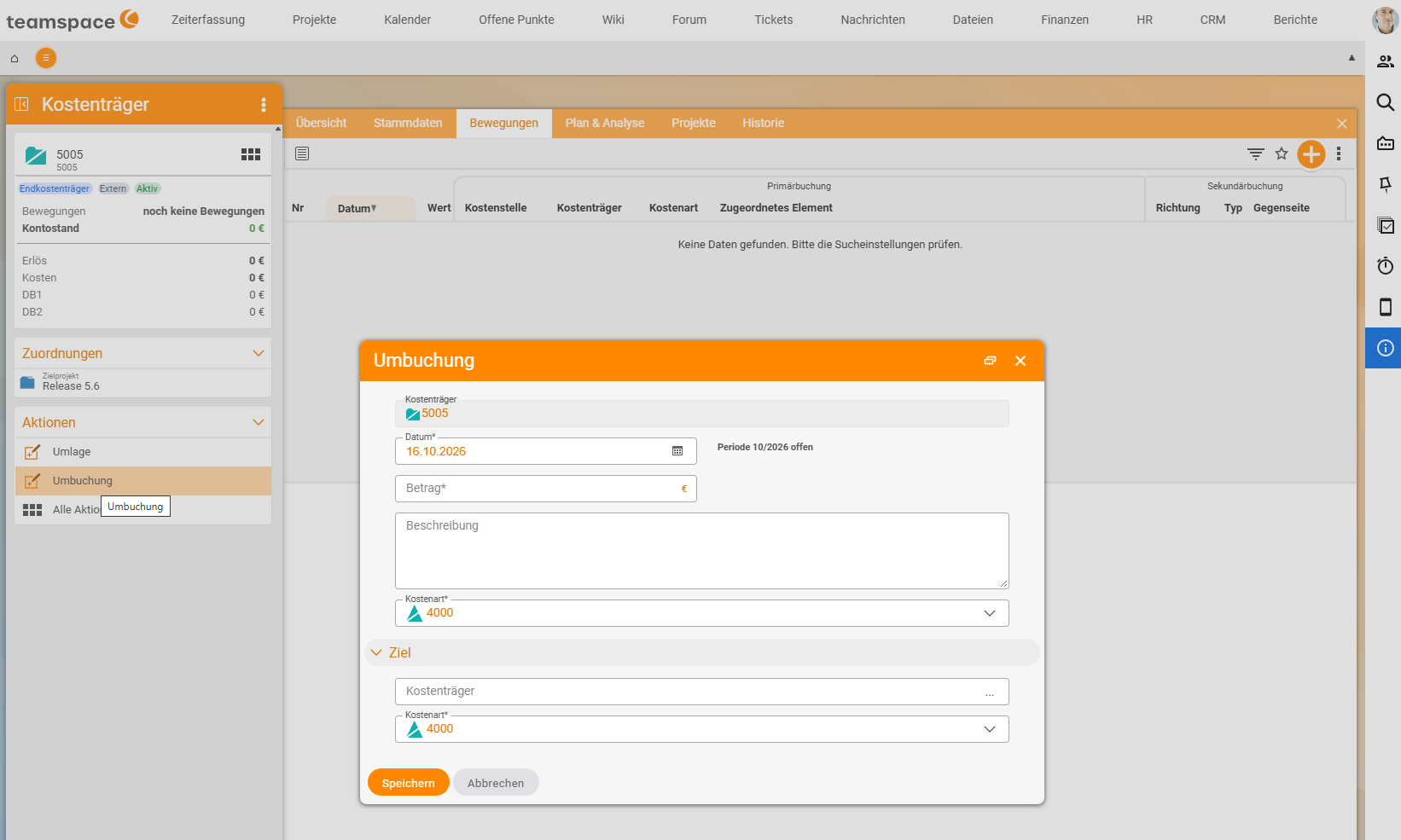
Actions, select the actionReposting. TheRepostingdialog opens; the source is already set at the top. - Enter the
Date*. Next to it, teamspace shows whether the period is open (e.g. “Period 10/2026 open”). The date determines the month in which the reposting takes effect. - Enter the
Amount*. - In
Description, write why you are reposting, for example “Trip to Hamburg 03/06: share Schmidt AG”. - Select the
Cost category*of the source, e.g.9200 Reposting. - In the
Targetsection, select the object that takes over the amount (aCost objectif the source is a cost object) and itsCost category*. - Click
Save.
What happens
The source is relieved (its balance rises), the target is charged (its balance falls). The total of the view stays the same; the other view is not affected.
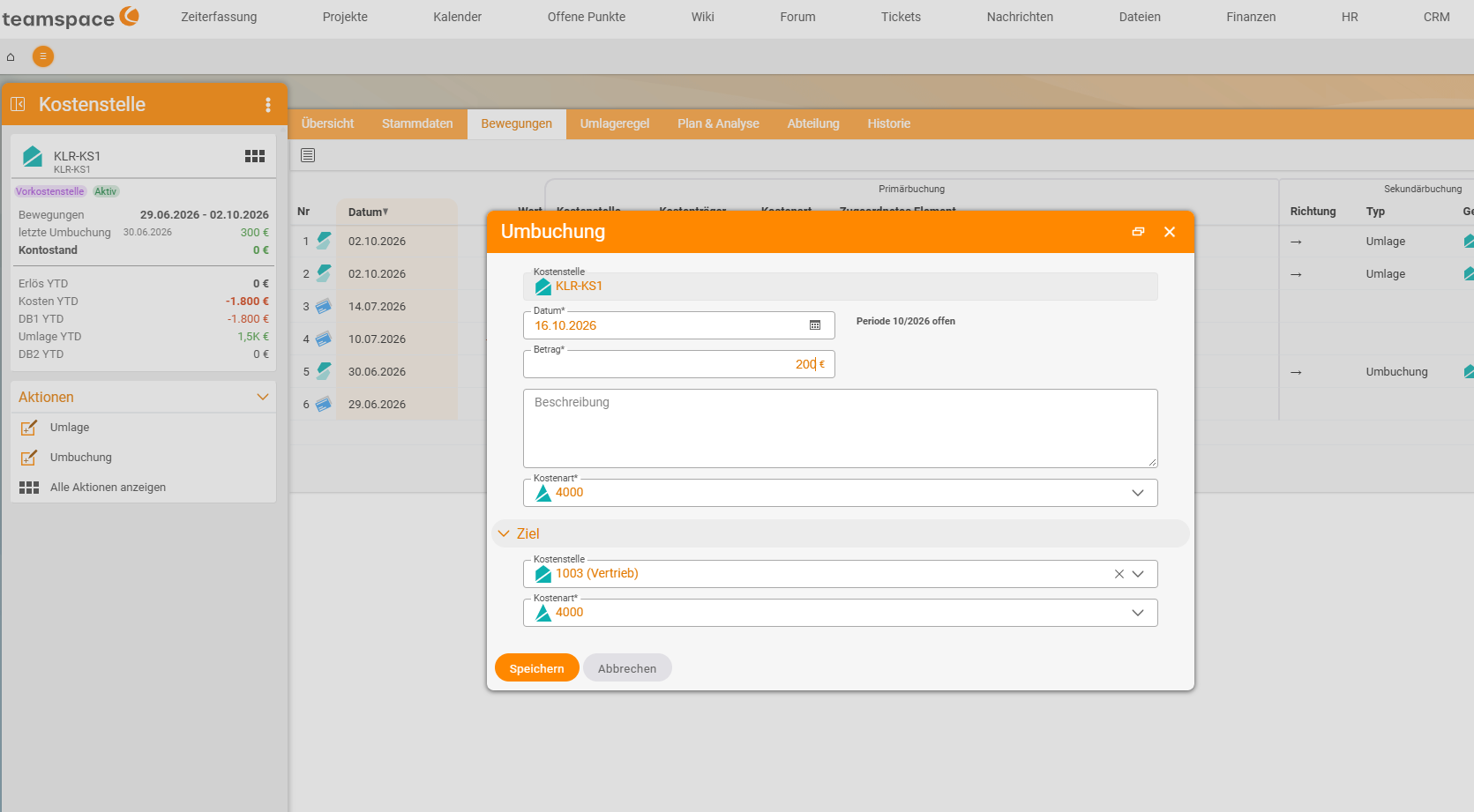
Example: reposting €300 from KLR-KS1 to KLR-KS2, cost category 9200.
| before | reposting | after | |
|---|---|---|---|
| KLR-KS1 (source) | −€1,400 | +€300 | −€1,100 |
| KLR-KS2 (target) | €0 | −€300 | −€300 |
| Σ cost centres | −€1,400 | €0 | −€1,400 ✓ |
In the movements of both cost centres, the reposting appears as a separate row under Secondary posting with Direction, Type and Counterpart: for the source with a right arrow (→, passed on), for the target with a left arrow (←, taken over).
Practical case 1: one trip for two customers
A consultant travels to Hamburg and visits two customers on two days. The travel costs of €640 (train, hotel, meals) are recorded as expenses entirely on P-2026-018 Müller GmbH. As a result, Müller’s margin looks worse and Schmidt’s better than they really are.
The trip is one transaction with one expense claim. So you do not split it when recording the expenses; instead you repost half of it:
| Reposting €320, cost category 9200 | Amount |
|---|---|
| Source P-2026-018 Müller GmbH (relieved) | +€320 |
| Target P-2026-021 Schmidt AG (charged) | −€320 |
| Travel costs afterwards | −€320 each |
Route: cost object → cost object. The cost centre view remains unaffected.
Practical case 2: margin share for the department doing the work
A developer works 40 hours on a consulting customer project. The project belongs to consulting, so that is where the whole margin ends up. If you run departments as separate profit centres, development should receive a share – here a fixed mark-up of €20 per hour.
| Reposting €800 (40 h × €20), cost category 9400 Internal charge mark-up | Amount |
|---|---|
| Source: development (relieved) | +€800 |
| Target: consulting (charged) | −€800 |
| Project CM | unchanged ✓ |
Watch the direction: for development to receive a plus, it is the source. Route: cost centre → cost centre. The project has earned what it has earned; the margin is only shared between the departments.
Practical case 3: reclassify a cost category
Because the dialog has a cost category each for source and target, you can also reclassify a cost category without changing the object. Example: part of a trade fair was posted as “Advertising” but belongs to “Commission”. Source and target are the same cost centre; the source’s cost category is 7300 Advertising and trade fairs, the target’s is 7500 Commissions.
Reverse a reposting
Create a reversing entry: the same reposting with source and target swapped and a description such as “Reversal of reposting of 30/06”. This keeps what happened traceable. If the reposting was a mistake from the outset, delete it in the Movements tab using the bin icon at the end of the row; use the pencil icon next to it to edit it.
Notes
- Repostings do not change any invoices or customer billing. They only take effect in cost accounting.
- With the option ”… with right”, you must have rights to both the source and the target.
- Manual repostings and automatic allocations end up in the same movements. You can recognise allocations by their own cost category (e.g.
9320 Allocation IT).
Common problems
I cannot select a cost object as the target.
The source is a cost centre, and the Cross-posting (cost centre/cost object) switch is off. This is intentional, because such a posting counts twice (see Two views, one result). Check whether you actually want to repost from cost object to cost object.
The amounts arrive with the opposite sign. Source and target are swapped. The source passes on and is relieved (plus); the target takes over and is charged (minus). Reverse the reposting with a reversing entry and create it again in the right direction.
The “Reposting” action is missing.
You lack the right Create and run repostings and allocations, or it does not apply to this object type.
The reposting appears in the wrong month. What counts is the date of the reposting, not the date of the original posting. Create a reversing entry and repost again with the correct date.
Common questions & needs
| You want to … | How to |
|---|---|
| Split a trip between two projects | Reposting cost object → cost object for the share (practical case 1). |
| Give another department a share of the margin | Reposting cost centre → cost centre, department doing the work as the source, cost category 9400 Internal charge mark-up (practical case 2). |
| Correct a cost category without touching the document | Reposting with a different cost category for the target (practical case 3). |
| Move the same amount every month | Not a reposting but an allocation rule. |
| Undo a reposting | Reversing entry with source and target swapped; for a mistake, the bin icon in the Movements. |
| Move expenses to the correct project | Do not repost: correct the cost element itself (Record expenses & material). |
Related topics
- Reposting, allocation or correction? Choosing the right way Cost accounting Concept
- Set up an allocation rule Cost accounting Configuration
- Cost centres, cost objects and cost categories in the detail manager Cost accounting How-to
- Topic: Cost accounting Cost accounting
- Cost centre accounting with teamspace