



An organisation can be a prospect, customer or supplier – or two of these at once. teamspace sets the relationship automatically as soon as the relevant document is created: an invoice makes an organisation a customer, an incoming invoice a supplier, an open quote a prospect. For each relationship a separate ABC classification runs over a rolling period, with which you see top customers, weak accounts and dangerous concentrations.
Why the distinction matters
Anyone talking to a company should know which role it currently holds. That only makes sense in a time-based context – the fact that someone received a quote ten years ago no longer makes them an active prospect. Two effects make this maintenance worthwhile:
- Day-to-day business: on a call or in an email you immediately see who you are talking to – customer, prospect, supplier – and which service notes apply. The contact gets the right tone without you having to leaf through the customer file first.
- Concentration risk: who has a disproportionately large share of your revenue or your purchases? The ABC classification shows where the concentration sits – and therefore where a relationship falling away would hurt.
There is also financial accounting to consider: in many charts of accounts, only six-digit accounts-receivable and accounts-payable numbers are available. Anyone who creates a number for every organisation straight away risks hitting the limit at some point. Numbers are therefore only created once the relationship genuinely exists.
The three relationships
The relationships are not mutually exclusive. A company that uses your printer service and at the same time supplies toner to you is both a customer and a supplier. Each tile (Customers, Prospects, Suppliers) is a subset of the organisations.
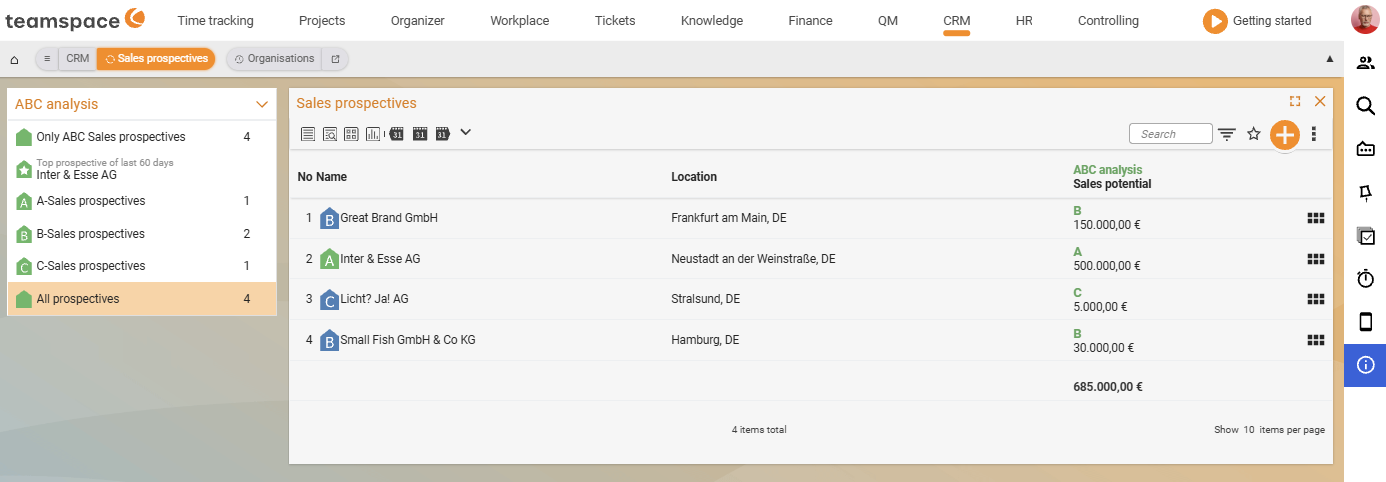
- Prospect: an organisation with an open sales case but no closed deal yet – usually originating from a quote or a sales opportunity. A green house icon on the row signals a currently valid quote.
- Customer: an organisation you sell to. If
Relationship to the organisationis set toAutomatic, teamspace sets the relationship with the first invoice or the first customer project. - Supplier: an organisation you source from – an incoming invoice, a purchase order or a project with this organisation as the contractor automatically makes it a supplier.
ℹ Info: “Once a prospect, always a prospect” is exactly what you do not want. If you fix the relationship manually, it stays that way permanently. Leaving it on
Automaticis almost always the right choice, because teamspace takes the time-based dependencies into account itself.
The ABC scheme
For each of the three relationships a separate ABC classification runs – the scheme is always the same:
- A: the best 20 per cent
- B: the middle 60 per cent
- C: the worst 20 per cent
Anyone with no movement in the analysis period – no invoice, no open quote, no incoming order – remains a customer, prospect or supplier, but gets no letter. They appear in the list without an ABC badge: a clear signal that nothing is happening here right now.
In the Prospects list tab, the sidebar block ABC analysis shows the filters ABC prospects only, Top prospect of the last 60 days, A-prospects, B-prospects, C-prospects, All prospects. For Customers and Suppliers the same pattern runs – only the period differs.
How the calculation works
Each relationship has its own rating model. teamspace uses a metric and a rolling period, sorts the organisations by it and divides them into A, B, C. You set the model in the CRM configuration (see Set up the CRM) – here is the logic behind it:
- Customers are typically rated by invoices. The preset is often
Project times; in many organisationsInvoicesover thelast 365 daysis worthwhile: sum all invoices per customer over the last year, build the ranking, assign A/B/C. Anyone who received no invoice over the last year remains a customer, but without a letter. - Prospects run on
Revenue potentialand/orQuotes of the last 60 days. TheRevenue potentialis a free estimate field in the master data – good for strategic maintenance, problematic if no one keeps it up to date. Anyone using sales opportunities is better off switching toSales opportunitiesor combiningRevenue potential and sales opportunities. - Suppliers are rated by
Time,QualityandCost– you maintain the three selection values per supplier underSupplier aspects. Weighting and time horizon (e.g. the last 90 days) are configurable.
⚠ Caution: If the
Revenue potentialstays permanently on an old value for many prospects, the A-prospects become inflated – especially as several old quotes add up. Set up a strict maintenance schedule or switch the model toSales opportunities: these run on their own with status and probability.
When the pipeline value flips
Sales opportunities carry a target value and probability – this is more accurate than the sum of competing quotes. An example:
Ingo Prospect is listed as a B-prospect in your list – with a quote of €550.00, probability 5%, target value €11,000.00. On the sales opportunity you create a New status and set it to Standard quote: the probability jumps to 10%, the current value to €1,100.00. In the prospect ranking, Ingo moves up.
If you set the status to rejected instead, the value becomes zero. Ingo drops out of the A-block – and another prospect who was previously B moves up. This happens without you doing anything to the prospect entry itself: the classification recalculates. The pipeline mechanics behind it are a topic of their own – see Topic: Sales opportunities.
Changing roles
If an organisation is both a customer and a supplier, it appears in both lists – in Customers with its customer ABC, in Suppliers with the supplier rating. The two classifications are independent: one rates by outgoing invoices, the other by incoming invoices.
Common problems
Why does an active customer have no ABC letter? Anyone with no movement in the evaluation period – no invoice, no open quote, no incoming order – stays a customer, prospect or supplier but receives no letter. They appear in the list without an ABC badge: a clear signal that nothing is happening here right now.
Why are suddenly so many prospects in the A class?
If the Revenue potential stays on an old value for many prospects, the A-prospects inflate – all the more as several old quotes add up. Set a consistent maintenance interval or switch the model to Sales opportunities: these run with status and probability on their own.
Why does an organisation stay a prospect even though it has bought?
The relationship was then set to a fixed value instead of left on Automatic. A forced relationship stays for life. Leaving it on Automatic is almost always right, because teamspace accounts for the time-based dependencies itself.
Related topics
- Create and manage organisations CRM How-to
- Set up the CRM: fields, rating models & activity types CRM Configuration
- CRM reports and analyses CRM Reference
- Topic: Sales opportunities Sales opportunities
- Lead management software