


The CRM provides several analyses with which you assess customer activity, sales performance and pipeline. This reference summarises which report answers which question and which levers it offers. Deeper, cross-module analyses are in Topic: Controlling.
Overview
| Report | Answers | Basis |
|---|---|---|
| Customer analysis | Which customers bring revenue and contribution margin? | Projects, income, expenses, internal cost rate |
| CRM analysis | How much sales activity is running, and by whom? | all CRM activities, by type over time |
| Sales opportunities report | Where does each individual sales opportunity stand? | individual sales opportunities with value and stage |
| Analysis of sales opportunities | How does the pipeline spread across the stages? | sales opportunities aggregated by stage |
| Activity analysis (Controlling) | What ran overall – all element types? | activities, appointments, tickets, documents and others |
Customer analysis
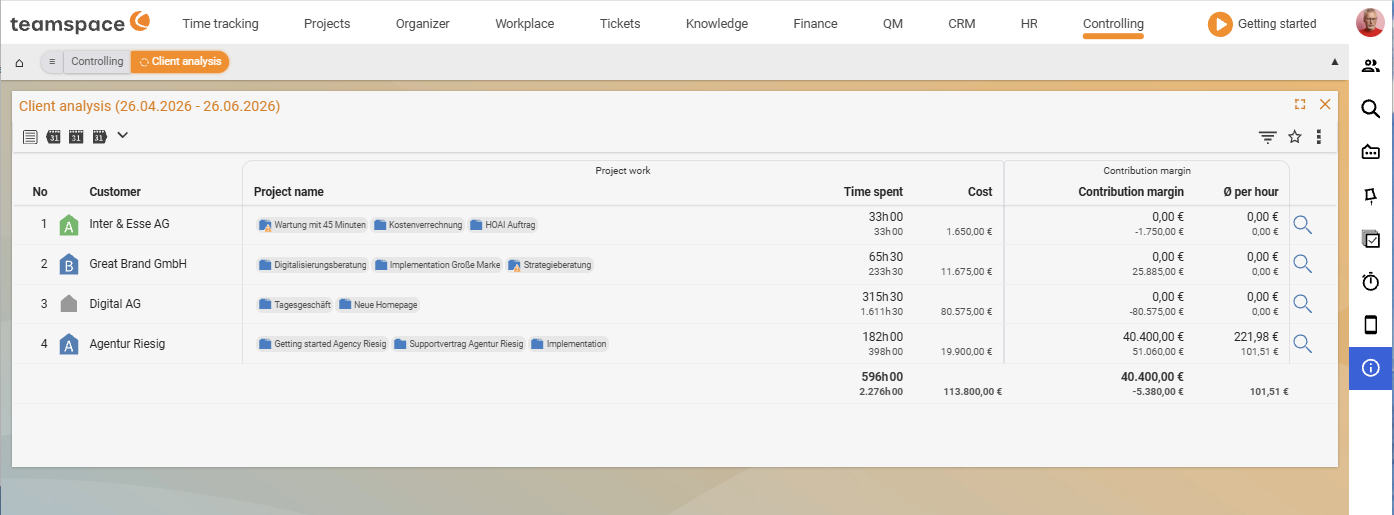
The customer analysis examines customers in terms of financial success: it shows how well customers perform based on their projects, their income and expenses, and calculates contribution margin and average income per hour.
You open it in the Controlling module via the Customer analysis report (checked live 2026-06-25). The table groups the columns into Project work (Booked, Cost) and Contribution margin (Contribution margin, Ø per hour), per customer with the associated projects and a totals row.
- Internal cost rate: the basis of the calculation is the employees’ internal cost rate – it is set in the HR portal for each period.
Showfield:Cumulativeshows only the head customers,Departmentsshows all customers with departments.- Project success basis: selectable based on bookings, documents and/or costs.
- Detail: a click on the magnifying glass symbol next to a customer opens the detailed individual plans.
- Filters narrow the data for specific scenarios.
CRM analysis
The CRM analysis gives an overview of customer activities and sales performance and allows an assessment of future orders. The basis is all CRM activities, summarised by type and shown over time.
Splitfield: subdivides the report by handler or customer.- Restriction: display only for a particular activity type or CRM status is possible.
- Report settings: show additional data such as count, revenue or forecast; for quotes the probability is factored in.
ℹ Info: The CRM analysis shows only CRM activities. Appointments, tickets, documents and projects are elements in their own right – for an overall view across all element types you use the activity analysis (see below).
Sales opportunities report
The sales opportunities report gives an overview of all sales opportunities: you analyse each individual one, see its current value and its stage and get an overview of the sales opportunities per key account manager.
- Period: defines when the sales opportunity was created or when the income is expected.
- Assignments: filter e.g. by customer or key account manager.
Analysis of sales opportunities
The analysis of sales opportunities shows the pipeline split by stages: which opportunities are in which stage, what the current value per stage looks like and which stage currently holds the most potential customers.
- Filter: such as by period or target value.
- Assignments: additional restriction by customer or key account manager.
The mechanics behind sales opportunities, stages and probabilities belong in Topic: Sales opportunities.
Activity analysis (in Controlling)
While the CRM analysis shows only CRM activities, the activity analysis in Controlling combines all element types – activities, appointments, tickets, documents, calendar entries, etc. You can filter the list (e.g. only CRM activities) and split by assignee to see how much each employee has handled across all element types. It is located in Topic: Controlling.
Common problems
Why are appointments, tickets and documents missing from the CRM analysis?
The CRM analysis shows only CRM activities. Appointments, tickets, documents and projects are teamspace elements in their own right and do not appear there. For an overall view across all element types, use the Activity analysis in Topic: Controlling.
Where do I find the customer analysis?
It is located in the Controlling module as the Customer analysis report – not directly in the CRM. It calculates Contribution margin and Ø per hour per customer based on projects, revenue and costs; the basis is the internal cost rate from the HR portal.
Common questions & needs
| You want to … | How to do it |
|---|---|
| Know which customers deliver the best contribution margin | Open the customer analysis; choose the project success basis (bookings/documents/costs), internal cost rate from the HR portal. |
| See how many activities an employee handled | CRM analysis split by Split → handler; restrict to an activity type if needed. |
| Check the value and stage of a single opportunity | Open the sales opportunities report and filter by customer/key account manager. |
| Spot where the pipeline is stuck | View the analysis of sales opportunities by stage – where do most opportunities gather? |
| Evaluate all activities (not just CRM activities) | Use the activity analysis in Controlling and split by assignee. |
| Assess a future order peak | CRM analysis with forecast/probability, or analysis of sales opportunities over the expected period. |
Related topics
- Activities and follow-ups CRM How-to
- Prospects, customers and suppliers CRM Concept
- Topic: Controlling Controlling
- Topic: Sales opportunities Sales opportunities
- Sales controlling