


Two reports gather what doesn’t fit into the finance, project, employee or CRM line: the Area/category analysis as a five-dimensional pivot analysis and the Ad-hoc report as automatic email dispatch for important events.
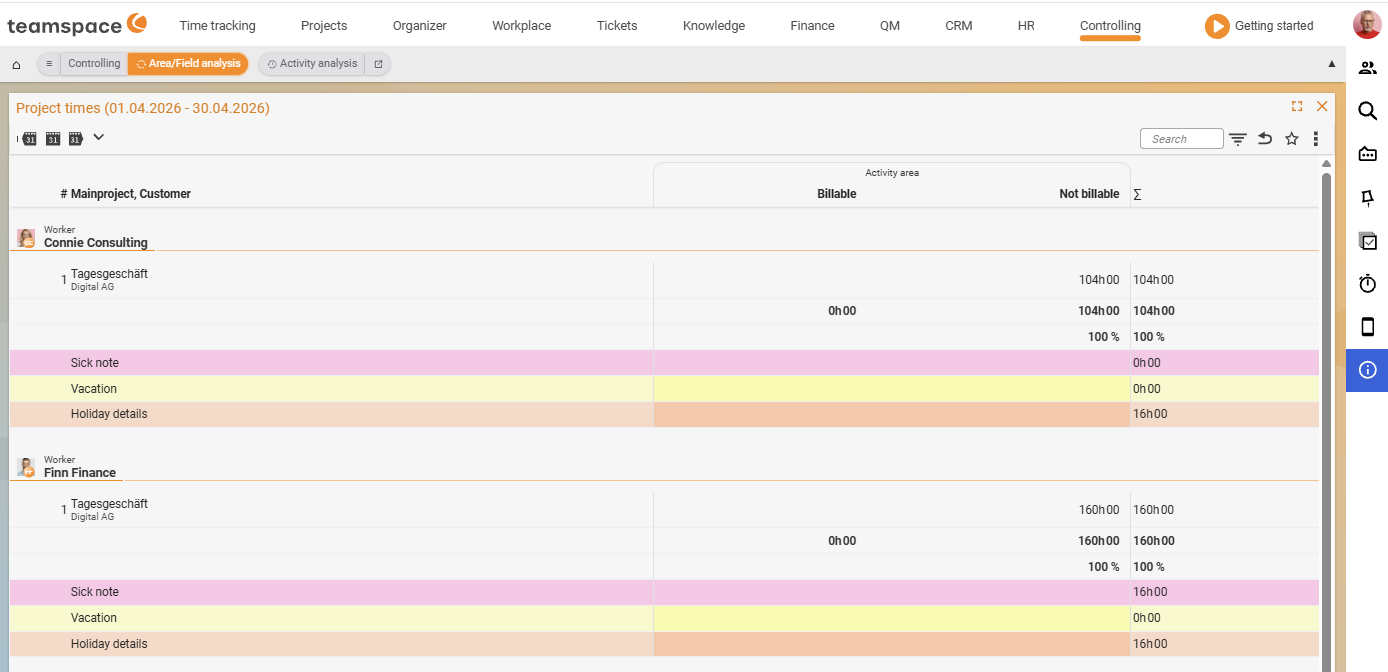
Area/category analysis
The Area/category analysis helps to analyse activities by area or category over a period – daily, weekly or monthly.
The report is five-dimensional: up to five criteria at once. Two of them are fixed:
- Time range (the row on the time axis).
- The
Activitiesresult (what is analysed).
The other three criteria are flexible – they control columns, rows and the split into blocks.
Examples:
- For a particular project type, all the projects it contains with category columns.
- Which projects all employees worked on in the last three months, split by category.
In the UI the table groups by Assignee (with a personal photo), rows carry Main project, Customer (with numbering). The columns are Category with the sub-columns Billable, Non-billable, Σ. Absence rows appear colour-coded: Sickness (pink), Leave (yellow), Public holiday details (orange).
Via the report settings you decide which values are displayed; a checkbox below the combo box enables/disables the values. Numerous filter options round off the analysis – period, individual employee, user group or project type.
The
Area/category analysisis an analysis view on the project times – the header showsProject times (<period>)as its title. It and the Project times work on the same data source, just presented differently.
Ad-hoc report
An Ad-hoc report is an automatically dispatched report that informs a particular person by email about important events – you don’t have to check yourself. The following events trigger it:
- Assignment of tasks.
- Warnings.
- New follow-ups.
- New tickets.
How often you receive an ad-hoc report you set yourself in your personal settings under Personal data – Notifications (not in the Controlling module). Three filters narrow down the analysis:
User account– for which user the sent ad-hoc reports are shown.Period– which period the reports should come from.- Additional filters – narrow down further by area, detail or action.
Note: The analysis tab of the ad-hoc report is not visible in the Controlling module as a separate tile; you configure the dispatch frequency in the personal settings area (avatar menu). See Set up cost rates, commissions & ad-hoc reports.
Common problems
Why can’t I find the Ad-hoc report in the Controlling module?
The analysis tab is not visible as a separate tile in Controlling. You set the dispatch frequency in your personal settings under Personal data – Notifications (avatar menu), not in the Controlling module.
Why don’t I get any ad-hoc emails?
Dispatch is per user and has to be active. Open the avatar menu → Personal data – Notifications and set how often you receive ad-hoc reports. The setup is described in Set up cost rates, commissions & ad-hoc reports.
Common questions & needs
| You want to … | How to |
|---|---|
| Billable vs. non-billable time per category | Area/category analysis – the sub-columns Billable/Non-billable/Σ. |
| Cross several dimensions at once | Area/category analysis – assign the three free axes (columns, rows, blocks). |
| Recognise sickness/leave in the activity picture | Area/category analysis – the colour-coded absence rows. |
| Be informed automatically about new tickets/warnings | Enable ad-hoc dispatch under Personal data – Notifications. |
| Change the dispatch frequency | In the avatar menu → Personal data – Notifications. |