


Kanban and Scrum are the two most widely used methods of agile working. teamspace ships ready-made boards for both, ready to use straight away – including the integration with tickets, projects and CRM. This article explains when which method pays off.
Kanban: continuous flow
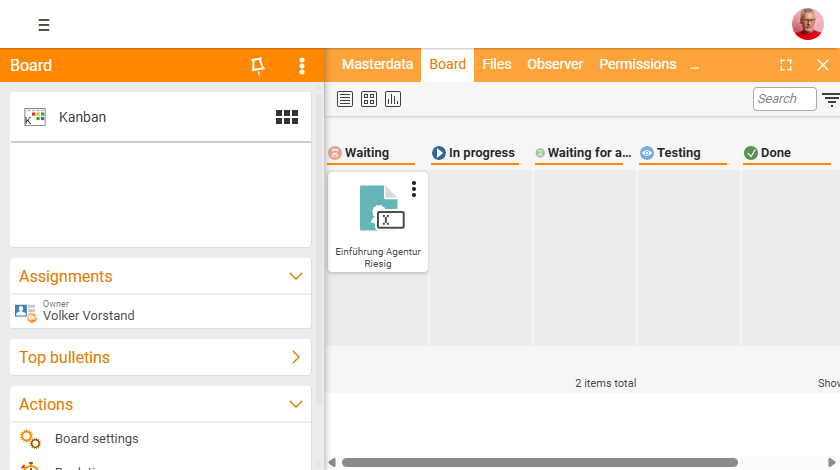
Kanban originally comes from Japanese manufacturing of the 1940s and roughly means “visual signal”. In the simplest case, a Kanban board consists of three columns – Open, In progress, Done – through which tasks move.
Kanban is suitable when work arrives continuously and is processed by priority: support, day-to-day business, maintenance, ongoing requests. There are no fixed time boxes – the focus is on a steady, visible throughput.
Scrum: reaching the result in sprints
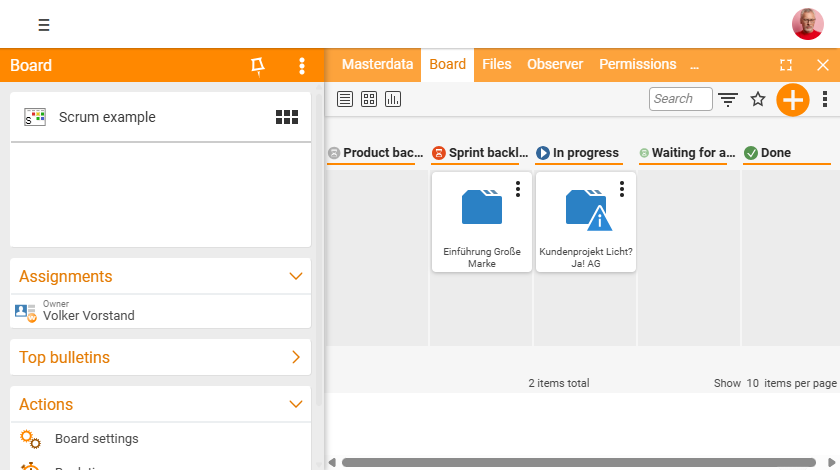
Scrum comes from agile project management. Requirements are first collected in the product backlog, prioritised and continuously adjusted. Selected tasks move into the sprint backlog and are completed within a fixed period (sprint) – via In progress and For approval through to Done.
Scrum is suitable for complex undertakings that should be carried out in an orderly yet flexible way – typically IT and development projects with changing requirements.
More than just moving cards: a Scrum board is not merely a visual board with linked elements. Together with project management you use the real Scrum functionality of the work packages – work packages are planned as backlog items, pulled into sprints, and keep their efforts, responsible people and times in the project. The board is then an agile view of the real project data, not a copy. The detailed Scrum implementation is explained in the Project management topic; an overview is available at teamspace.de/scrum-board.
Kanban or Scrum?
| Criterion | Kanban | Scrum |
|---|---|---|
| Work rhythm | continuous flow | fixed sprints |
| Good for | support, day-to-day business, maintenance | projects with changing requirements |
| Planning | ongoing | per sprint from the backlog |
Both boards can be freely customised in teamspace – your own columns, rows and splits are possible at any time. You can even switch between the types without losing content.
Connected, not isolated
The real lever in teamspace is connectivity: the boards hold not just notes but real system elements – tickets, work packages, quotes, contacts. A sub-project can thus be handled in an agile way while remaining anchored in project management; support tickets pass through a Kanban board without leaving the ticketing system.
The decisive point is this: a board card is not merely a representation but the real element. A work package on a Scrum board keeps its full project-management functionality – effort estimate, actual times, responsible people and status work in both directions. You steer it in an agile way on the board and see the same data in the project at the same time.
Teamwork
Boards are shared via the cloud: no matter where the team members are based, everyone sees the same state and can create or move cards. Distributed teams in particular benefit from this shared, always up-to-date view. You control access via the board permissions.
Related topics
- Board types Boards Concept
- Add tasks & elements to a board Boards How-to
- Kanban Boards · Scrum Boards · Project management