


To use the forum confidently, you should understand two things: how the content is stacked (parent forum → forum → topic → post) and how access to it is controlled (read, write, moderate). Together these make the forum both open for collaboration and safe for sensitive content.
The four levels
The forum arranges content into four nested levels:
- Parent forum – the top-level grouping. Individual forums are assigned to it, creating a tree structure (e.g. parent forum
Saleswith the forumsCustomer insights,Campaigns,Service cases). - Forum – the collecting shell for the discussions of one area. It holds no posts directly, but topics and polls. Every forum has a moderator and a permission group and can be archived.
- Topic (or poll) – a single discussion with an opening post.
- Post – the individual contribution within a topic.
This keeps even a large forum manageable: instead of a flat list of a hundred individual discussions, you group them via forums and parent forums by team, department or occasion.
Note: The hierarchy of parent forums and forums is not maintained in day-to-day use but in the configuration. For how to create forums and parent forums, see Setting up & managing the forum.
The access model
For each forum and each topic, you define in the Permissions tab which groups or individual people have access. There are three levels to distinguish:
- Read – the content is displayed; posts can be read but not written.
- Write – in addition, people may create their own posts and take part in discussions.
- Moderate – in addition, people may edit and delete other people’s posts and archive topics (see Moderators below).
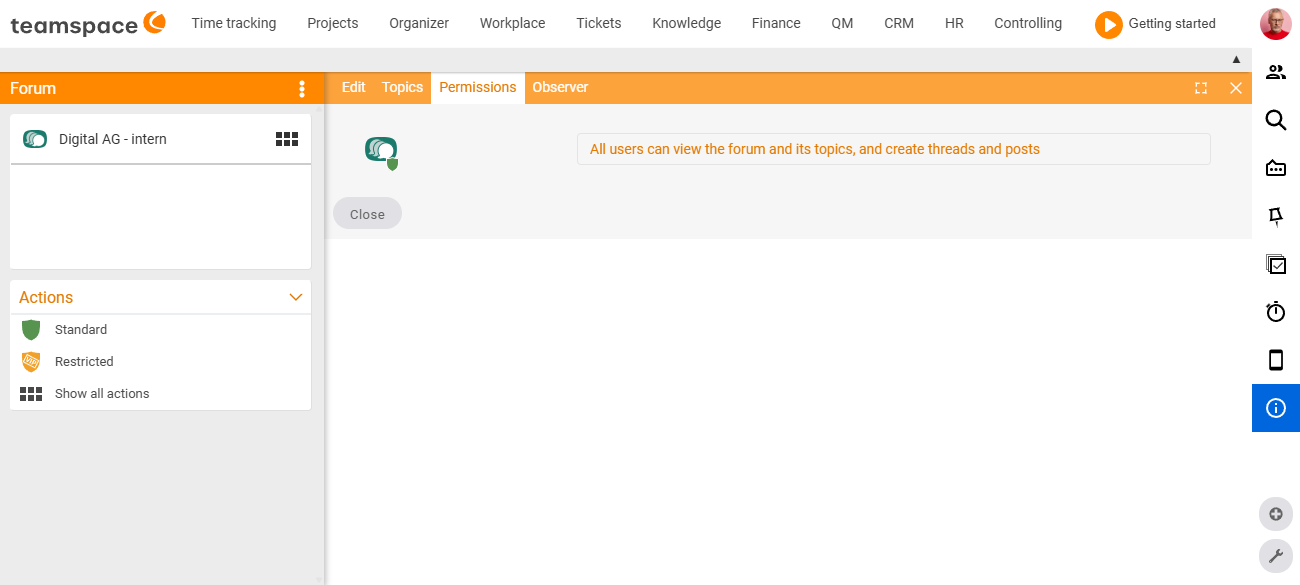
In the Permissions tab, you first choose between two basic modes (the Standard and Restricted actions): in Standard mode the forum is open – the display then reads “All users can view the forum and its topics, as well as create topics and posts”. Only in Restricted mode do you enter the individual groups and people with their read/write/moderation rights.
Inheritance from the forum to its topics
A forum’s permissions initially apply to all topics and posts beneath it. On an individual topic, however, you can narrow the circle further: by adding only certain groups or people there, a sensitive discussion stays protected even within an otherwise open forum.
This is how you build mixed structures:
- an open
Generalforum that everyone may read and write in, - an internal
Adminforum for administrators only, - a sealed-off
Project Xforum for the project team, - a forum that an external partner is also given access to.
Moderators
Every forum and every topic can have one or more moderators. They steer the discussion and have special rights: they can edit and delete posts and archive topics. You see a topic’s moderator behind the author in the topic list and in the sidebar of the topic detail manager as a separate person card.
Who may create forums at all
The rights within a forum (read/write/moderate) are one thing; who may create or archive forums or publish news articles at all is another. The latter is governed by the system’s module permissions via the permission groups. For an overview, see Permissions – overview.
Common questions & needs
| You want to … | How to |
|---|---|
| Make a discussion visible only to a project team | Create a dedicated forum with read/write permission restricted to the team (Setting up & managing the forum). |
| Protect a sensitive topic within an open forum | In the topic itself, narrow the circle to certain groups/people in the Permissions tab – the tighter rule overrides the forum’s. |
| Give an external partner access | Add the partner as a person or group to the permissions of exactly the forum concerned, not globally. |
| Appoint someone to keep a discussion in order | Enter that person as moderator of the forum or topic – they may then edit/delete other people’s posts and archive. |
| Keep many forums tidily organised | Assign forums to a parent forum (Setting up & managing the forum). |
Related topics
- Introduction to the forum Forum Introduction
- Setting up & managing the forum Forum Configuration
- Topics & posts: working in the forum Forum How-to
- Topic: Permissions Permissions