


The forum is set up via the system configuration. As an administrator, you activate the module if needed, add the entry points to the menu and create the forum structure – the individual forums, their assignment to parent forums, their permission groups and, optionally, their coupling to a CRM or project record.
Activating the module
If the forum is not yet available in a tenant, you activate it first:
System configuration → General → Modules → ForumAdding the entry points to the menu
If the forum entry points (Forums, Recent topics, News, Editorial) are missing from the main menu even though the module is active, you add them via the menu configuration:
System configuration → General → MenusNote: The menu in teamspace is fully configurable. Where the forum entry points sit can differ from installation to installation.
Creating forums and parent forums
You maintain the forum structure centrally under:
System configuration → Forum → ForumsThere you see the complete forum structure as a table and create new forums with a name and a permission group. By assigning them to a parent forum, you build up the tree structure – so beneath a parent forum Sales sit, for example, the forums Customer insights, Campaigns and Service cases. Forums can also be marked as archived.
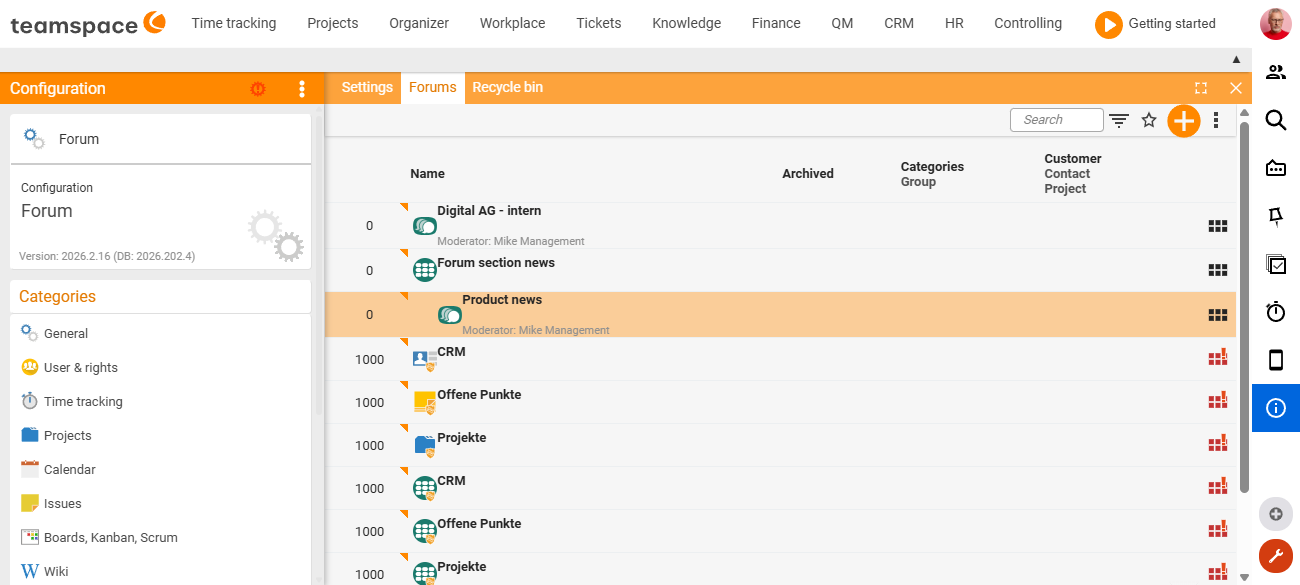
Coupling forums to CRM or project records
In the forum table, a forum can additionally be coupled to a specific record – to a customer, a contact or a project. This automatically opens the matching forum for that record: a customer record or a project then has its own discussion space directly attached.
Permissions per forum
When creating a forum, you use the permission group to define who may read, write in and moderate it. These rights are inherited by the topics and posts beneath; on individual topics, the circle can be narrowed further afterwards. The full access model – inheritance, moderators, external partners – is explained in Structure & permissions in the forum.
Common problems
I cannot find the forum area at all – where do I activate the module?
If the forum is not yet available in a tenant, the module activation is missing. You switch the module on under System configuration → General → Modules → Forum.
The module is active, but the entries are missing from the menu.
The forum entry points (Forums, Recent topics, News, Editorial) are added separately via the menu configuration under System configuration → General → Menus. The menu is fully configurable, so the entries do not appear automatically after the module is activated.
I want to get rid of an old forum without losing the content. Do not delete the forum; mark it as archived in the forum table instead – the discussions are kept, but the forum moves into the background.
Common questions & needs
| You want to … | How to |
|---|---|
| Make the forum available for the first time | Activate the module under System configuration → General → Modules → Forum. |
| Bring missing forum entries into the menu | Menu configuration under System configuration → General → Menus. |
| Create a new forum for a team | Under System configuration → Forum → Forums, create a forum with a name, permission group and parent forum. |
| Group many forums clearly | Assign forums to a shared parent forum. |
| Give every customer/project its own discussion space | Couple the forum to the customer, contact or project record in the forum table. |
| Retire a forum without losing content | Mark the forum as archived. |
Related topics
- Structure & permissions in the forum Forum Concept
- Introduction to the forum Forum Introduction
- Topic: Permissions Permissions