


In the News area you read the news articles written and published in the Editorial area – the internal company blog. Read, filter and comment: that is what this view does. The articles are created and edited exclusively in the Editorial area.
Reading published articles
In the News area you see all the currently published news articles released for you. An opened article shows the heading, teaser and full text – like a blog post. This way you read not only the latest announcement but also page through older articles.
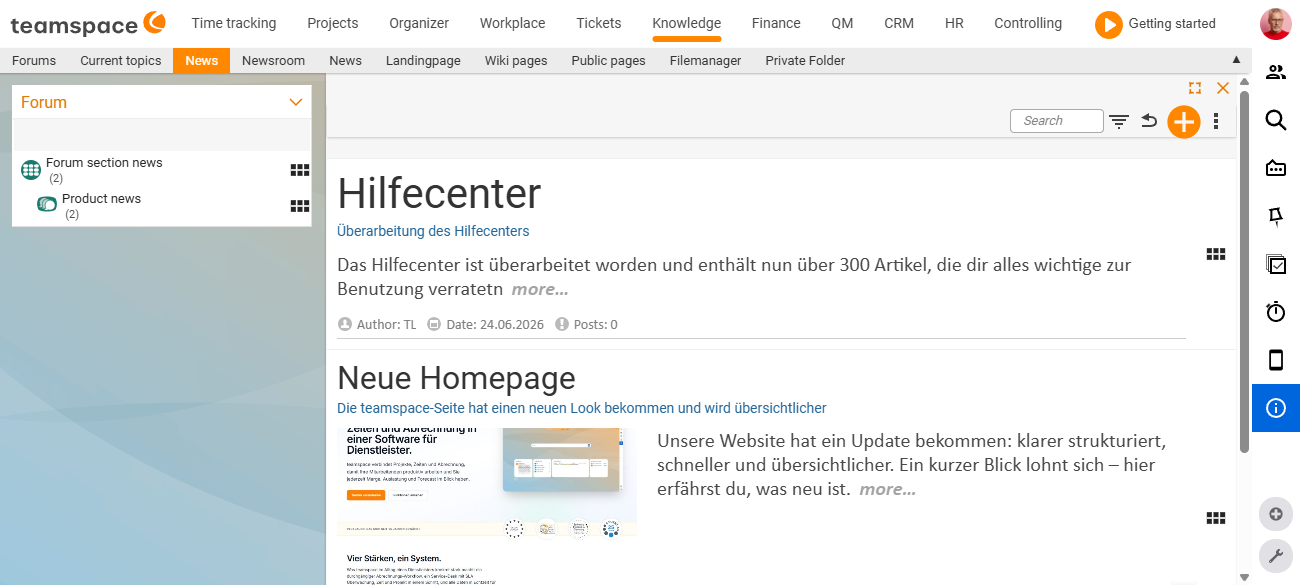
Filtering by forum
Each news article is assigned to a forum when it is created – such as Marketing news, Service notices or Staff info. In the news overview, you filter by this assignment to see only the articles of one area, and so page through the individual forums purposefully. This keeps the overview manageable even when the editorial team publishes many articles.
Adding a post to an article
Beneath an opened article you can add a post of your own. This creates a short discussion directly on the article, without needing a separate topic in the forum. The posts work like the posts beneath a topic: with author, date and avatar; you can edit or delete your own posts (see Topics & posts: working in the forum).
What the permission controls
Which news articles are shown to you at all depends on the forum the article is assigned to: if a forum’s read right is restricted to a group, its articles do not appear in other people’s news overview. This lets you target sensitive announcements – such as Board information or Confidential HR – at a specific circle only. The model behind this is explained in Structure & permissions in the forum.
Note: Anyone with editorial rights sees, alongside
News, the additionalEditorialentry in the navigation; anyone without them sees onlyNews. Creating, editing and publishing happens exclusively in the Editorial area.
Common problems
A colleague cannot see a news article that I can see. Which articles are shown depends on the assigned forum. If that forum’s read right is restricted to a group, the article does not appear in other people’s news overview. This lets you target sensitive announcements at a specific circle only – the model is explained in Structure & permissions in the forum.
Why can I not create or edit an article here?
The News area is the reader view – reading, filtering and commenting. Creating, editing and setting the publication period happens exclusively in the Editorial area, and that requires editorial rights.
Common questions & needs
| You want to … | How to |
|---|---|
| See only the news of one area | Filter by the forum assignment in the news overview. |
| Respond to an article | Add a post of your own beneath the opened article. |
| Correct a comment of your own | Edit or delete your own post. |
| Write an article yourself | This does not happen here, but in the Editorial area (editorial rights required). |
| Understand why a colleague cannot see an article | The read right for the assigned forum is missing – see Structure & permissions. |
Related topics
- Editorial: writing news articles Forum How-to
- Introduction to the forum Forum Introduction
- Structure & permissions in the forum Forum Concept