


In the Forums area you see the complete forum structure, create new topics or polls, write posts and watch the discussions you want to stay on top of. This article covers the day-to-day work with ordinary topics; the special case of a poll is described in Creating and running polls.
Opening the forum structure
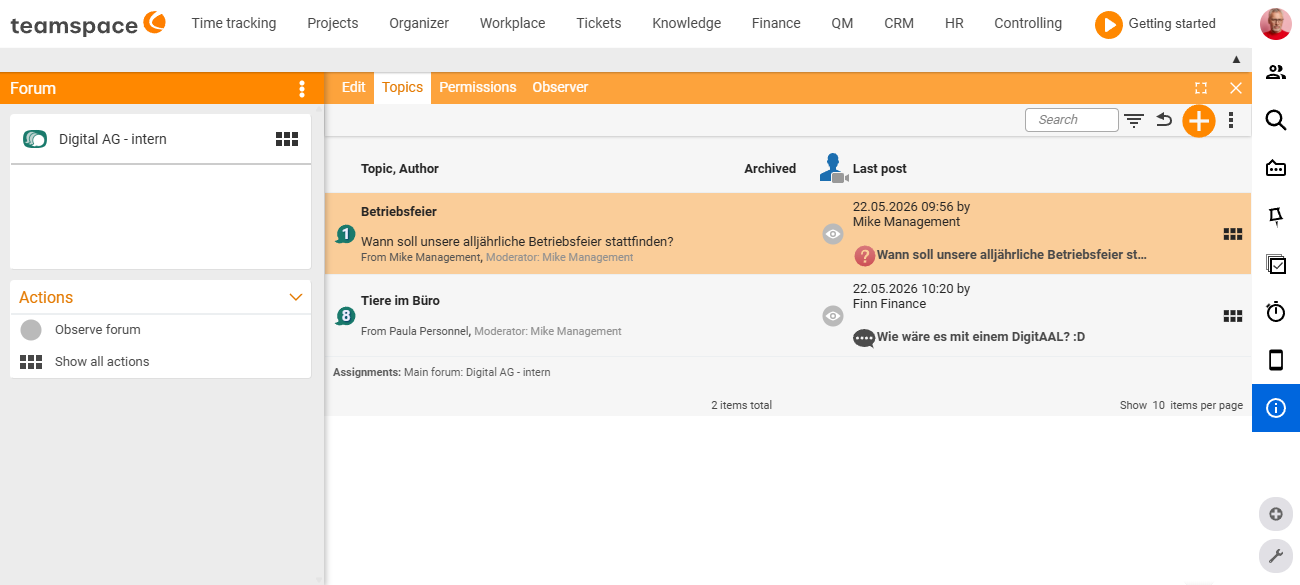
In the Forums area you see all the forums you have access to. Clicking a forum opens its detail manager. Along the top are the tabs Edit, Topics, Permissions and Watchers; on the left in the sidebar is the forum card with its name, and beneath it the Actions box.
The Topics tab shows the list of all the forum’s topics and polls – with the title and author, the Archived status and the last post (date, author and a short preview). A type indicator in front of each entry distinguishes an ordinary topic from a poll.
Creating a new topic
- In the forum detail manager, open the
Actionsbox and, above it, the actions modal. - In the
Generalsection, choose New topic. - Give the topic a title and write the opening post – the first text that sets the discussion in motion.
- Assign the topic to a forum (usually the one you are currently in).
- Use the permissions to define who reads along and replies (see Structure & permissions in the forum).
- Save – you land straight in the detail manager of the new topic.
Tip: Word the opening post so that the title alone already conveys the question or the request. That makes it easier for others to place it in the topic list and in the “Recent topics” feed.
Working in a topic
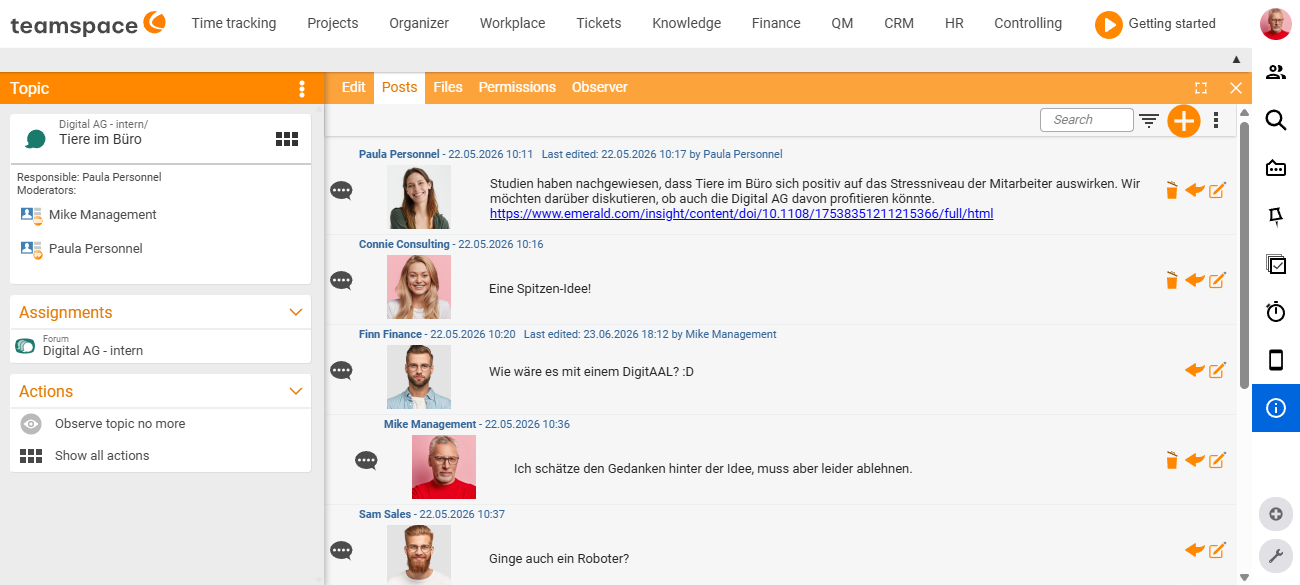
Clicking a list entry opens the topic’s detail manager. Along the top are the tabs Edit, Posts, Files, Permissions and Watchers. On the left in the sidebar is the record card with <forum name>/<topic title>, beneath it the person responsible and the moderators, plus the Assignments and Actions boxes.
The Posts tab shows the posts in chronological order. Each post carries the author’s name and date/time at the top; if it was edited later, a note about the last change follows. The avatar sits on the left, with the post text to its right.
Writing a post
- In the topic, open the
Actionsbox and the actions modal. - In the
Generalsection, choose New post. - Enter your reply in the editor and save.
Editing, deleting and quoting posts
Directly on each individual post there are action icons you can use to edit the post, reply to/quote it or delete it. Only a moderator of the topic or forum may edit or delete other people’s posts.
Watching topics
When you watch a topic, you get a notification in the messaging system as soon as someone writes a new post in it.
- Turning it on and off in the topic: In the
Actionsbox, one click switches betweenWatch topicandStop watching topic. - Quickly from the list: In a forum’s topic list, an eye icon shows whether you are watching a topic, and you switch watching on or off right there.
That way you stay up to date on exactly the discussions that concern you, without having to click through every forum one by one.
Keeping an overview: “Recent topics”
Alongside the view sorted by forum structure, there is the Recent topics area – a second view sorted by activity. The posts are grouped under Today, Yesterday and Past, so you can see at a glance which discussions saw activity today. Use the filter settings to narrow the view down to individual forums.
This is how you use both views together: Forums for working purposefully in a particular discussion, Recent topics as a daily activity feed across all forums.
Common problems
Why can I not see a particular forum at all?
The Forums area only shows the forums you have at least read rights for. If a forum is missing, it is either not released for you or it sits in a protected parent forum. The access model is explained in Structure & permissions in the forum.
Why can I not write a post even though I can see the forum?
Then you have read but not write rights. Reading only displays the content; you only create your own posts with write rights. Who has which right is governed by the Permissions tab of the forum or topic.
Why am I not allowed to edit or delete someone else’s post? Only a moderator of the topic or forum may edit or delete other people’s posts. Your own posts, by contrast, you can change at any time via the edit icon on the post.
Common questions & needs
| You want to … | How to |
|---|---|
| Start a new discussion | In the forum detail manager via the actions modal General → New topic, entering a title and opening post. |
| Be notified of new replies | Watch the topic – via the eye icon in the list or via Watch topic in the Actions box. |
| Respond to a specific post | Use the reply/quote icon on the post instead of writing a loose new post. |
| Fix a typo of your own | Use the edit icon on your own post; the change is noted on the post. |
| Have people vote on a question rather than just discuss it | Create a poll instead of a topic – see Creating and running polls. |
| See where things happened today | Open the Recent topics area and filter to a forum if needed. |
Related topics
- Introduction to the forum Forum Introduction
- Creating and running polls Forum How-to
- Structure & permissions in the forum Forum Concept