


A wiki is only a reliable source of knowledge if two things are secured: nobody loses a change, and nobody overlooks one. teamspace solves this with two mechanisms that run in the background – version control and the watcher list. This article explains how both work and when to use them deliberately.
Version control: every state is preserved
Every save of a wiki page automatically creates a new version. You do not need to “archive” or “back up” anything – it happens on every Save. The original version is stored, and the new state becomes the current version.
You find the history in the detail-manager tab Versions. There you see each version as a row with reference name, short description and change date, so you can trace when what changed.
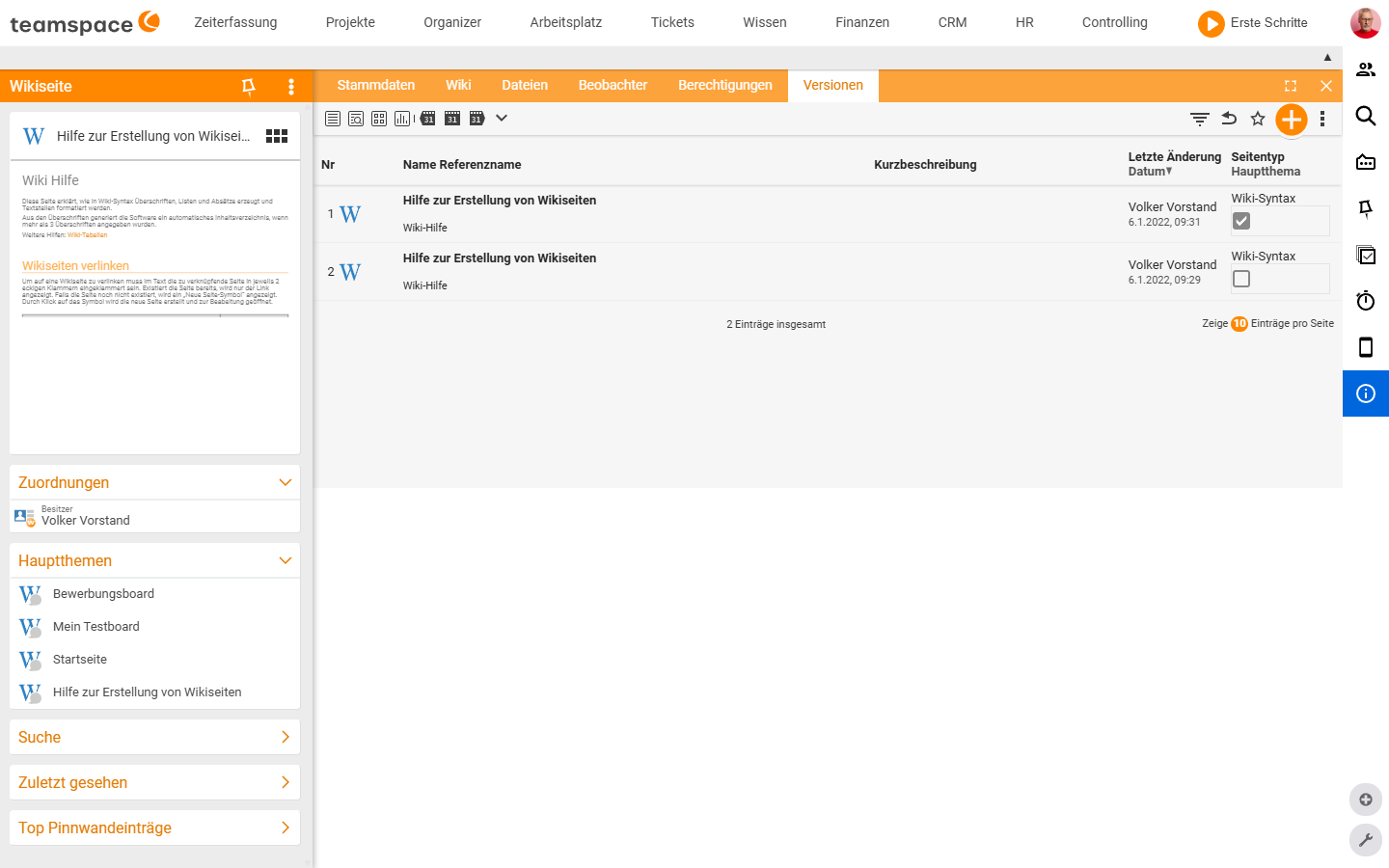
Reactivating an earlier version
If a mistake has crept in or an old state should come back, you reactivate the version you want: you select it in the table, and it becomes the current version again. The previous state is not lost in the process – it remains as an older version. This means you can undo any rollback again, without losing content.
Mental model: The version list is not a one-way street. “Current version” is just a pointer that you can set on a different state at any time. You move freely back and forth without ever destroying anything.
Watchers: nobody overlooks a change
Knowledge goes stale when changes go unnoticed. To prevent that, every wiki page has a watcher list. Whoever is on it gets a notification as soon as someone changes the page.
Two ways lead onto the list:
- Automatically: anyone who creates or edits a page is added to the watcher list automatically.
- Manually: in the detail-manager tab
Watchers, in theAdd watcherarea, you add further colleagues via the mandatoryEmployeefield and the Add button. The table below shows all current watchers.
So you always know who is informed – and the knowledge stays current, because every change is reported.
Working together day to day
Versions and watchers complement each other: the watcher list reports that something has changed; the version list shows what changed and undoes it if needed.
Process glossary. Anna Müller maintains a Campaign workflow wiki page. After every retrospective she adds an insight and saves – a new version is created. Her team is on the watcher list and gets the notification. If an addition turns out to be wrong, Anna reactivates the previous version. Nobody has to guess what currently applies.
Common problems
Why do I not see a notification when a page changes?
A change notification only reaches whoever is on the page’s watcher list. You land there automatically when you create or edit the page – but not when you only read it. Add yourself in that case in the detail-manager Watchers tab via the Employee field.
Do I lose my current state if I reactivate an old version? No. When you reactivate, the chosen version becomes the current one and the previous state remains as an older version. So you can undo any rollback yourself without losing content.
Notes
- You do not need to copy or duplicate anything before experimenting – every saved state is reachable again via
Versions. - For important pages, deliberately add the right watchers instead of relying on automatic inclusion – that way change notifications also reach people who only read the page.
- Version control is no substitute for a permissions concept: who may change a page is controlled via Wiki permissions.
Related topics
- Create and edit wiki pages Wiki How-to
- Wiki permissions: controlling visibility Wiki Configuration
- Introduction to the wiki Wiki Introduction