


A wiki only looks professional once pages of the same kind look the same – customer profiles, process instructions, onboarding chapters. Two tools provide this consistency: templates prescribe structure and content, headers and footers frame the pages by area. This article shows how to set up both.
Templates from existing pages
A template is an ordinary wiki page that you mark as a starting point for new pages. This is how you create one:
- Create or open the wiki page that should serve as the model – with the structure, the headings and the example content that new pages should adopt.
- Open the detail manager and switch to the
Master datatab. - In the
Configurationsection, activate theTemplatetoggle or checkbox. - Save with Save or Save and close.
The next time you create a wiki page, you can choose this template as the basis – the content and master-data structure are adopted, and the author only fills in the page-specific parts.
Tip: Build placeholders and short hints into the template (e.g. “The short description of the process goes here”). This guides authors through the page and keeps the wiki consistent even with many contributors.
Headers and footers per group
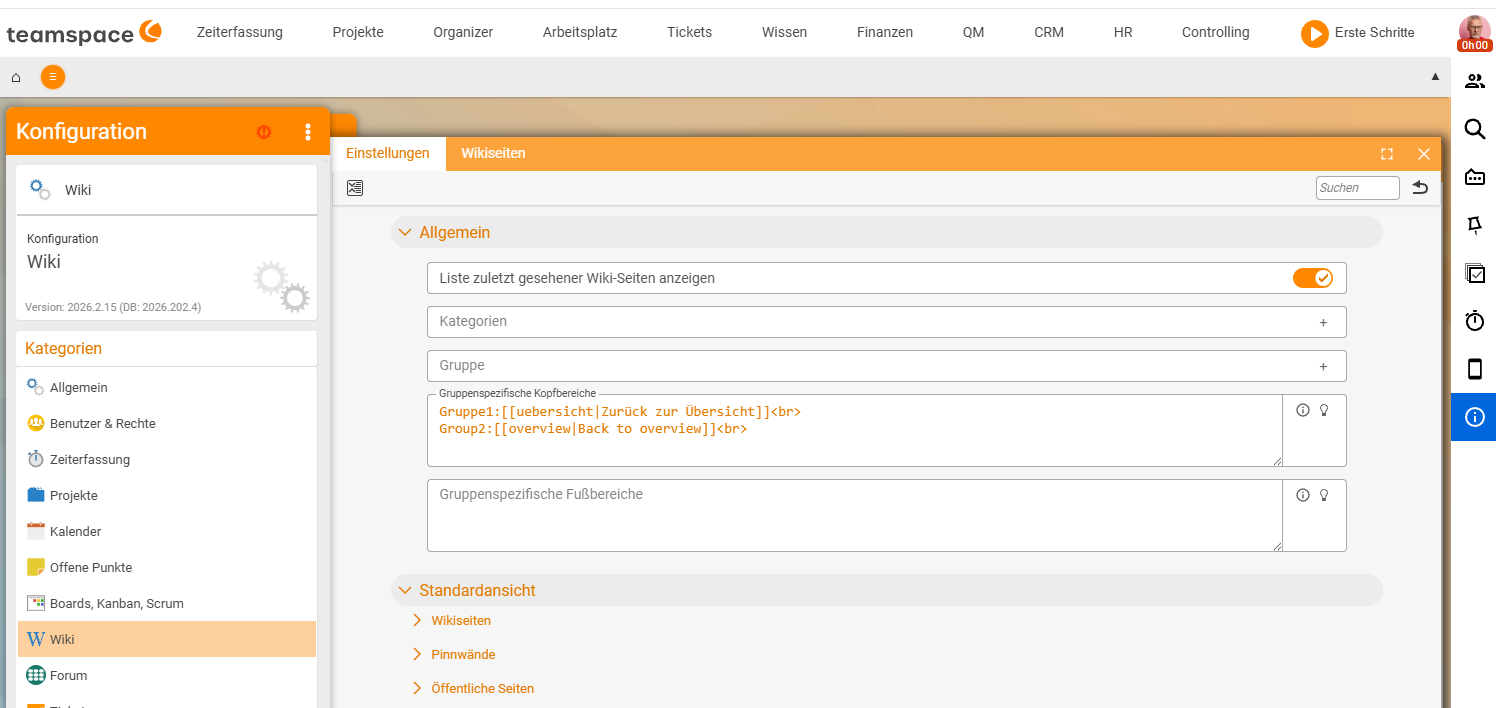
So that pages carry the same frame – for instance a consistent header with the area name or a footer with a contact person – you create headers and footers in the configuration. These can be distinguished by groups of wiki pages: that way different wiki areas each carry their own headers or footers.
You reach the configuration area for the wiki via the central Configuration of teamspace:
Configuration → Wiki → Headers and footersThere you create a header and/or footer per group. You control the assignment of an individual page to a group via the Group field in the master data (see Wiki permissions) – so the same group logic that controls visibility also determines which frame applies.
Common problems
I cannot find Headers and footers under Configuration → Wiki.
The exact menu path to the wiki configuration can vary depending on your teamspace version and tenant setup. Check your tenant’s configuration structure or turn to your administrator.
My page does not pick up the right header or footer.
Headers and footers are controlled per Group of wiki pages. If the wrong frame applies, check the Group field in the page’s Master data – the same group logic determines both the frame and the visibility (see Wiki permissions).
Common questions & needs
| You want to … | How to |
|---|---|
| Create pages of the same kind faster | Mark a model page via the Template checkbox in the master data; choose it as the basis when creating. |
| Guide authors through a new page | Write placeholder texts and hints into the template. |
| Prescribe a consistent page header | Create a header under Configuration → Wiki and assign it to the group. |
| Different frames per area | Create a separate header/footer per group; assign pages via the Group field. |
| Control who uses the template | Via the group/module permissions (see Wiki permissions). |
Related topics
- Create and edit wiki pages Wiki How-to
- Wiki permissions: controlling visibility Wiki Configuration
- Wiki syntax: commands and formatting Wiki Reference