


You can handle the login to teamspace/projectfacts through an LDAP server (e.g. Active Directory). This guide shows how to determine the necessary DNs, adjust the web.xml and set the parameters.
LDAP over SSL: If you use an encrypted LDAP connection, the LDAP certificate must first be imported into the Java truststore. This is described in the section “Importing an SSL certificate into the Java truststore” in Additional server configurations.
Determining the DNs and host names
Connect to the LDAP server and determine the values through the CMD:
- User Base DN:
dsquery user -name <username used> - Group Base DN:
dsquery group -name <group name> - LDAP host name:
set L
Adjust web.xml
In the web.xml, the LDAP connection is commented out. Uncomment the block and adjust the marked areas. If the block is not present, add it.
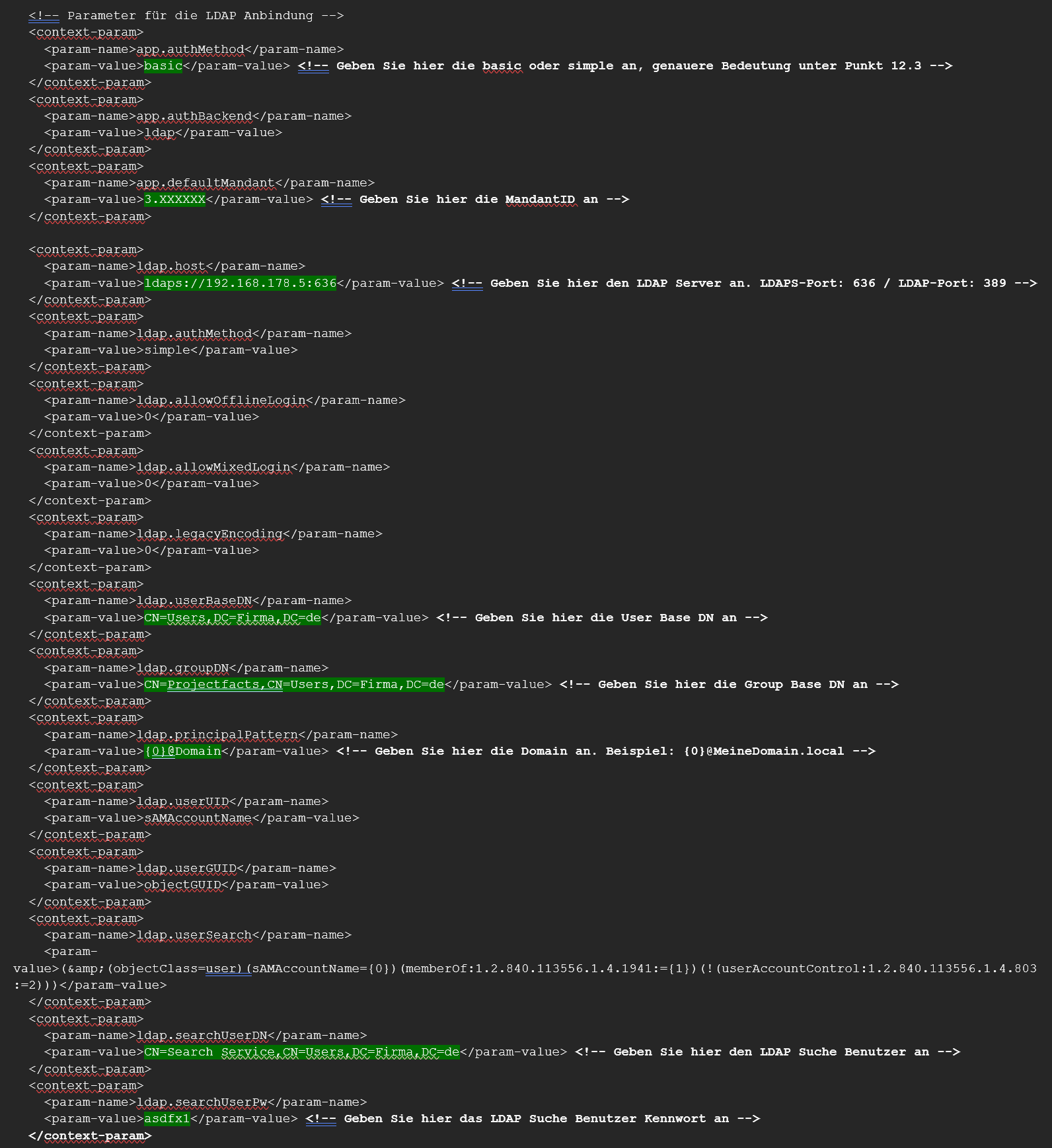
Parameter reference for LDAP
| Name | Description |
|---|---|
| app.authMethod | Can be set to “basic” if you want to use Basic Authentication instead of a form for the login. |
| app.authBackend | For the LDAP connection, “ldap” must be entered here. |
| app.defaultMandant | The ID of the tenant. |
| ldap.host | The full URL to the LDAP server (e.g. ldap://127.0.0.1:389). |
| ldap.authMethod | ”none”, “simple” or a sasl_mech list (see the Oracle JNDI documentation). |
| ldap.allowOfflineLogin | How long you may still log in after the last successful LDAP login if the LDAP is unreachable (value in hours). |
| ldap.userBaseDN | The DN in which users are searched for. |
| ldap.groupDN | The DN of the group a user must belong to in order to be allowed to log in. |
| ldap.principalPattern | Determines whether and how the “raw” login name is reformatted into a principal (e.g. {0}@5p). |
| ldap.userUID | The attribute that uniquely identifies the user (the login name). With AD, usually sAMAccountName. |
| ldap.userGUID | The attribute that globally and uniquely identifies the user and stays the same even when renaming/moving. With AD, the objectGUID. |
| ldap.userSearch | The search filter used to find a user. The placeholder for the username is {0}. |
| ldap.searchUserDN | The DN of a user who is allowed to search for users in the LDAP. |
| ldap.searchUserPw | The password for the search user. |
Assigning LDAP users
In the teamspace tenant, map the LDAP users to the teamspace users:
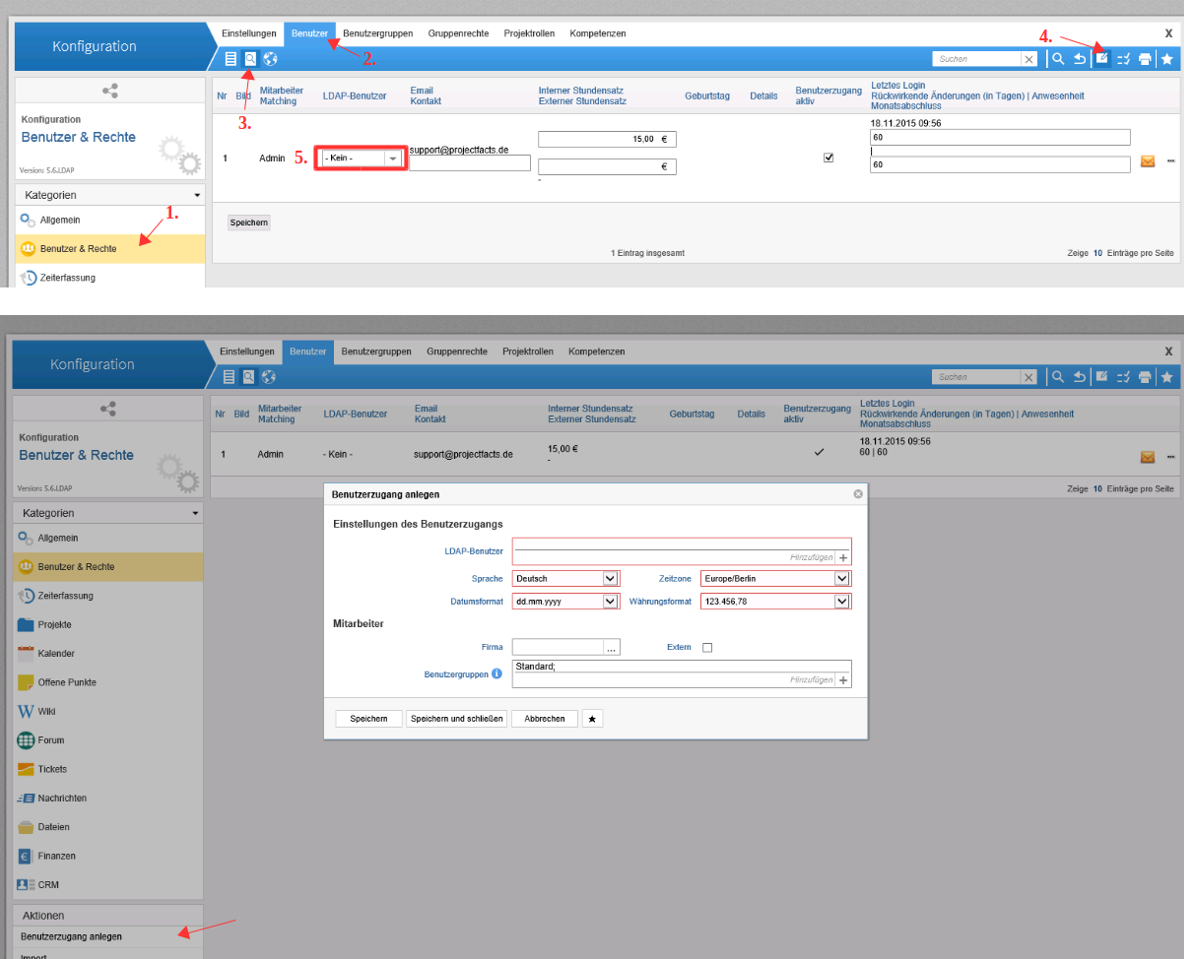
Common problems
Why won’t the encrypted LDAP connection (LDAP over SSL) come up? Without the LDAP certificate in the Java truststore, the encrypted connection fails. Import it first – this is described under “Importing an SSL certificate into the Java truststore” in Additional server configurations.
Why can’t users in a group log in?
ldap.groupDN defines which group a user must belong to in order to log in. Check that the DN is correct and that the user is a member.
Why isn’t a user found?
The search base and search filter have to match: ldap.userBaseDN defines where the search runs, ldap.userSearch the filter (placeholder {0}), and ldap.userUID the identifying attribute (usually sAMAccountName with AD).
Common questions & needs
| You want to … | How to |
|---|---|
| Replace the form login with Basic Auth | Set app.authMethod to “basic”. |
| Login should still work briefly if LDAP fails | Set ldap.allowOfflineLogin (in hours). |
| Allow only members of a specific group | Define the group through ldap.groupDN. |
| Connect LDAP over SSL | Import the certificate into the Java truststore first (see Additional server configurations). |
Related topics
- Additional server configurations Installation Configuration
- Introduction to permissions Permissions Introduction
- How teamspace is built Installation Concept