


Before you install teamspace, it is worth taking a look at the architecture. Once you know the building blocks and their configuration files, you understand the installation steps as a whole – rather than just typing them out – and you find faults more quickly later.
The building blocks
teamspace is a Java web application. It consists of these components:
- Apache Tomcat 10 – the application server. This is where the teamspace
.waris deployed (unpacked into thewebappdirectory). The Tomcat listens internally on port 8080. - OpenJDK 17 (Temurin) – the Java runtime that the Tomcat runs on.
- MySQL 8 / MariaDB 10.5 – the database with the
projectfactsuser and schema. - Reverse proxy (Apache 2.4 or Nginx 1.24) – receives the requests from the internet on port 80/443, terminates the SSL/TLS certificate and forwards them internally to the Tomcat on
localhost:8080. - userfiles directory – the file storage area of the file module. It resides outside the application (e.g.
/srv/projectfacts/userfilesorC:\projectfacts\userfiles) and can be moved to a separate disk.
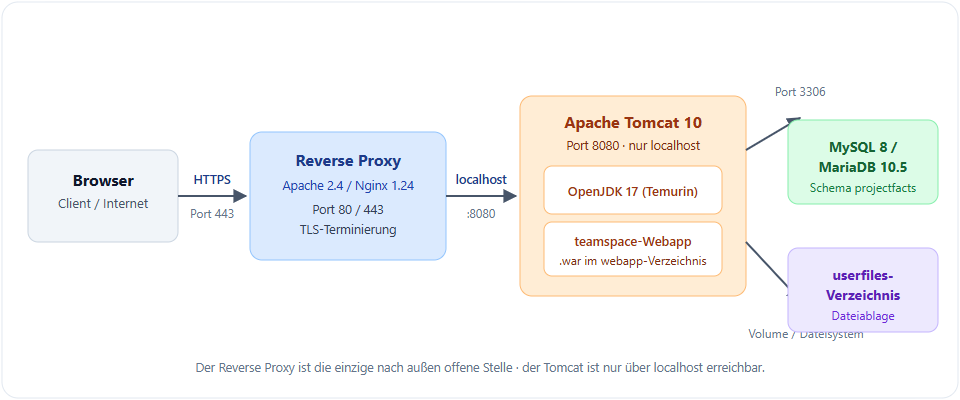
The path of a request
Browser/Client  ──HTTPS (443)──▶  Reverse proxy (Apache/Nginx)
                                        │  decrypts TLS,
                                        │  sets X-Forwarded-Proto
                                        ▼
                                   Tomcat (8080)  ──▶  teamspace web app (Java)
                                        │
                                        ▼
                            MySQL/MariaDB (3306)   +   userfiles directory
The reverse proxy is the only point exposed to the outside. The Tomcat itself is only reachable from localhost – with Docker, this is additionally secured via iptables.
The central configuration files
During an installation, you work with the same four files again and again. It helps to keep their roles apart:
| File | Role |
|---|---|
web.xml (webapp/WEB-INF/web.xml) | Application parameters (context-param): paths to htdocs/data, mail-fetch interval (timer.mailfetcher), permitted mail recipients (mail.positive_mail_list), server URL (server.url), OAuth/PDF service. |
| ROOT.xml or context.xml | The database connection (connection pool). Since version 2023.4, the Tomcat manages the pool through a Resource with username, password and url. Previously this was held in data-source.xml. |
| server.xml (Tomcat) | The Tomcat itself: connector, host (unpackWARs="false", autoDeploy="false"), listeners. |
deploy-war script (deploy-war.sh / .bat / -docker.sh) | Unpacks a new .war while preserving the existing configuration. It knows the installation path through the BASEDIR variable. |
Important: The
ROOT.xml/context.xmlwith the database credentials is not overwritten during an update – the deploy script ensures this. If you make your own changes to the script, take particular care here.
Standard, Docker and “partial containerisation”
There are two ways to operate the system:
- Standard installation (Linux/Windows): Tomcat, Java, the database and the reverse proxy all run directly on the operating system.
- Docker (Linux only): Only Tomcat and Java sit in a container. MySQL/MariaDB, the teamspace application and the userfiles still run on the host – they are mounted into the container through volumes, and the Tomcat reaches the database via the Docker network at 172.17.0.1. This “partial containerisation” is intentional; full containerisation as well as Kubernetes are not supported.
Notes
- The time zones must match: the time zone of the database must match that of the operating system on which the Tomcat runs. On Linux, check it with
cat /etc/timezone. - Two brand names, one product: projectfacts and teamspace are technically identical. The guides usually say
projectfacts; with teamspace, replace the name.
Related topics
- System requirements Installation Reference
- Installing teamspace on Linux Installation Configuration
- Installing teamspace with Docker Installation Configuration