


The Apache web server serves as a reverse proxy: it receives the requests on port 80/443, terminates the SSL certificate and forwards them internally to the Tomcat on localhost:8080. This guide covers Linux and Windows. For Linux, Nginx is an alternative.
Linux
Ideally, place your own certificates in /etc/apache2/ssl/. If you do not have an SSL certificate, you can have a free one issued via Let’s Encrypt – the Certbot is recommended.
Enable the required modules:
a2enmod ssl rewrite proxy proxy_wstunnel proxy_httpCreate the file projectfacts.conf under /etc/apache2/sites-available:
<VirtualHost *:80>
   ServerAdmin admin@example.de
   ServerName server.example.de

   Redirect / https://server.example.de/
</VirtualHost>

<VirtualHost *:443>
   ServerAdmin admin@example.de
   ServerName server.example.de
   AddDefaultCharset utf-8
   AddCharset utf-8 .html
   AddCharset utf-8 .do

   SSLEngine On
   SSLProtocol all -SSLv3 -TLSv1 -TLSv1.1
   SSLHonorCipherOrder On
   SSLCipherSuite ECDHE-ECDSA-AES128-GCM-SHA256:ECDHE-RSA-AES128-GCM-SHA256:ECDHE-ECDSA-AES256-GCM-SHA384:ECDHE-RSA-AES256-GCM-SHA384:ECDHE-ECDSA-CHACHA20-POLY1305:ECDHE-RSA-CHACHA20-POLY1305:DHE-RSA-AES128-GCM-SHA256:DHE-RSA-AES256-GCM-SHA384
   SSLCertificateFile /etc/apache2/ssl/server.example.de.crt
   SSLCertificateKeyFile /etc/apache2/ssl/server.example.de.key
   SSLCACertificateFile /etc/apache2/ssl/server.example.de.intermediate.crt

   ErrorLog /srv/projectfacts/logs/httpd_error_log
   CustomLog /srv/projectfacts/logs/httpd_access_log combined

   HostnameLookups Off
   UseCanonicalName Off
   ServerSignature Off

   Header set Rtime "%D"
   Header always set Strict-Transport-Security "max-age=31536000; includeSubDomains"

   ProxyPreserveHost on
   RequestHeader set X-Forwarded-Proto "https"

   Redirect permanent /pfea/login/ExternalaccessLoginDialog.do https://[DOMAIN]/htdocs/apps/pfextern
   Redirect permanent /pfea/home/ExternalaccessHomeDialog.do https://[DOMAIN]/htdocs/apps/pfextern

   ProxyRequests Off
   ProxyPass /pfea/home/ExternalaccessHomeDialog.do !
   ProxyPass /pfea/login/ExternalaccessLoginDialog.do !
   ProxyPass /ws/ ws://localhost:8080/ws/ timeout=90
   ProxyPassReverse /ws/ ws://localhost:8080/ws/
   ProxyPass / http://localhost:8080/
   ProxyPassReverse / http://localhost:8080/
</VirtualHost>
To adjust the cipher suite, you can use the Mozilla SSL Config Generator.
Harden the server through /etc/apache2/conf-available/security.conf:
ServerTokens Prod
ServerSignature Off
TraceEnable Off
Adjust /etc/apache2/mods-enabled/ssl.conf:
SSLCipherSuite ECDHE-ECDSA-AES128-GCM-SHA256:ECDHE-RSA-AES128-GCM-SHA256:ECDHE-ECDSA-AES256-GCM-SHA384:ECDHE-RSA-AES256-GCM-SHA384:ECDHE-ECDSA-CHACHA20-POLY1305:ECDHE-RSA-CHACHA20-POLY1305:DHE-RSA-AES128-GCM-SHA256:DHE-RSA-AES256-GCM-SHA384
SSLHonorCipherOrder on
SSLProtocol all -SSLv3 -TLSv1 -TLSv1.1
SSLCompression off
Adjust /etc/apache2/mods-enabled/mpm_event.conf:
StartServers 2
MinSpareThreads 320
MaxSpareThreads 320
ThreadLimit 64
ThreadsPerChild 64
MaxRequestWorkers 320
MaxConnectionsPerChild 0
Edit /etc/logrotate.d/apache2 and change the entry from …/apache2 reload to …/apache2 restart. Add the following line above /var/log/apache2/*.log:
/srv/projectfacts/logs/httpd_*_logEnable the site and restart Apache:
a2ensite projectfacts.conf
systemctl restart apache2.service
To disable a site, use a2dissite <configuration file>. Under /etc/apache2/sites-enabled you can see which configuration is active.
Windows
Ideally, place your own certificates in C:\Apache24\conf\ssl\ (a free certificate is likewise available via Certbot).
- Place the Apache web server in
C:\apache24. - Start the CMD with administrator rights, change to
C:\Apache24\binand install the service:httpd.exe -k install -n "apache2.4" - Create a file
projectfacts.confunderC:\Apache24\conf\extra\(content as in the Linux example configuration) and include it in thehttpd.conf. - Open
C:\Apache24\conf\httpd.confand adjust the modules, mods, ports and the vHost configuration.
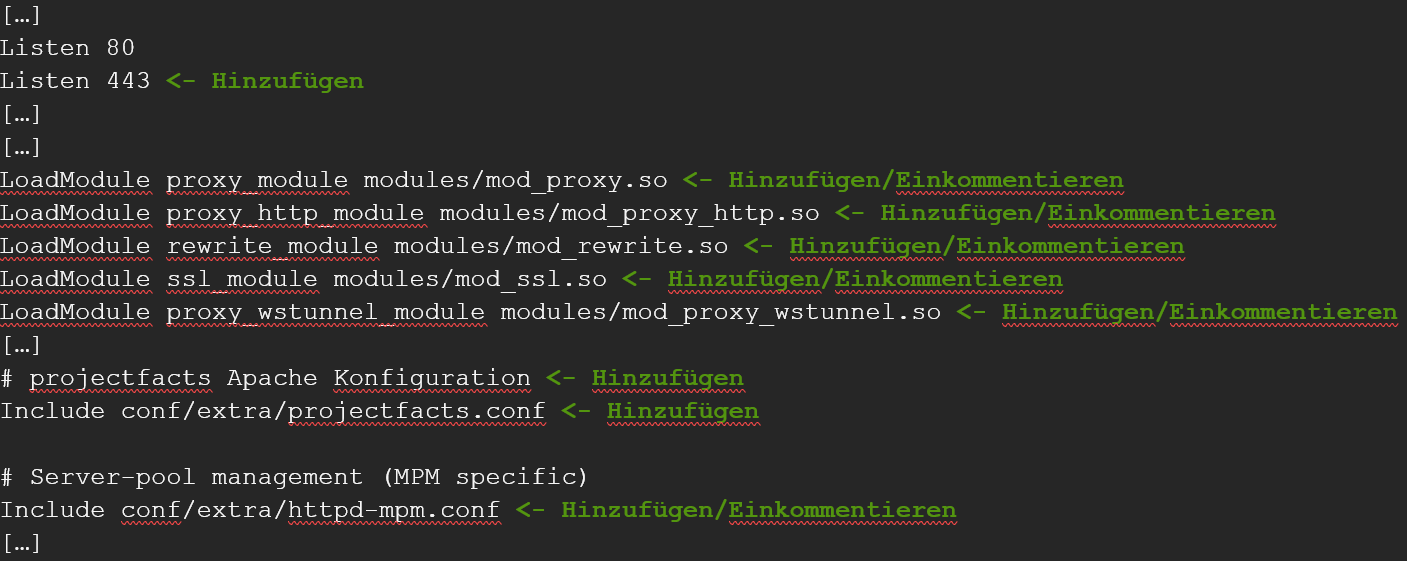
Open C:\Apache24\conf\extra\httpd-mpm and add the following under mpm_worker_module:
StartServers 2
MinSpareThreads 320
MaxSpareThreads 320
ThreadLimit 64
ThreadsPerChild 64
MaxRequestWorkers 320
MaxConnectionsPerChild 0
Then restart the Apache server.
Apache connection timeout
Adjust the ProxyPass in the projectfacts.conf (Windows: C:\Apache24\conf\extra\projectfacts.conf, Linux: /etc/apache2/sites-enabled/projectfacts.conf):
ProxyPass "/" "http://example.com" connectiontimeout=10 timeout=600Common problems
Why don’t the live updates (WebSockets) work?
Without the WebSocket forwarding, real-time notifications don’t get through. Adopt ProxyPass /ws/ ws://localhost:8080/ws/ (and the matching ProxyPassReverse line) from the example configuration.
Why are long requests dropped?
The reverse proxy’s default timeout is too short. Increase it on the ProxyPass, e.g. connectiontimeout=10 timeout=600.
Why do requests still land on HTTP instead of HTTPS?
The redirect is missing in the *:80 VirtualHost. Set Redirect / https://server.example.de/ there.
Common questions & needs
| You want to … | How to |
|---|---|
| A free SSL certificate | Via Let’s Encrypt with the Certbot. |
| Redirect HTTP to HTTPS | Set Redirect / https://server.example.de/ in the *:80 VirtualHost. |
| WebSocket connections (live updates) | Adopt ProxyPass /ws/ ws://localhost:8080/ws/ from the example configuration. |
| Long requests are dropped | Increase the ProxyPass timeout (e.g. timeout=600). |
| Use Nginx instead of Apache | See Nginx as a reverse proxy (Linux only). |
Related topics
- Setting up Nginx as a reverse proxy Installation Configuration
- Installing teamspace with Docker Installation Configuration
- Additional server configurations Installation Configuration