


teamspace’s MCP toolkit is made up of tools, grouped into categories. An administrator switches on what an access should offer – see Select and tailor tools. This page lists what is on offer.
What you see here is not what you get. This list shows the catalogue. Which tools are available to you depends on how your access is tailored – and what you see with them depends solely on your permission profile. The quickest way is to ask your assistant itself: “Which tools do you have for teamspace?”
One tool per record type
Each tool stands for one type of record – Project, Ticket, Contact, Invoice. What the assistant may do with it is set by the allowed operations: Read, Write and Delete. They are granted for the whole access and for each tool individually.
That makes for the most important decision when tailoring: not just which tool, but also how far. A Ticket tool with only “Read” answers questions about tickets; only with “Write” does the assistant create or change tickets itself.
Categories and tools
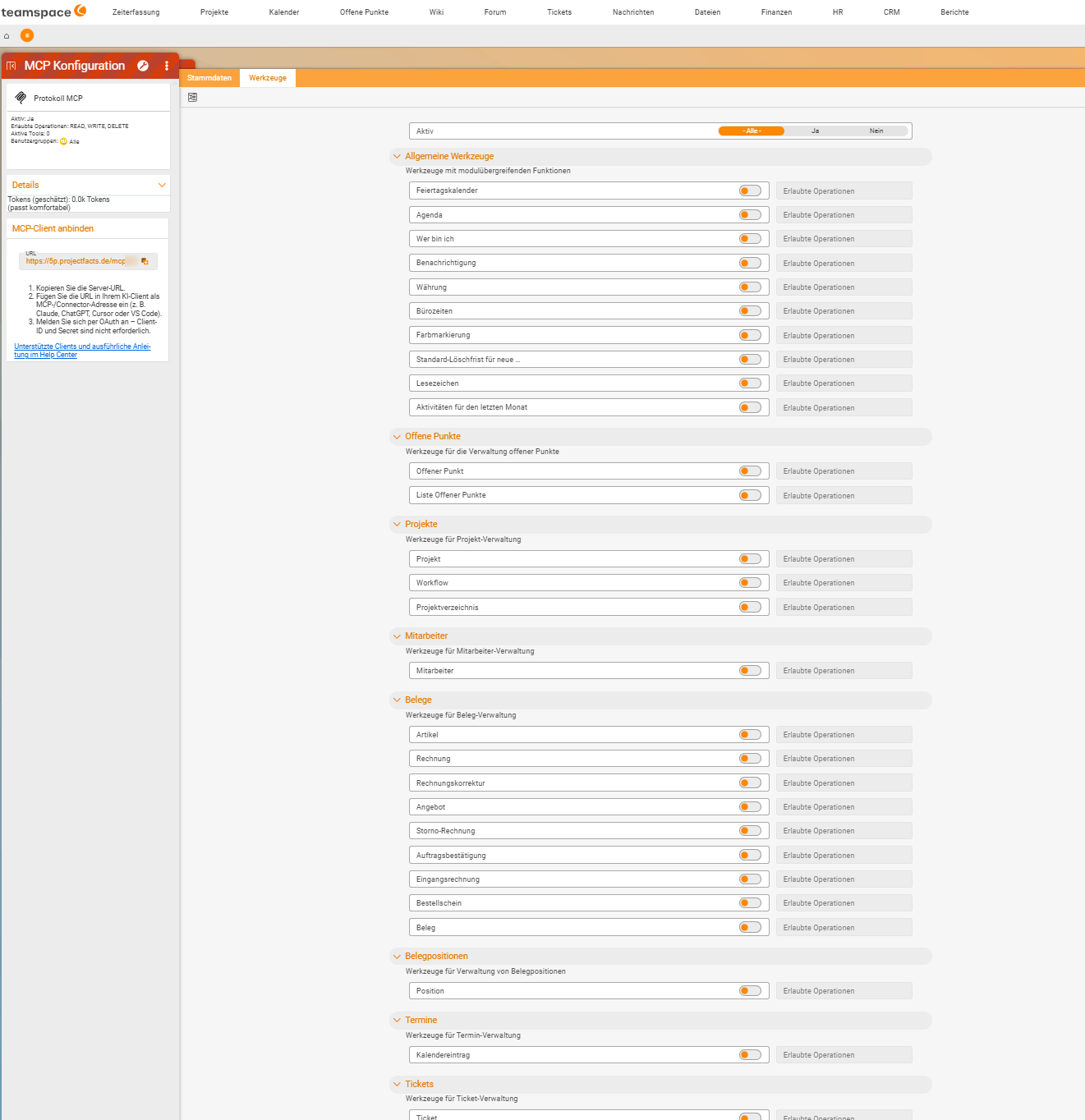
On the Tools tab of an MCP configuration, the tools are grouped into categories, each with a short explanation:
| Category | Explanation on the tab | Tools |
|---|---|---|
| General tools | Tools with cross-module functions | Public holiday calendar, Agenda, Who am I, Notification, Currency, Office hours, Colour marker, Default deletion deadline for new …, Bookmark, Activities for the last month |
| Open items | Tools for managing open items | Open item, Open-items list |
| Projects | Tools for managing projects | Project, Workflow, Project directory |
| Employees | Tools for managing employees | Employee |
| Documents | Tools for managing documents | Article, Invoice, Invoice correction, Quote, Cancellation invoice, Order confirmation, Incoming invoice, Purchase order, Document |
| Line items | Tools for managing line items | Line item |
| Appointments | Tools for managing appointments | Calendar entry |
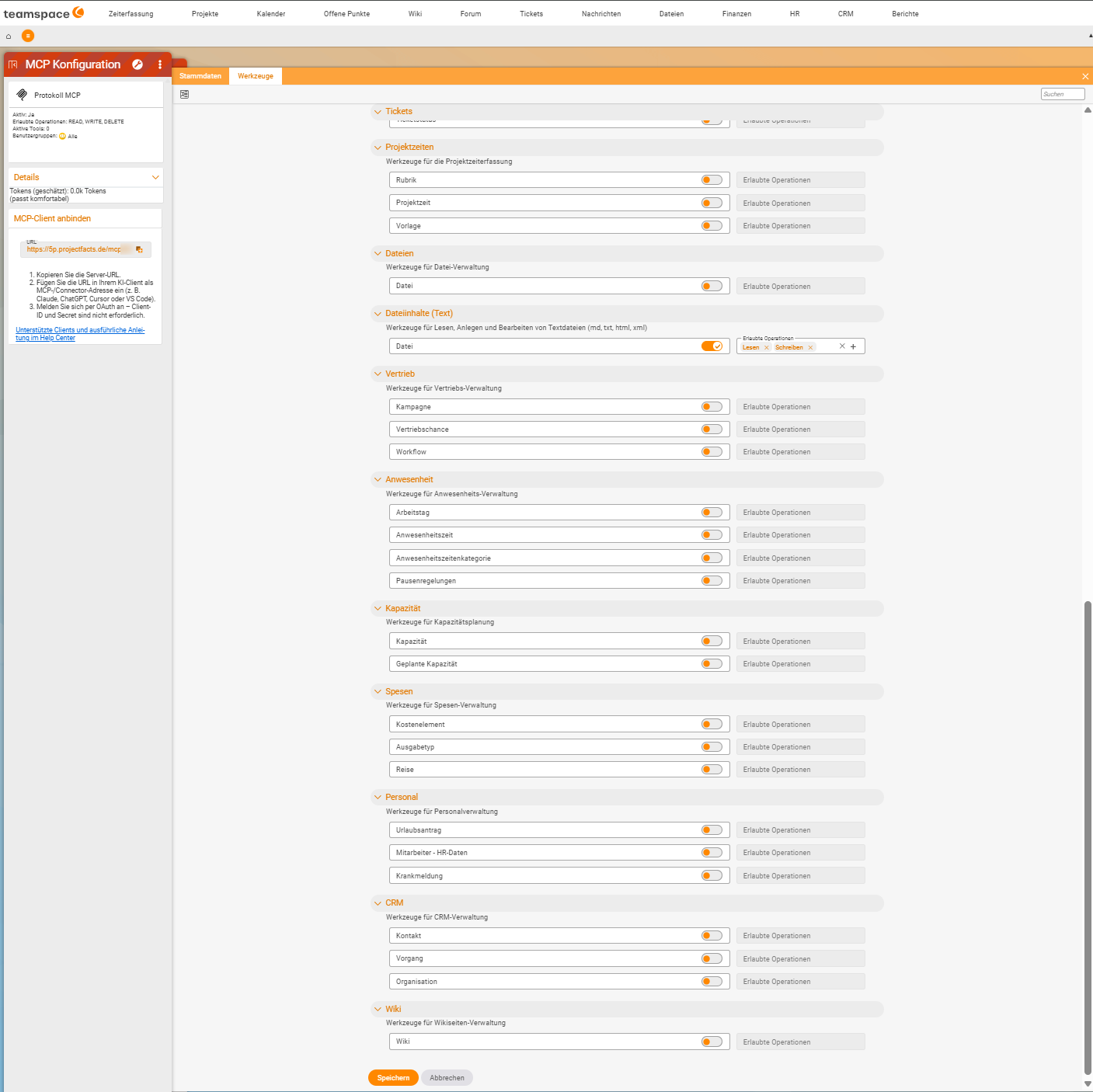
| Tickets | Tools for managing tickets | Ticket, Ticket status and others |
| Project times | Tools for project time tracking | Category, Project time, Template |
| Files | Tools for managing files | File |
| File contents (text) | Tools for reading, creating and editing text files (md, txt, html, xml) | File |
| Sales | Tools for sales management | Campaign, Sales opportunity, Workflow |
| Attendance | Tools for attendance management | Working day, Attendance time, Attendance time category, Break rules |
| Capacity | Tools for capacity planning | Capacity, Planned capacity |
| Expenses | Tools for expense management | Cost element, Expense type, Trip |
| Personnel | Tools for personnel management | Leave request, Employee - HR data, Sickness report |
| CRM | Tools for CRM management | Contact, Activity, Organisation |
| Wiki | Tools for managing wiki pages | Wiki |
Particularly useful tools
| Tool | Why it belongs in almost every access |
|---|---|
| Who am I | Returns the logged-in user. Small but important – without this tool the assistant doesn’t understand questions like “my tickets” or “my team”. |
| Agenda | The user’s agenda. |
| Activities for the last month | What has happened over the past four weeks – useful for reviews and weekly reports. |
| File (file contents) | Reads, creates and edits text files (md, txt, html, xml) – such as minutes or notes in the file storage. |
Two tools called “File”. The one in Files manages the file as an object in the file storage; the one in File contents (text) works with the text inside it. For “Read me the minutes”, you need the second one.
An example configuration
An access “Employee” with the description “For everyday tasks” needs only a small part of this catalogue: Who am I, Agenda and Activities for the last month from the general tools, plus Employee, Contact and Organisation, Ticket, Project and Open item – all with Read only.
That covers the everyday work of most colleagues – and there isn’t a single tool from Personnel, Documents or Expenses among them. That is exactly what good tailoring means.
Notes
- The catalogue keeps growing. This list reflects the current state; new tools are added all the time. What counts is always the Tools tab in your tenant.
- Tools know nothing about permissions. Whether a tool is part of the access says nothing about what you see with it – see Security and permissions with MCP.
- More is not better. Every additional tool costs speed and accuracy – see How MCP works in teamspace.
Related topics
- Select and tailor tools MCP & AI agents Configuration
- How MCP works in teamspace MCP & AI agents Concept
- Supported clients MCP & AI agents Reference
- Topic: Ticketing system Ticketing
- Topic: Open items Open items