


Every file and every directory has an access mode that governs reading and writing. You set it in the detail manager under the Permissions tab – the four modes sit in the Actions sidebar.
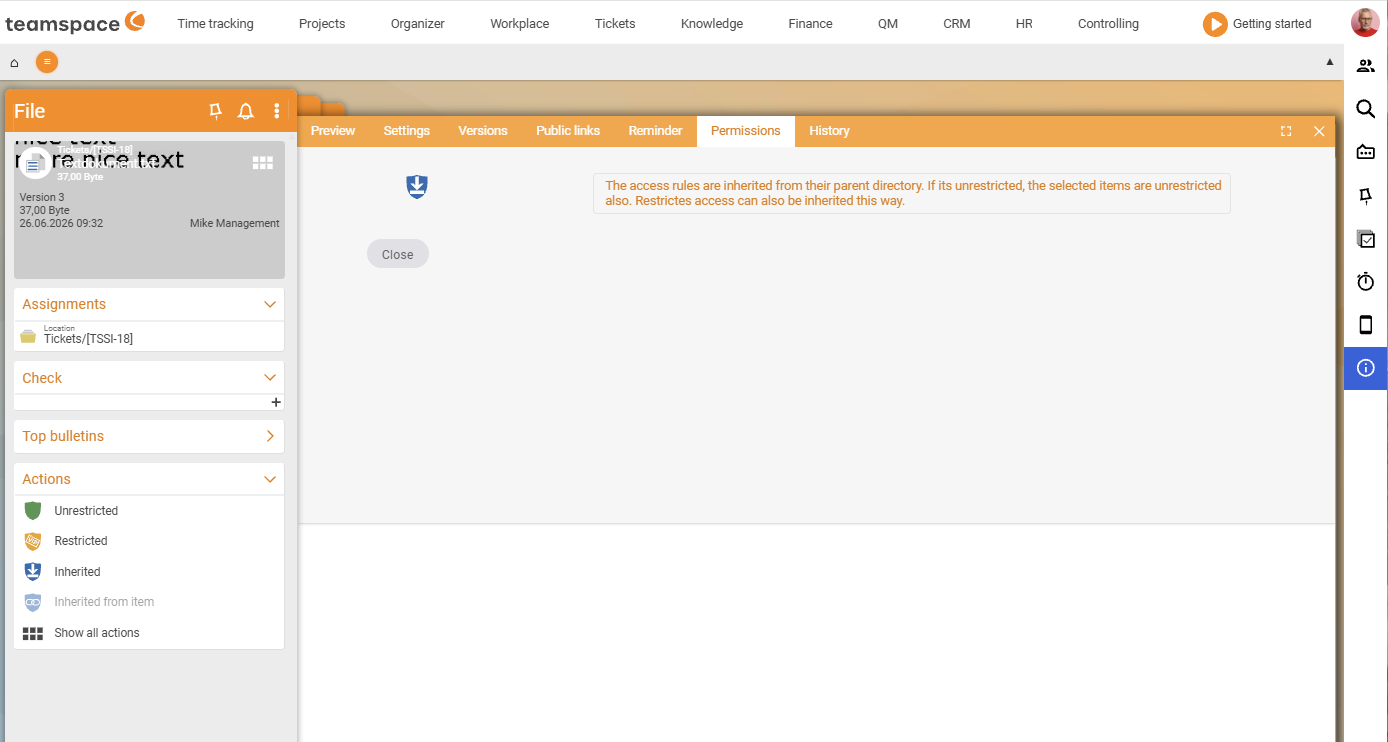
The four modes
Unrestricted– the default: all users have full access. The main area shows a note that you can limit access via theRestrictedmode.Restricted– access only for selected people or groups. You define the permission rules in the main area: one group or individual per rule, and whether only reading, only writing or both is allowed. With Add rule you save the rule.Inherited– the file adopts the permission of its parent directory. Not available in the main directory – there is no “above” to inherit from there.Inherited from element– if the file is attached to an element (project, order, ticket), it follows that element’s permission. Whoever may enter the project may access the file; whoever may not, doesn’t see it.
ℹ Tip. Grant rights to groups rather than to individuals wherever you can – that stays easy to maintain when staff change.
Inheritance: rights act downwards
Directory permissions carry on downwards: subdirectories and files can adopt the rights of the parent directory via Inherited, or set their own rules that override the inherited ones. This way you set up a protected directory once, and all new files within it are protected automatically.
Permissions apply over WebDAV too: in Explorer you only see what you are authorised for in teamspace.
Common questions & needs
| You want to … | How to |
|---|---|
| Open a directory only for one team | The Restricted mode; add a rule with the group and read/write rights. |
| New files to be protected automatically | Protect the directory and leave the files on Inherited. |
| Project files to follow the project permission | The Inherited from element mode. |
| Release a file to everyone | The Unrestricted mode. |
| Give external people without an account access | Not a permission, but an external link. |
Related topics
- The detail manager of a file File management Concept
- Share files with external people File management How-to
- Topic: Permissions Permissions