


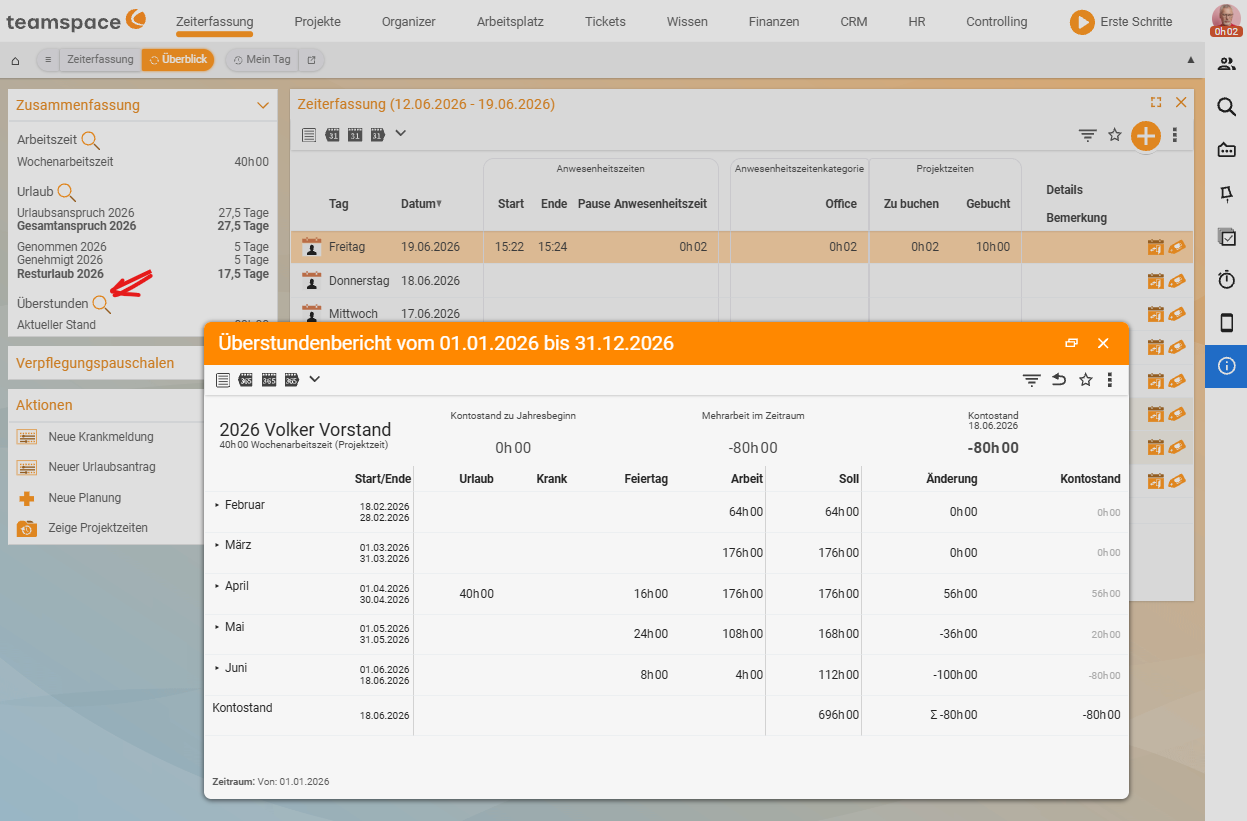
From your attendance times and the stored target, teamspace keeps a working-time account (overtime account). It shows at any moment whether you are in credit or in deficit, and it takes automatically calculated supplements into account.
The working-time account
The balance is derived continuously from recorded attendance time minus target working time. teamspace shows it in the summary of time tracking with traffic-light/target-actual logic:
- More attendance than target → the account grows (overtime).
- Less than target → the account falls (negative hours).
What feeds the account is stored contractually per employee – in the personnel file under HR → Employee → Contract data (Time tracking and overtime section). There you choose the source of the overtime account:
- from attendance times,
- from project times, or
- no overtime tracking.
You also set limits, such as a maximum of overtime per month.
Supplements
Certain working times automatically trigger supplements, e.g.:
- Night supplement – work during defined night hours.
- Sunday and public holiday supplement – work at weekends/on public holidays.
Each supplement rule defines a period of validity, a percentage and a combination rule (what happens when several supplements coincide). The rules are maintained by your administrators; you see the resulting supplement on the day’s card. The configuration is described in Configure time tracking.
Reducing overtime
Accrued overtime can be settled in several ways:
- Time off – request it as a dedicated leave type, “Time off in lieu” (see Record leave and sickness).
- Conversion or payout – via HR/payroll preparation, depending on the contractual arrangement.
Notes
- The overtime account builds on clean attendance times – so clock in and out reliably (see Check in and check out).
- In the event of sickness, the account is topped up based on the rules, rather than creating negative hours.
- You open detailed analyses via the magnifying glass on the summary.