


A maintenance item is the recurring fee that belongs with a sale – update entitlement on a licence, a service flat rate on a device. So that it isn’t accidentally missing from the order, you store on the sales article once which maintenance item belongs with it. As soon as someone adds the sales article to an order, teamspace flags Maintenance missing – one click creates the item with price, quantity and a link to the purchase item.
Prerequisites
Prerequisites: Product management must be active (see Product management – introduction). You need two articles – the purchase article (e.g. a licence) and the maintenance article as a time-based item.
Step 1 – Create the purchase licence and maintenance fee
Both articles sit in the configuration under Finance → Articles.
Volker sells a software purchase licence, with a monthly maintenance fee on top. He creates:
- Purchase licence – article number
2040, tax rate19%, billing typeFixed price. In the pricing:€380 per unit. That is the one-off sales price. (Optionally he files the article underLicences.) - Maintenance fee – article number
2050, tax rate19%. The billing type isTime-based item, because the fee recurs periodically (monthly or annually). When creating it, Volker choosesper month, price€50 per month per unit.
Note: The difference between
Fixed priceandTime-based itemmakes the maintenance character. A fixed-price item bills once, a time-based item monthly or annually. If you create the maintenance article as fixed price, it only bills once – and the customer gets no follow-up invoice.
Step 2 – Set the maintenance toggle on the purchase licence
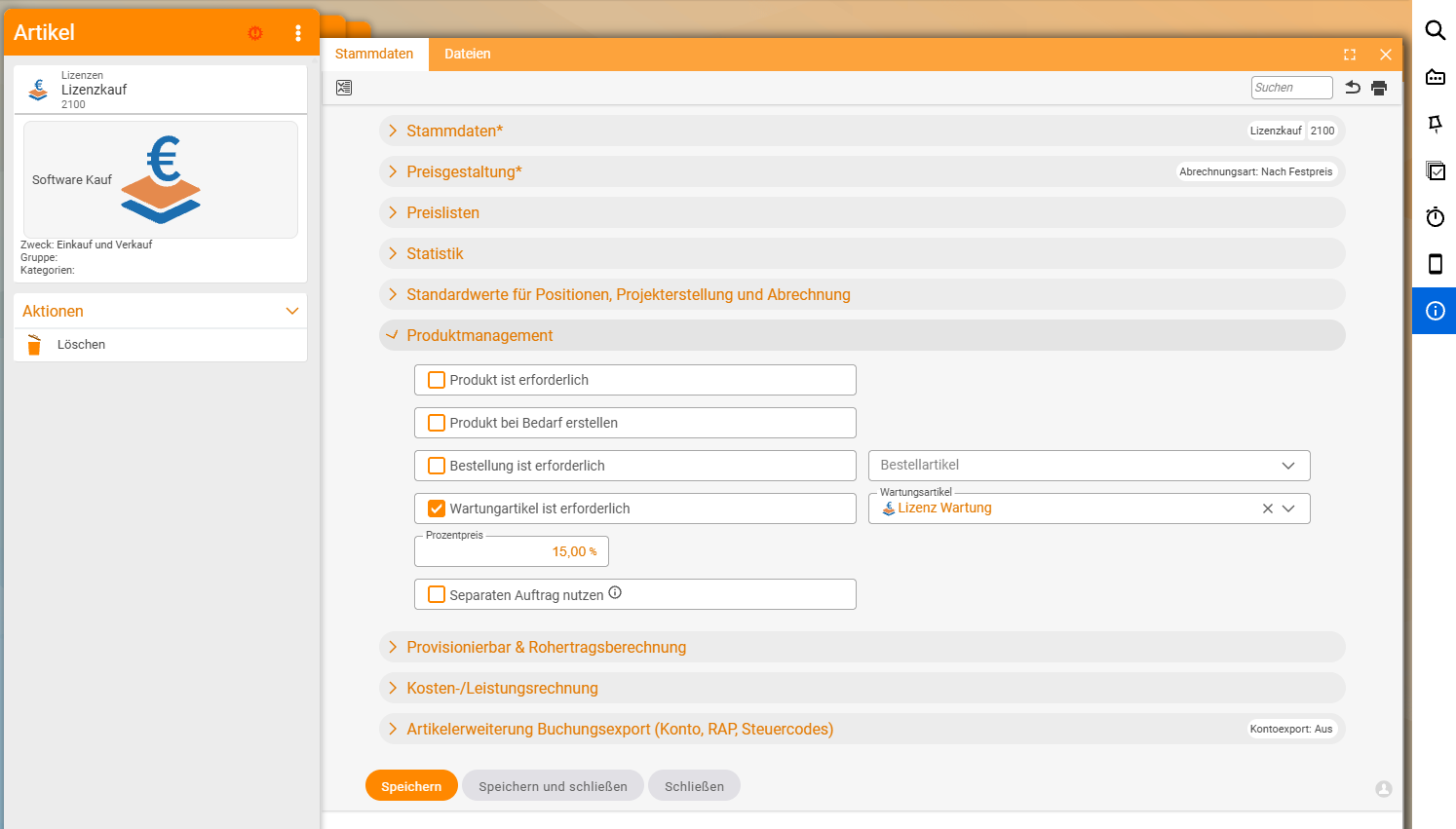
Volker opens the purchase licence and goes to the Product management section. Three settings:
Maintenance article is required– the toggle that switches on the workflow flag.- Select the maintenance article –
Maintenance fee. This tells teamspace which article to create on theMaintenance missingclick. - Percentage price (optional) – if the maintenance is to be calculated as a percentage share of the sales price, you enter e.g.
15%. Otherwise teamspace takes the price from the maintenance article itself (Volker’s€50 per month).
Save. From now on every new order with the purchase licence triggers the workflow helper.
Step 3 – Create the maintenance item in the order
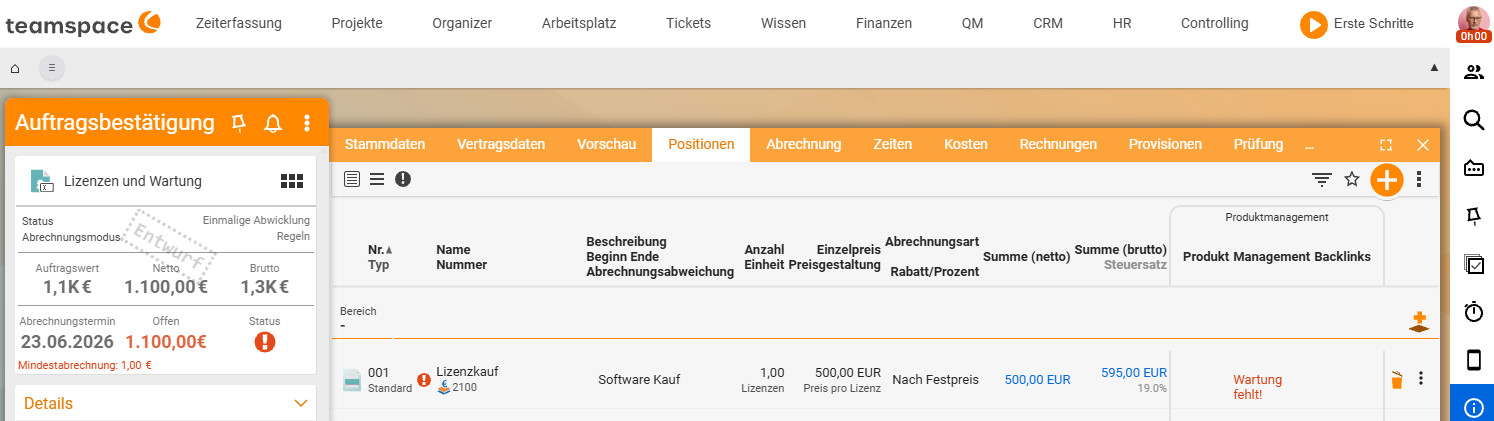
Volker creates an order for Ingo Interessent, adds an item with the purchase licence, quantity three. Save. The red badge Maintenance missing appears in the item row straight away.
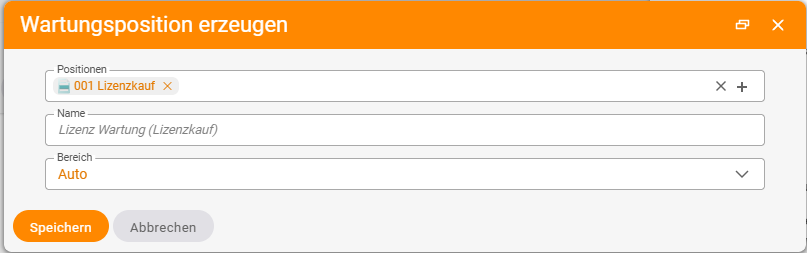
Via the three-dots action on the item he opens the dialog for creating the maintenance item (he can optionally give it his own name). teamspace automatically takes the right quantity (three) and the stored price (€50 per month) and creates the maintenance item. It now sits directly below the purchase licence in the same order.
Both items are linked to each other. If you later move the maintenance item as a reference to another order – e.g. into the large maintenance contract – the link to the purchase licence remains. This is also the connecting point: first create the maintenance item here, then move it into the maintenance contract.
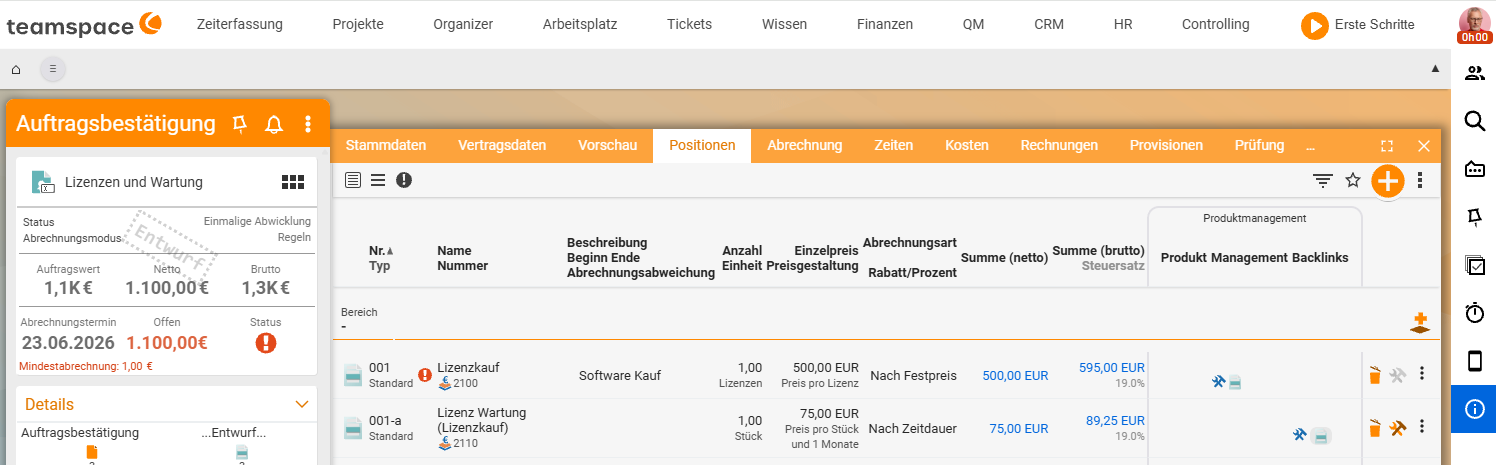
What teamspace carries over when creating
On a click on Create maintenance item, teamspace sets:
- Quantity – the same quantity as the purchase licence. Three licences → three units of the maintenance fee.
- Price – from the maintenance article or the percentage price on the sales article. If Volker entered
15%, the price follows automatically from the€380of the purchase licence. - Link – the maintenance item knows the purchase licence as its origin. The link is retained even when it is moved later.
- Billing mechanics – the maintenance item is a
Time-based itemand bills periodically according to the order’s contract data.
When the workflow doesn’t kick in
Three pitfalls that keep the Maintenance missing badge from appearing:
- Toggle on the wrong article: The
Maintenance article is requiredtoggle has to be on the sales article (purchase licence), not on the maintenance article itself. - Maintenance article not selected: The toggle is set, but the field for which maintenance article is empty. teamspace flags nothing because it doesn’t know what to create.
- Maintenance article as fixed price instead of time-based: The workflow creates the item, but it only bills once. With annual maintenance this becomes a one-off invoice, not the ongoing contract you wanted.
The typical follow-on workflow
In practice Volker combines three mechanics in sequence when a customer buys a new licence with maintenance:
- Create the order with the purchase licence – the actual sale.
- Create the maintenance item – via the three-dots action, as above. Both items now sit in the sales order.
- Move the maintenance item into the maintenance contract – via item as a reference. The purchase licence bills once, the maintenance item runs along in the periodically billing maintenance contract.
The three steps turn a one-off sale into a clean purchase-plus-maintenance workflow, without anyone having to keep two orders in their head at once.
Common questions & needs
| You want to … | How to |
|---|---|
| Be reminded of the maintenance on every sale | Set Maintenance article required on the sales article and select a maintenance article. |
| Bill the maintenance periodically (monthly/annually) | Create the maintenance article as a Time-based item with per month/per year. |
| Derive the maintenance price from the sales price | Store a percentage price (e.g. 15%) on the sales article. |
| Bill the maintenance in the collective maintenance contract | Then move the item as a reference. |
| Keep the purchase and maintenance items coupled | Do nothing – the link is created automatically and remains when moved. |
Note: If you use the maintenance workflow often, think early about the maintenance contract’s contract data. How recurring billing works is described in Recurring invoices and Maintenance fee & quota.
Related topics
- Move an item as a reference to another order (with video) Product management How-to
- Trigger a purchase order from an order (with video) Product management How-to
- Maintenance fee & quota Invoicing How-to
- Billing types Invoicing Concept