


Expenses and material are the most common cost elements – the hotel document from the business trip, the bucket of nails you bought, the travel flat rate. Three document types carry them: expense receipt for single receipts, expense invoice for incoming invoices with several items, material for consumption and flat rates.
Expense receipt – the receipt
A receipt has one item and one VAT rate: taxi receipt, fuel receipt, simple hotel invoice without an itemised breakfast.
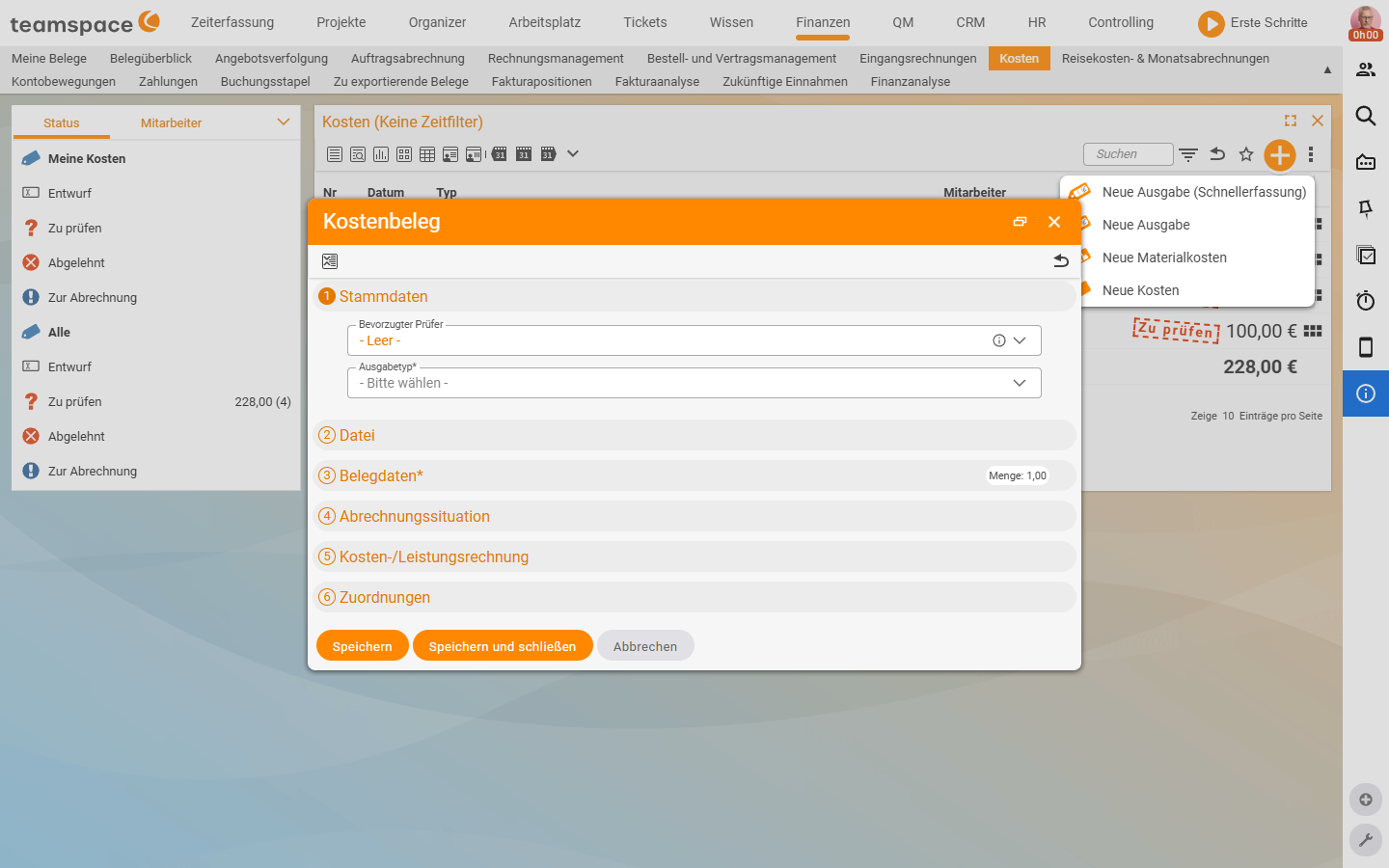
- In the
Costslist, open the plus button and chooseNew expense (quick entry)orNew expense. - The
Expense receiptdialog opens with six numbered accordions:- Master data:
Preferred reviewer(default- Empty -) andExpense type*(default- Please choose -). - File: document scan or PDF.
- Document data:* date, gross or net amount,
Quantity(default1.00), description. - Billing situation: the three accounts Project costs, Billable amount, Employee reimbursement.
- Cost accounting: if cost accounting (KLR) is active in the tenant.
- Assignments: employee, customer, project.
- Master data:
- Enter gross or net – teamspace calculates the other value.
- Finish via
Save,Save and closeorCancelat the bottom.
Created from within a travel expense report context, employee, customer and project are pre-filled from the trip’s Default values accordion – then Save and close is enough, without releasing the document individually.
Expense invoice – the incoming invoice
Several items, mixed VAT rates, the full incoming-invoice mechanics. A hotel invoice with overnight stay (7%) and breakfast (19%) is the classic choice.
- Plus button in a travel expense report or in the
Costslist, choose document typeExpense invoice. - teamspace first asks for the incoming invoice: either choose an existing incoming invoice or
New invoice. - With
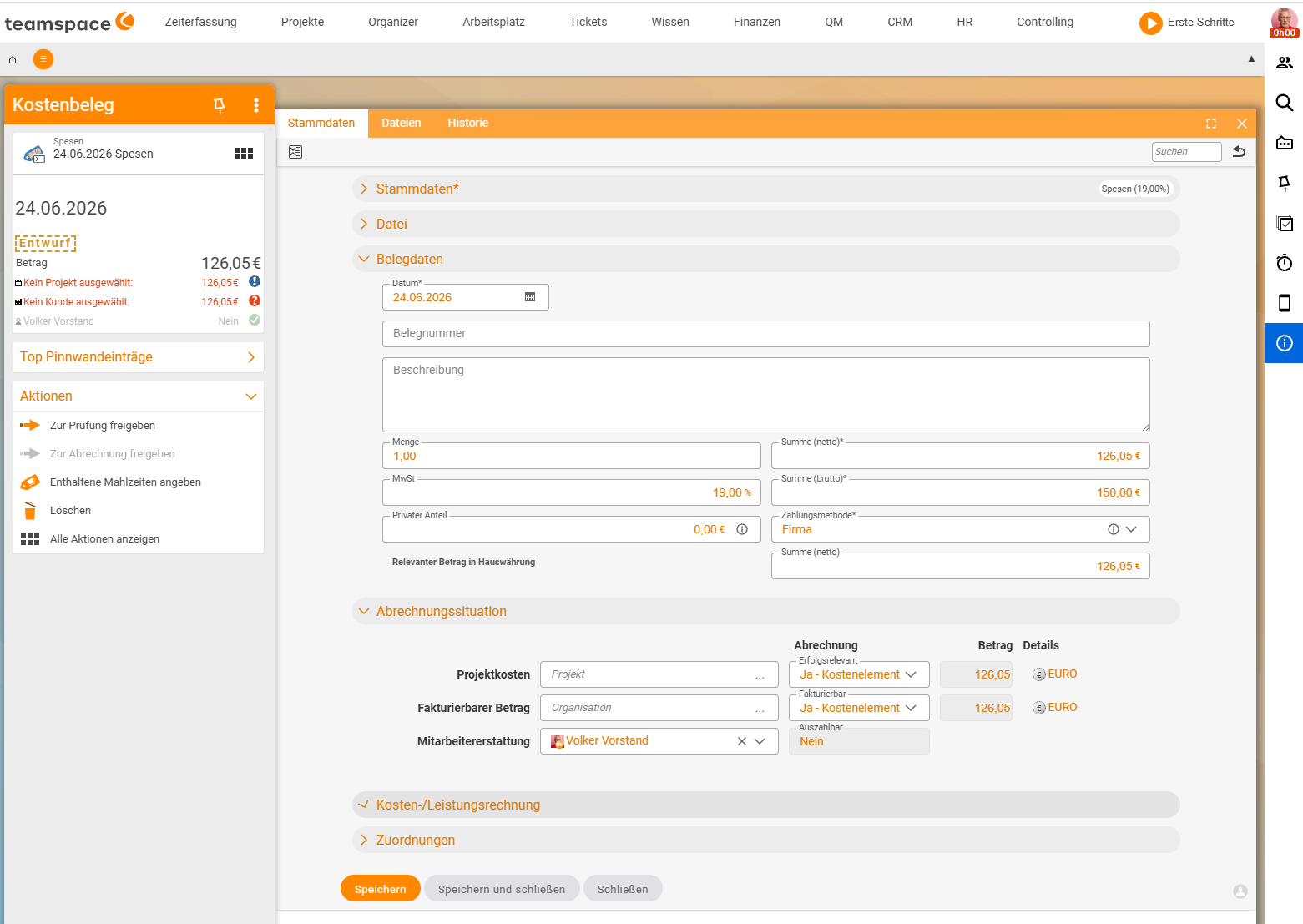
New invoicethe dialog runs with a template from the configuration. The template defines the compartments (typically a 19% and a 7% block) and a collective recipient – usually an anonymous contact, so you don’t have to create master data for every tiny invoice. - Enter the items in the document: a 19% item of €100 gross and a 7% item of €50 gross add up to €150 total gross – the rates run cleanly separated through accounting.
- Via
Save and closeyou land in the detail manager of the cost element that the invoice is based on. Here you set theBilling situation. The incoming invoice itself sits in the background as the document source.
ℹ If the document type
Expense invoiceis missing from the plus button drop-down, it hasn’t been created in the tenant. OpenSystem configuration → Finance → Cost typesand create anExpense invoicevia the plus – details in Set up cost types, supplements & document templates.
Material – consumption and flat rates
Material is everything you consume in the project and want to invoice to the customer. Classic flat rates too – travel and accommodation flat rates – often run through material, because they’re treated like a piece of goods.
- Plus button in the
Costslist, entryNew material costs. - The
Materialdialog has five numbered accordions:Master data,Document data*,Billing situation,Cost accounting,Assignments. Fields underMaster data:Preferred reviewer,Expense type*. - A
Quantitygreater than 1 makes sense – five travel flat rates, three buckets of nails.
If you book material from within a project (via quick entry in the project detail manager), the selection offers the material types your order provides for. A travel flat rate with Billable amount → as per order pulls the price from the order item – e.g. €17.80 – instead of the master price of the expense type (e.g. €50). How the four price sources work is in Recharge costs to customers.
Payment method – private or company card
When creating, teamspace asks who paid. That’s the decisive trigger for employee payroll:
- Paid privately: the employee gets the money back.
Employee reimbursementis set to the gross amount, and employee payroll in the HR module picks the item up. - Company card / company paid: the employee gets nothing back.
Employee reimbursementis set to 0 orNo. The document still runs to the project and the customer – but not through employee payroll.
Employee reimbursement can also be kept in a different currency, in case you paid cash abroad.
Link to the trip
In the context of a travel expense report, creating via the plus in the Costs tab is quicker, because project and customer are pre-filled from the trip’s default values, the document-type selection (Meal allowance, Travel costs, Expense receipt, Expense invoice, Material) appears straight away and the document automatically lands in the trip context when saved. Documents outside a trip you attach later via the collective statement.
Common questions & needs
| You want to … | How to |
|---|---|
| Quickly record a simple taxi receipt | New expense (quick entry) → expense type, date, amount, done. |
| A hotel invoice with breakfast and overnight stay | Expense invoice with separate 19% and 7% items instead of an expense receipt. |
| Get your money back | When creating, choose paid privately – then Employee reimbursement is set to the gross amount. |
| Record documents paid by company card | Choose company card – the document runs to the project/customer but not into employee payroll. |
| Book a travel flat rate with the order price | Book material from the project, Billable amount → as per order – the price comes from the order item. |
| Several identical material items | Set Quantity greater than 1 instead of several single documents. |
| The document type Expense invoice is missing from the menu | Create the type in System configuration → Finance → Cost types – see Configuration. |