


From an e-invoice you create an expense receipt or an expense invoice directly – invoice as a PDF in, teamspace reads the XML data, the values are pre-filled, the document is linked as a reference. What would otherwise be typing happens in one step.
Which document type fits
Two document types are candidates – the choice doesn’t depend on the e-invoice but on what the document carries:
- Expense receipt: one item, one VAT rate, quickly entered. Taxi receipt, fuel receipt, single-item invoices.
- Expense invoice: any number of items, mixed VAT rates, the full incoming-invoice mechanics with a payment instruction. Hotel invoice with overnight stay and breakfast, caterer with mixed rates.
The difference between the two types is covered in detail in Cost types at a glance.
Path 1 – expense receipt from an e-invoice
- In the
Costslist, open the plus button and chooseNew expense (quick entry). - In the
Expense receiptdialog, choose theExpense type. - Expand the
Fileaccordion, drag the e-invoice in as a reference document or upload it viaUpload. - teamspace reads the XML data and fills in date, amount and VAT automatically.
- In the
Billing situationaccordion, decide what should happen – charge the project, bill the customer, reimburse you. - Save via
SaveorSave and close. The e-invoice is attached as a reference document.
Path 2 – expense invoice from an e-invoice
For several items or mixed VAT rates.
- Plus button
New elementin theCostslist, in the drop-downNew costs. - Choose document type
Expense invoice– if it’s missing, it hasn’t been created yet (see below). - Choose
New invoice(instead of an existing incoming invoice). - Upload the e-invoice as an incoming document or drag it in.
- teamspace recognises the recipient and line-item data (incl. ZUGFeRD data); you give the document a name.
- Via
Nextyou go into the detail manager of the resulting cost element – amount, reimbursement and the link to project and customer are set there.
Context decides project and customer
If you create the document in a vacuum (the free Costs list), project and customer stay empty – you add them afterwards. If, on the other hand, you create it inside a project, a travel expense report or a collective statement, project and customer are pre-filled from the context.
The “Incoming invoices” list
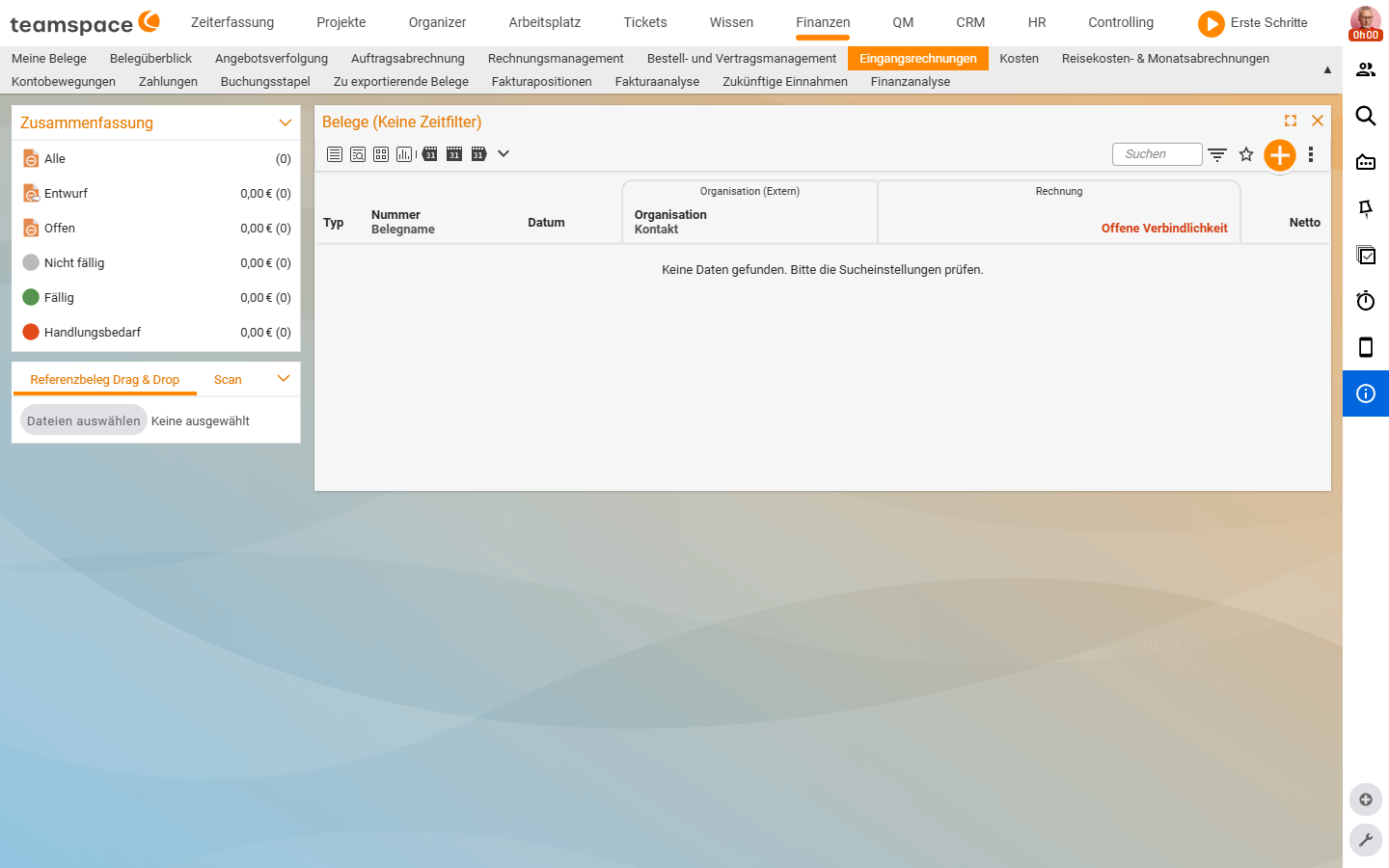
E-invoices that aren’t recorded directly from a cost context land via the Incoming invoices list. The list has a sidebar block Summary with the status filters All, Draft, Open, Not due, Due, Action needed – each with a total and a counter. Two prominently placed sidebar buttons:
- Reference document drag & drop: drag in an e-invoice PDF, teamspace pulls the data.
- Scan: scan a paper document, the document lands in the list.
In the Organisation (external) column group you see organisation and contact, in the Invoice group the open liability and the net amount.
Interface to financial accounting
The decisive advantage: a document that enters the system this way is automatically forwarded to financial accounting. teamspace’s DATEV or banking interfaces take the document over without you having to record it again.
ℹ If the recipient of an expense invoice is not unambiguous (small single documents, service providers without a fixed master-data entry), enter an anonymous collective contact in the document template. For larger invoices the real organisation is mandatory – otherwise the DATEV export rejects it.
When the Expense invoice document type is missing
If no Expense invoice appears in the plus button drop-down, the type hasn’t been created in your tenant. You need two things – both steps are in Set up cost types, supplements & document templates:
- the cost type
Expense invoiceunderSystem configuration → Finance → Cost types, - a document template under
System configuration → Documents → Incoming invoicewith VAT compartments (19%, 7%) and an anonymous collective contact.
Common questions & needs
| You want to … | How to |
|---|---|
| Record an e-invoice as a simple expense document | New expense (quick entry) → File accordion → drag in the PDF. |
| An e-invoice with several VAT rates | New costs → Expense invoice → New invoice → upload the PDF. |
| Assign the document to a project straight away | Create the document from the project or a collective statement – then everything is pre-filled. |
| Hand documents to DATEV automatically | Record them via the e-invoice/scan path – the accounting interface takes over automatically. |
| Anonymous mini-invoices without master data | Store an anonymous collective contact as the recipient in the document template. |