



Project and order are two objects that need to know about each other. The project steers the operational side – who does what and when, what is done, where documents are. The order steers the billing – what runs onto which line item, when and at which hourly rate. So that both sides match up, there are links that are created automatically with the right order configuration. (There can even be several orders attached to one project – for example with extension orders.)
You typically create the project from the order: the order already holds line items, customer and agent – when you create it, this becomes the project with matching work packages.
Three questions the order must answer
From an order’s point of view, three questions arise:
- Which subprojects/work packages should be created from the order line items?
- At which hourly rate can I bill times (or costs)?
- When may I create an invoice?
The first two answers are project linking; the third is billing logic. Both are maintained in the line-item settings under Project creation and billing – or once, in advance, in the article or in an order template.
How a project is created from the order
In the order, you find the action Create project in the Actions. Exactly one project is created per order – after that the action is used up. You can give the new project one of three roles:
Main project– the order gets its own project. Default.Subproject– the order attaches itself under an existing project. Handy for extension orders.Work package– one level deeper still; rare, but useful for mini orders.
If you create sections in the order (e.g. “Conception”), the project receives this structure too – this is how you deliberately shape what the project looks like.
Per line item – controlling the project link
Per line item there are two switches that shape the project.
What should be created in the project – field Project creation:
Auto– the system creates a work package.Do not create project– nothing happens for this line item (typical for basic fee, base value, hourly-rate collector).Individual settings– detail options expand (for example: only create at the statusIn progress).With template– a subproject template is used (good for recurring task bundles).
Where the line-item billing docks on – field Link:
Original line item– linked directly with the work package created from it.Main project– docks onto the project root (useful for hourly-rate collectors).Section– docks onto the subproject that is created from a document section.None– no link; time bookings do not find the line item on their own.
How the project plays times back to the order
When an employee books time onto a work package, the system looks for the matching order line item – according to rules that you configure per line item:
Priority– if several line items are linked to the same element, the one with higher priority is addressed first.Max. billable timeandMax. applies per X time units– limit per line item, periodic if needed (45 minutes per month).Category and sectionas well asAssignee– only times with a matching category or from particular employees (Hourly rate Volkeronly catches Volker’s times).From–to– time limit on validity.
If the system finds no matching line item directly on the work package, it runs up the project hierarchy – subproject, main project – and keeps searching there. This way, a few hourly-rate collectors on the main project are enough to cover many work packages.
ℹ Pitfall “Several employees, one work package”. If the work package has no hourly rate of its own and the main project has only one collector for
Volker, times from other employees land on Volker’s hourly rate – he is overcharged. A clean setup: two collectors on the main project –Hourly rate VolkerwithAssignee = Volker Vorstandandthe restwith no assignee restriction. Times then find the right collector automatically. If the warning “Times without order line item” appears, exactly such a collector is missing.
When the order may bill
Via the Billing data on the order (tab Master data) you determine when the system marks the order as “to bill now” – using the modes Rules, Manual, Payment plan, Billing rules and Billed. In the Rules mode, criteria such as project progress, project status, minimum billing and earliest billing date apply. With the checkbox On a subproject basis, progress is counted separately per subproject. The full list of modes with examples is in Create and bill orders.
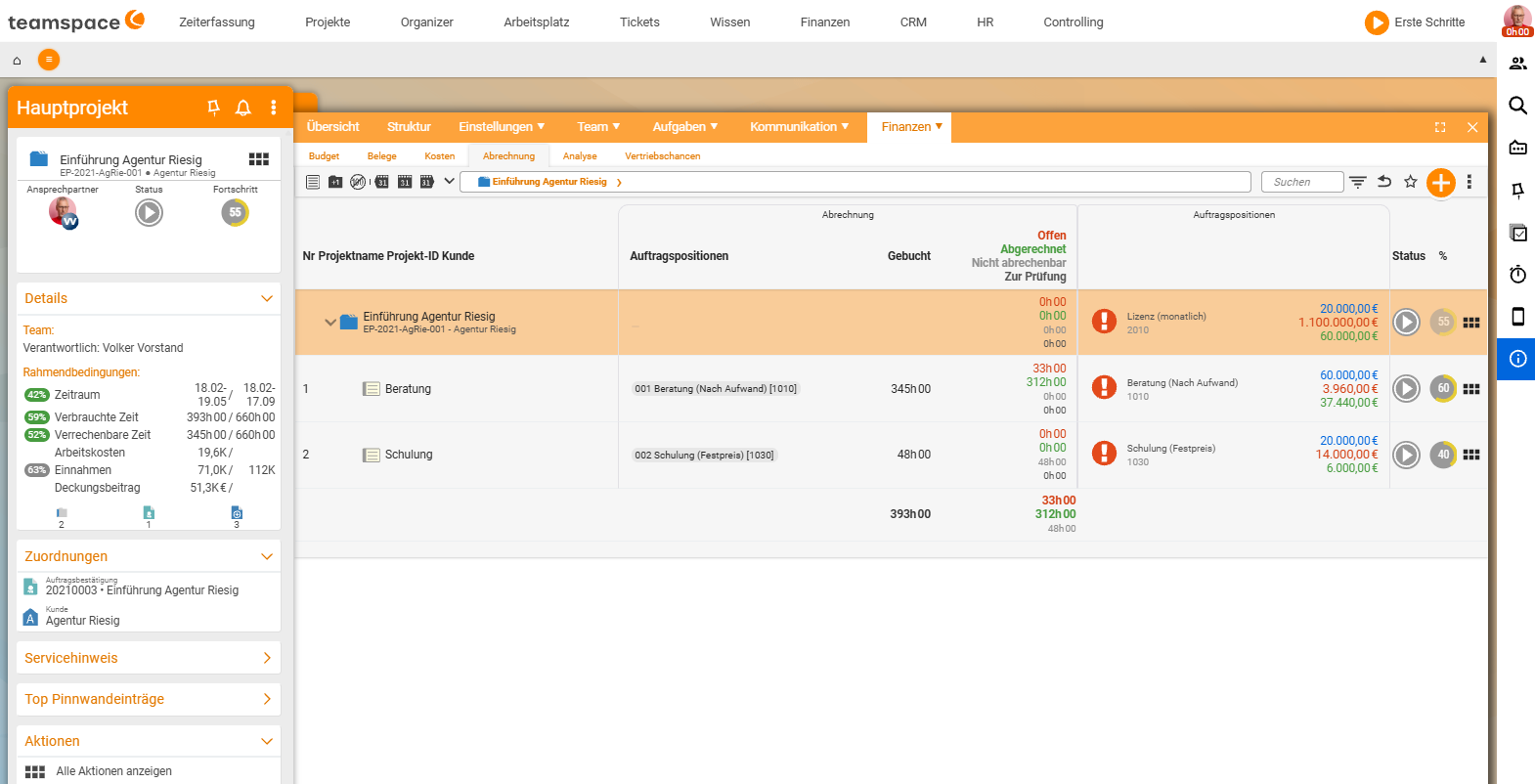
Important: the reference point for “50% complete” is the linked subproject – not just any project. Which line item bills which project element is shown on the Billing tab.
Related topics
- Create and bill orders Invoicing How-to
- The six billing methods (with video) Invoicing Concept
- Topic: Project management Project management
- Order processing software