



Every line item in an order carries a billing method. It tells the system how the line item becomes a row in the invoice – what is multiplied, what is gathered, what is repeated. teamspace knows six methods, with which almost any contract situation can be modelled.
The order is the “duty manager” of the billing process: it always shows exactly what you can bill right now (red dot), what is still waiting (yellow hourglass) and what has already been billed (green). You set the billing method when you create the article. In an individual line item you can still swap fixed price and effort – time duration and percentage are fixed once created.
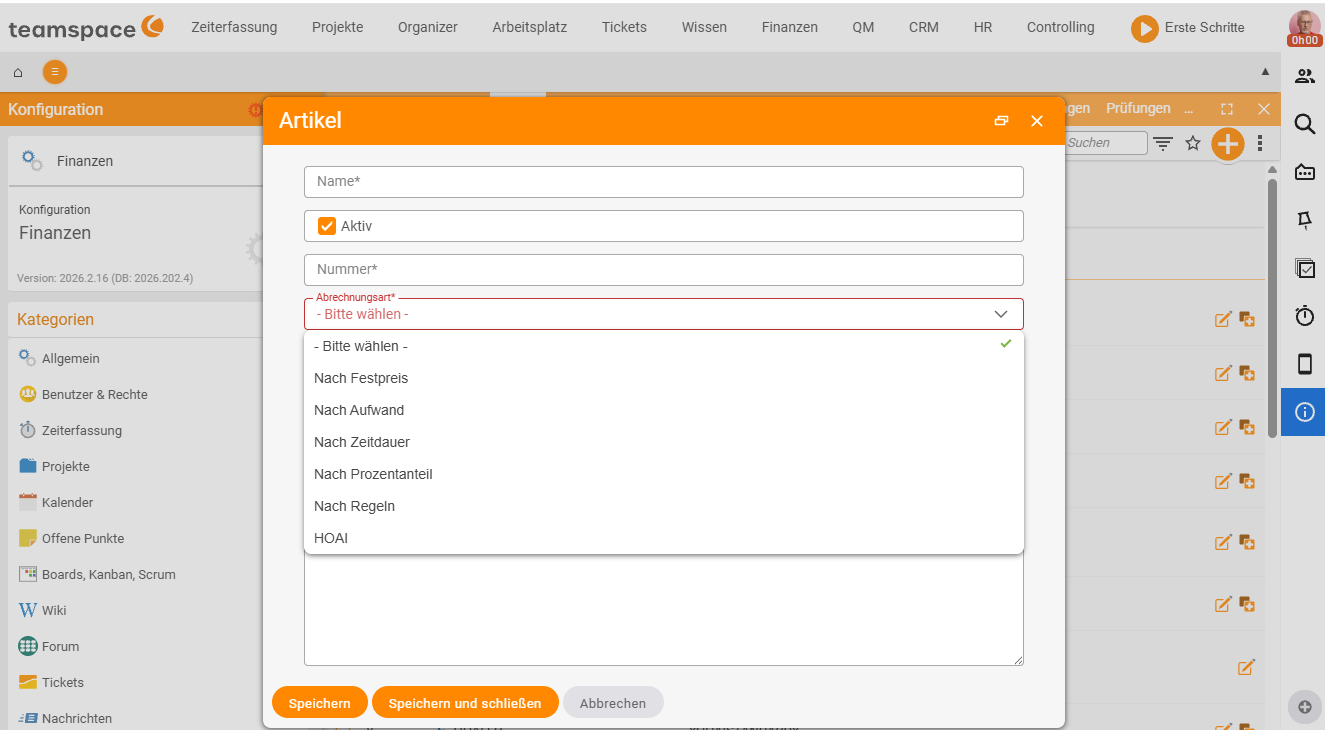
Not everyone sees all six. Which billing methods appear in the drop-down can be switched on and off in the administration area. To keep the choice manageable, in many tenants only the four most important are active by default –
By fixed price,By effort,By time durationandBy percentage.By rulesandHOAIare added on demand. If a method is missing, contact your administration.
TODO-DONE · FAKTURA-T02 · REDAKTION
Done 25 June 2026: teamspace knows six billing methods –
By fixed price,By effort,By time duration,By percentage,By rulesandHOAI. Which ones appear in the drop-down is configurable; by default often only the four most important are active – which is why only four were visible on 22 June 2026. Article changed from “five” to “six billing methods”, HOAI added as its own method and the configuration note inserted.
Fixed price – the simple form
Fixed price is unit price times quantity, minus discount – no gathering in the background. You create the line item, enter quantity and unit price, and the system calculates the sum. The order checks its invoices for what has already been billed; the rest is open and billable, provided no rule holds it back. The classic choice for flat rates, training and deliveries.
By effort – gathering time bookings
With “by effort” (time and material) you set what one unit costs – an hour of consulting, a travel flat rate. The system gathers the booked times from the project, applies them to the line item and supplies an activity and cost record with the invoice.
An effort line item needs a link to the project so that it can find the times. You can also run it without its own work package as an hourly-rate collector: when an employee books time, the system checks the line-item hierarchy and assigns the time to the matching hourly rate. This lets you build differentiated logic – Hourly rate Volker at €120, the rest at €100. How the time-to-line-item assignment works is explained in How projects and orders work together.
By time duration – recurring billing
A time-duration item needs two details: the cycle (every X months, every X years) and the start date. As soon as a period begins, the line item becomes billable. The cycle is set in the article and can no longer be changed later – if you need the same thing yearly instead of monthly, you create a new article.
Via the billing deviation you determine when billing happens – at the start of the period (0 days), before (e.g. −10 days for advance licences) or after. Time-duration items can be combined with an effort allowance (for example 45 minutes of free support per month). Everything about this is in Recurring invoices and Maintenance fee with free allowance.
Percentage – one line item on another
A percentage line item needs a calculation base: another line item, a section (with all line items in it) or a base value – a special line item that is not billed but exists only as a reference figure.
Classics are surcharges on services rendered. The HOAI fee also calculates with percentages in the background – but there is a dedicated billing method for it (see below).
By rules – automatic additional costs
A “by rules” line item analyses the times billed in an invoice and generates additional cost line items from them – when the rule applies. Example: for each day on which an employee was on site for more than five hours, a flat-rate expense of €50 is added. This method is the rarest – useful for standardised on-site flat rates and night and weekend surcharges.
HOAI – fees by work phase
The fee scale for architects and engineers is stored as a dedicated billing method. Instead of building the nine work phases by hand as percentage line items, you choose the method HOAI for the article: you set the framework conditions (version, service profile, fee zone, fee rate and eligible construction costs), and teamspace calculates the fee and creates all work phases as sub-line-items. Step by step, this is covered in Bill HOAI fees.
Which method for which contract
| Contract type | Suitable method |
|---|---|
| Flat rate, delivery, workshop | Fixed price |
| Consulting, training with time booking, on-site assignment | By effort |
| Maintenance, licence, rental, subscription | By time duration |
| Surcharge on services, fee on base value | Percentage |
| Flat-rate expense from time analysis | By rules |
| Architects’ and engineers’ fees | HOAI |
All methods may sit in one order at the same time – most real-world contracts mix two or three. A software maintenance contract can carry a time-duration item (basic fee), an effort line item (additional support beyond the allowance) and a fixed-price line item (one-off setup) together.
Related topics
- Create and bill orders Invoicing How-to
- How projects and orders work together (with video) Invoicing Concept
- Articles and price lists Invoicing Configuration
- Order billing software