



An article is the source form of every line item: name, description, default price, billing method, tax rate, statistical values. A price list selects from the articles and refines price, name, description and currency – you can bill the same maintenance for €24 in one list and for €25 in another, both based on the same article.
On the document it works like this: every line item is linked to exactly one article; the price list on the document fills in price and description. If you change the article price later, no old documents change – the line item keeps its historical value.
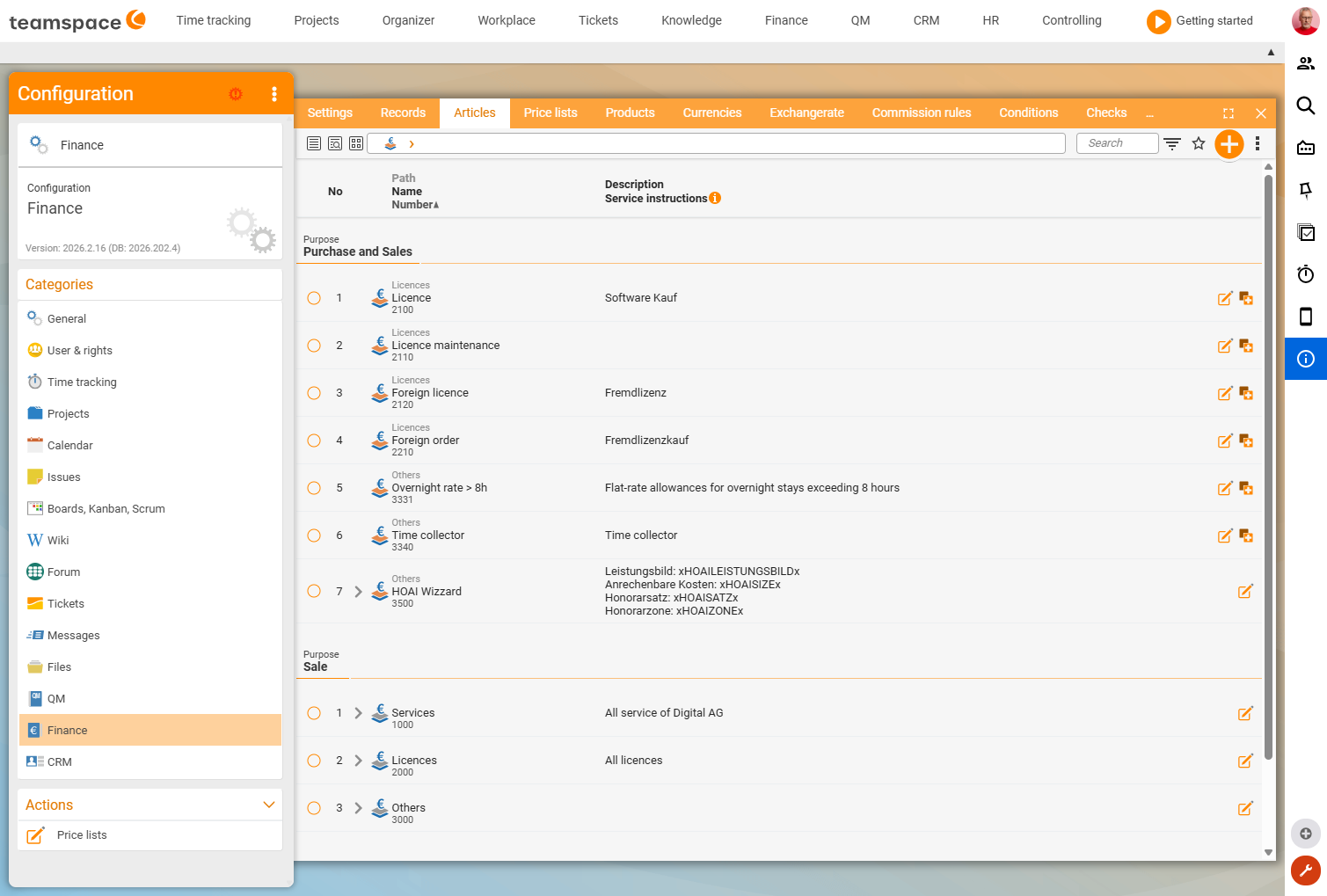
Create an article
In Configuration → Finance → Articles via New article. The detail manager has seven sections:
Master data– name, number, tax rate,Main article(for the hierarchy), category (e.g.Service,Licences).Billing method– one of the six (Fixed price,By effort,By time duration,Percentage,By rules,HOAI). See The six billing methods.Pricing– unit price, unit and the quantity logic in thePricingfield:Unit price (editable),Unit price (not editable),Tiered prices (open),Tiered prices (closed),Tiered prices (% of base price)(verified live on 25 June 2026). ForBy time durationthere is also the time unit/period and the billing deviation; for effort with an allowance, the included time.Statistical values–Product type,Account for financial accounting, cost centre. These values exist only in the article and cannot be overridden in the document line item (exception: cost centre as a default).Project creation and billing– default values for the project link (see How projects and orders work together).PDF and dispatch– visibility options for the PDF (such asShow activity report).Price lists– shows which price lists the article is active in (display only).
Which values live in the article, which in the line item
Three kinds of values – important for understanding what can be changed where:
- Statistical values (
Product type,Account,Cost centre) – exist only in the article. A change affects every report, even retroactively. Price,Description,Name,Discount,Quantity– are copied into the line item via the price list. Once the line item has values, they are independent; a later article change only takes effect for new line items.Billing method,Unit,Period– taken from the article, no longer editable in the line item. Fixed price ↔ effort can be swapped;Time duration/Percentageare fixed.
ℹ If you want to evaluate how often you have sold “monthly licence” – regardless of language or currency – you only need one article and map languages/currencies via price lists.
Price list – selection and refinement
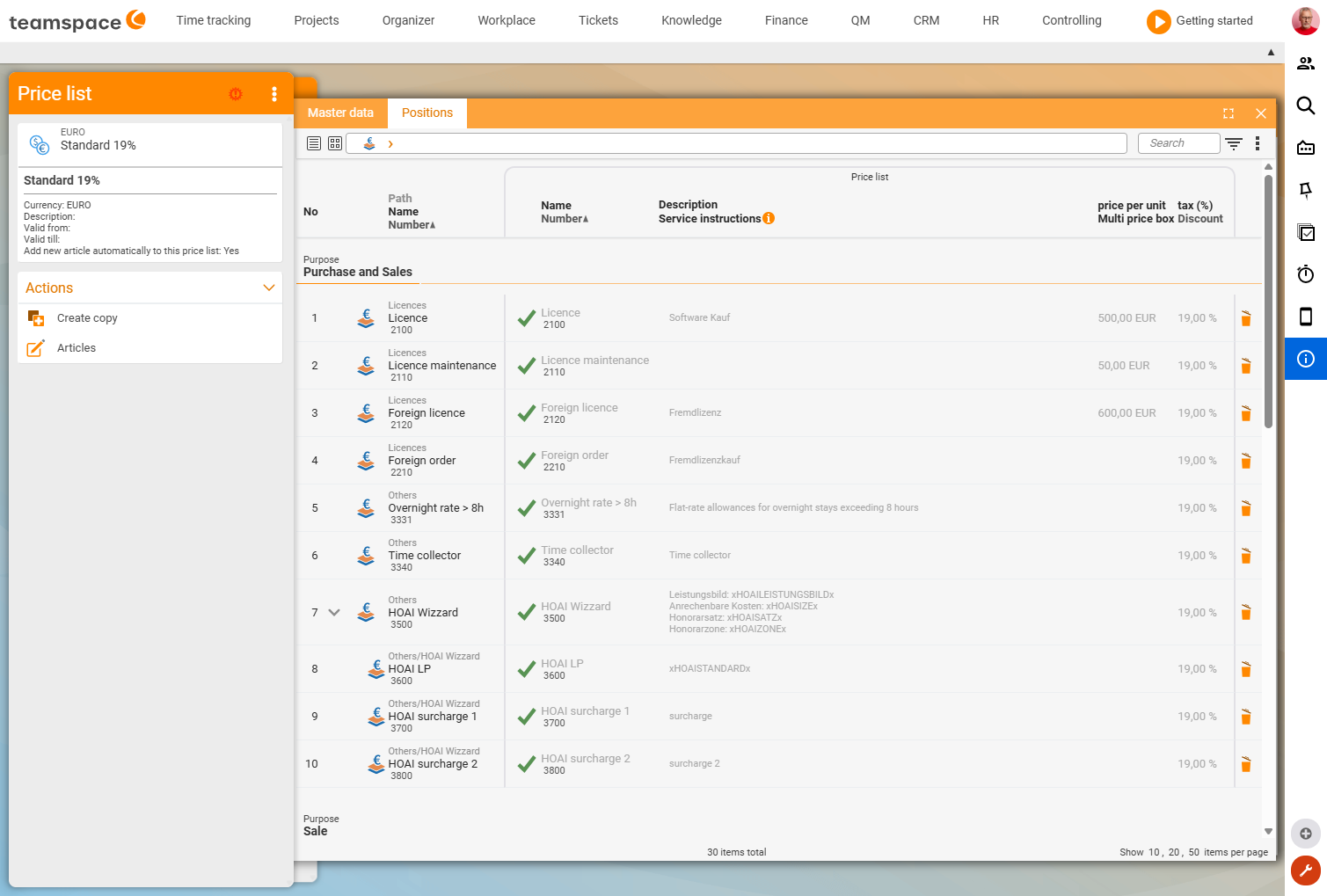
You maintain a price list in Configuration → Finance → Price lists. It has two sides: on the left the article list (what exists), on the right the activated articles (what this list offers).
- Activate an article – visible and selectable in the price list.
- Deactivate an article (click
X) – no longer selectable in this list. This is how you retire old articles without deleting them (old invoices still need them).
For every activated article you override price, name, description, discount and VAT. Fields you fill in yourself turn dark (the price list beats the article), fields left empty stay light grey (the article value applies).
This lets you build the classic constellations: Price list 2024/2025 (year change), German/English (language in the PDF), CHF (currency/VAT change by copying the list).
Price list on the document
Every document must have a price list (via the creation dialog or document template). It determines which articles appear in the New line item dialog and with which price/name they fill the line item.
If you switch the price list on a document, three checkboxes appear asking whether existing values should be updated (take over price, take over description, take over further values).
⚠ Take care with orders that already have issued invoices. If you switch the price list, the system may recalculate retroactively – the old invoice then no longer matches. For price increases in ongoing contracts,
Adjust price and quantityis the clean way, see Adjust prices in ongoing contracts. For quotes the switch is uncritical; a pure language switch on an order works cleanly as long as the price stays the same.
Article hierarchy and statistics
Via Main article you build a hierarchy (Licences → Licence monthly, Licence annually). In reports you group by main article and see total revenue – regardless of the variant. The statistical values help you build clean controlling reports.
Common questions & needs
| You want to … | How to |
|---|---|
| Offer the same article in two currencies | Two price lists, same article, override price/VAT per list. |
| Output PDF texts in English | Price list English with translated name/description. |
| Retire an old article | Deactivate it in the current price list (do not delete). |
| Evaluate revenue per product type | Maintain statistical values (Product type, Account) on the article. |
| New prices for the year change | Copy Price list 2025, set prices, assign to new documents. |
Related topics
- Tiered prices, volume discounts & quantity structures (with video) Invoicing Configuration
- Adjust prices in ongoing contracts Invoicing How-to
- Document templates, approvals & commissions Invoicing Configuration
- Topic: Product management Product management