



Prices change – inflation, competition, new terms. If you do this wrong, the system recalculates retroactively, old invoices no longer match the line item, and the customer asks why the next invoice differs.
The basic problem: if the first annual fee cost €100 and you simply change the price to €120, the line item calculates both years at €120 (= €240). But if you have already billed the first year at €100, suddenly €140 is left open. The correct way is therefore: two line items – one with the old price up to the effective date, one with the new price from the effective date.
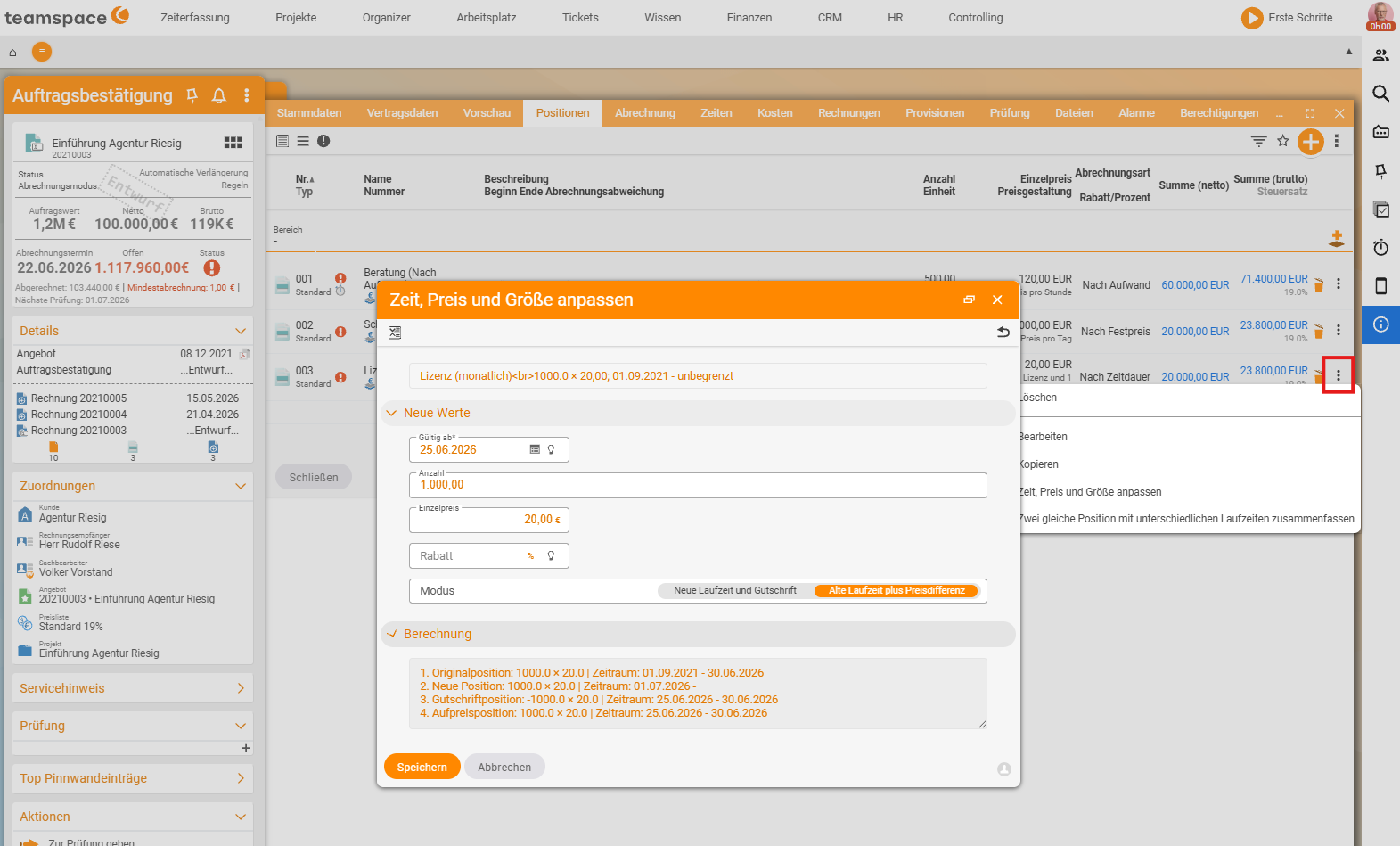
Adjust one line item – the clean single case
Open the line item via the three-dots menu → … Adjust price and size (depending on the line-item type, the entry is named Adjust time, price and size or Adjust value, price and size, verified live on 25 June 2026). In the dialog, you choose:
- The date from which the new value applies – typically the first of a month or year.
- The new unit price (or new quantity).
Keep term– the end date of the original line item is retained.
The preview shows what happens: the system sets an end date on the old line item and creates a new one from the chosen date. Both live in parallel – the old one for its past, the new one from the change onwards.
ℹ Why not just overwrite the price? In edit/administration mode, the unit price can be changed (only a warning appears), but then the system bills the entire term at the new price – the next invoice becomes substantively wrong.
Adjust price and sizeis the mechanism intended for this.
Many orders at once – the bulk action
If you have 500 maintenance contracts that should rise on 1 January, this runs from the price list:
- Enter the new price in the price list –
Configuration → Finance → Price lists, set the new value on the affected article. - Three-dots menu on the article in the price list →
Assign price-list data to affected orders. - Upper filter block – which orders: document type (order confirmations), period, status (validated), project conditions, “contains article”. Using bookmarked elements, you filter very finely (e.g. just one order by name).
- Lower filter block – which line items:
Line item already billed,Line item not yet billed,open end and start date set(always leave this on, otherwise completed line items come back in). - What is changed – unit price, description, quantity – and on which date.
The system shows at the bottom which orders are affected. Orders that have already been adjusted manually are left out – you do not duplicate the change. With Also enter bookmarked elements enabled, the system remembers the changed line items so that you can review them afterwards as a filtered list.
⚠ Check the filter before you run it. With 500 orders, the preview is everything. First filter on one order (e.g. by name via bookmarked elements), check the result, and only then widen the filter to all of them.
Set the effort line item to passive
For effort articles, there is the special option Set old line item to passive. By default, the old effort line item continues to run after the change date (for past time). If you set it to passive, nothing more can be billed through it – old time keeps the old hourly rate, new time goes exclusively onto the new line item (for instance: all time before 1 July at €100, after that at €120).
Common questions & needs
| You want to … | How to |
|---|---|
| Increase the price of ONE line item on the effective date | Three-dots menu → Adjust price and size. |
| Change the price in MANY orders | Price list → article → Assign price-list data to affected orders. |
| Adjust only not-yet-billed line items | Lower filter: Line item not yet billed. |
| Test in advance what changes | Filter on one order via bookmarked elements, check the result. |
| Block the old hourly rate completely from date X | Set old line item to passive (only for effort). |
| Tidy up an overfull order afterwards | Multi-select → Tidy up. |
Related topics
- Recurring invoices Invoicing How-to
- Tiered prices, volume discounts & quantity structures (with video) Invoicing Configuration
- Articles and price lists Invoicing Configuration
- Invoicing software