


Via the API you create expense documents – that is, expenses, incoming invoices, mileage, material, commission, additional subsistence expenses, overtime payouts and supplements. An expense always consists of two parts:
- Expense category (
expenseCategory) – provides the framework, such as the currency, and distinguishes the document types. You manage these in teamspace under “Expense categories”. - Expense (
expense) – the actual expense element with all its data.
When creating a new expense, you must always pass the ID of the expense category. If it is missing, the API returns an error.
1. Find the expense category and its ID
You read the expense categories via the endpoint of the expense category collection. It supports GET only and is used for lookups – you use it to find the expense category with the type you are after:
GET server/api/expensecategoryThe expense category carries, among other things, a name, internal name, description, active status, type, currency, default payment method and default vehicle. The exact fields are in the field reference.
Reading the ID via the interface instead: Edit an expense category and enable debug mode with the key combination CTRL + # or CTRL + ^. You can then copy the ID value.
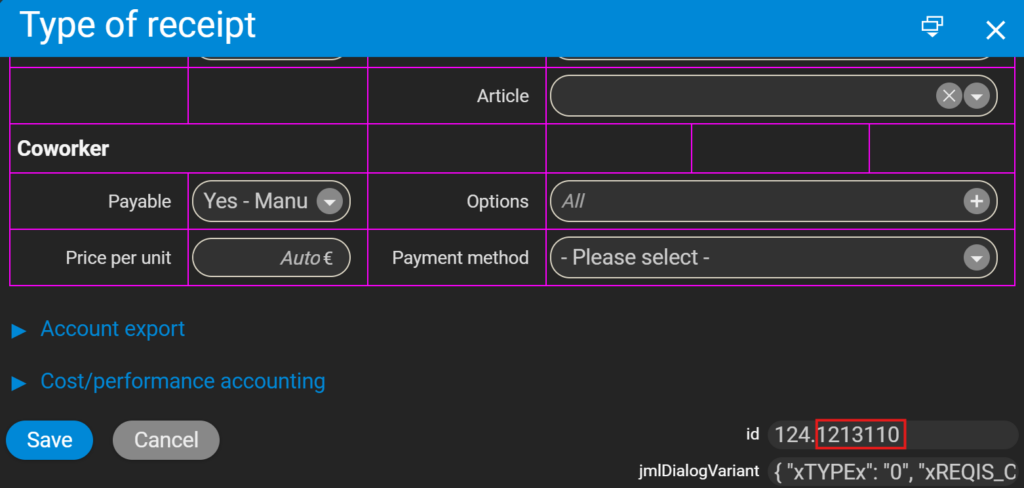
2. Create the expense
With the expense category ID, you create the expense via the expense endpoint:
POST server/api/expenseVia this endpoint you can create the following document types: expense voucher, expense invoice, mileage, material, commission, additional subsistence expenses, overtime payout and supplement. The assigned expense category determines which type is created.
A mileage expense, for example, looks like this:
POST /api/expense
{
  "date": "2025-03-03",
  "expenseCategory": 11582821,
  "coworker": 54967,
  "distance": 100,
  "vehicle": "PRIVATE"
}
Which fields you must pass per expense category and which are optional – including examples for all eight document types – is set out in full in the field reference: expense & document fields.
3. Understanding amounts and billability
- Mandatory fields are marked with
*in the field reference and are required when creating an expense. - Amounts not marked as mandatory are calculated by the system itself. You can override them – but there is a risk they will be overwritten again when the record is edited manually in the system.
- For the billable options (
externalBillable,projectBillable,coworkerBillable) the value of the expense category acts as a fallback. The automation adds the amount – just as the system does – whenever “billable” is not set to “NO”. If you want different values, you have to set them manually. - If both net and gross are empty on an expense, the base price of the expense category is used. If none is defined, an error is returned. If only the gross is given, the net is calculated.
Common questions & needs
| You want to … | How to |
|---|---|
| find the ID of an expense category | Query GET server/api/expensecategory, or open the expense category in the interface in debug mode (CTRL + #) and copy the ID value. |
| create a mileage expense | POST server/api/expense with expenseCategory, coworker, distance and vehicle. |
| look up the mandatory fields of a document type | In the field reference: expense & document fields – mandatory fields are marked with * there. |
| set different billable amounts | Provide the billable fields (externalBillable, projectBillable, coworkerBillable) manually – otherwise the value of the expense category acts as a fallback. |
Common problems
Why does the API return an error when creating the expense?
When creating an expense you must always pass the ID of the expense category (expenseCategory). If it is missing, the API returns an error. Obtain the ID via GET server/api/expensecategory or in debug mode.
Why is my expense amount not applied or wrong? Amounts not marked as mandatory are calculated by the system itself. If you override them manually, they may be overwritten again when the record is edited later in the system. Set your own values only where you really need them.
Why does an expense return an error even though net and gross are empty?
If both voucherNetto and voucherGross are empty, the base price of the expense category is used. If none is defined, the API returns an error. Either provide an amount or store a base price on the expense category.
Notes
- The expense category collection (
expensecategory) is purely informational (GETonly) – you maintain the expense categories themselves in the interface under “Expense categories”. - Mind the date format ISO (
YYYY-MM-DD); without a date, the current day is used. - Concrete request examples per document type are provided by the API Compact Guide (PDF & PowerPoint to download).
Related topics
- Field reference: expense & document fields API Reference
- API address structure (URLs) API Concept
- Topic: Costs & travel expenses Costs & travel expenses
- Invoicing software