


With sales opportunities you guide prospects through your sales process step by step. Every opportunity carries a sales stage, a probability, a target value and an account manager – from these teamspace works out the current value of your pipeline and shows you which stage a deal sits in. Each stage change is recorded as an activity in the opportunity’s timeline; at the end it reads Ordered or Rejected.
This is how you answer the typical sales questions without a separate tool: which member of staff looks after which prospect? How much revenue potential is there in the coming months? Where does the funnel run thin?
Getting in through the CRM
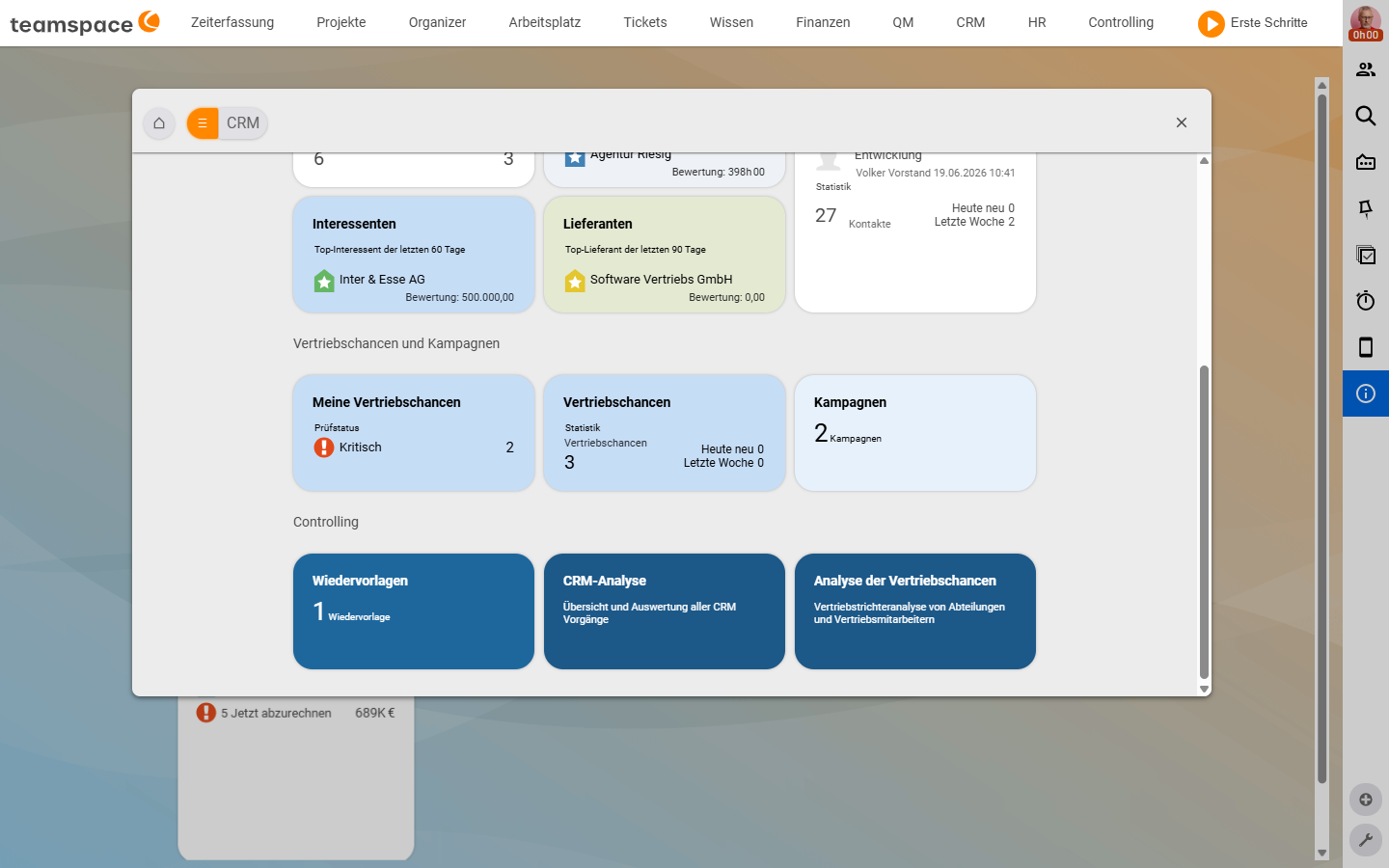
Sales opportunities are an area within the CRM – not a separate main-menu entry. You open CRM, and in the Bookmarks area you find the Sales opportunities and campaigns section with three tiles:
My sales opportunities– every opportunity where you are recorded as theAccount manager.Sales opportunities– the full list of every opportunity you have access to.Campaigns– the higher-level sales activity (mail series, follow-up sequences) that opportunities can be attached to.
The analyses sit in the same module under the Controlling section – Sales opportunity analysis and CRM analysis. Who is assigned as Account manager, and who sees which opportunities, depends on the record itself and on the permission model.
What a sales opportunity carries
A sales opportunity is its own document type in the CRM. It is attached to an Organisation and a Contact, has an Account manager and runs through a sequence of sales stages – the standard funnel. The funnel name comes from the configuration; other tenants can have their own funnels with different stage names.
Four values make the opportunity concrete:
Sales stage– the step in the funnel, with a leading number (1 Enquiry,2 Requirements meeting,3 Presentation,4 Quote presentation).Probability– a percentage that travels with the stage (e.g. Enquiry 5%, Requirements meeting 10%, Presentation 30%) – can be overridden manually per opportunity.Target value– the order value you expect. InAutomaticmode it is the basis for the projection.Current value–target value × probability, calculated automatically – the arithmetic pipeline value of this stage.
Exactly how stage, probability and status work together – and why you should not mix up Sales stage and CRM status – is explained in Understanding the sales funnel, stage & CRM status.
The typical workflow
- Create. Through
+ New sales opportunityyou set the name, organisation, contact, account manager, sales stage and target value – see Create a sales opportunity. - Maintain. At every step – a call, a meeting, a quote sent, an order placed – you document it through the
New statusaction. The activity lands in thetimeline, the stage moves forward, and probability and current value update – see Maintain a sales opportunity. - Analyse. Through the lists and the
Sales opportunity analysisyou read off how much money sits in which stage and where opportunities are stalling – see Analyse sales opportunities.
How you use the module
Anna Müller, an account manager at Agentur Riesig, gets a call from Ingo Interessent. In the CRM module she opens the Sales opportunities tile, clicks + New sales opportunity and, in the dialog, sets the name, organisation, sales stage 1 Enquiry and a target value of €5,500. The opportunity now has probability 5% and a current value of €275. Three weeks later she moves it via New status to 2 Requirements meeting – the probability jumps to 10% and the current value to €550.
Volker Vorstand looks at the Sales opportunity analysis tab on Friday afternoon. He sees that 3 Presentation holds two open opportunities worth €18,000 – something is coming in next month. In 1 Enquiry, by contrast, seven new opportunities are piling up with a target value of €21,000, of which only €1,050 will statistically come through. Anna needs more meetings in stages 2 and 3, and fewer loose enquiries at the start. That is exactly the question the funnel answers.