


For the Costs module to run smoothly, a few places in the configuration have to be set up cleanly: the cost types with their switches, the document templates for incoming invoices, the supplement rules for the month-end closing and the payout rates in HR. This article brings together the admin setup.
TODO-DONE · EXPENSE-T06 · CLAUDE
Done 2026-06-24: the supplements configuration illustrated as a 3-part sequence –
EXPENSE-ADM-06(rules inTime tracking → Settings → Supplements and allowances), newEXPENSE-ADM-08(cost type of kind “Supplement” inFinance → Articles) and newEXPENSE-ADM-09(linking inFinance → Settings → Travel expenses & weekly/monthly closing → Supplements). Documented path corrections: the rules sit underTime tracking → Settings(notAttendance times), the cost types underFinance → Articles(kind “Supplement”), the linking in theTravel expenses & weekly/monthly closingaccordion.EXPENSE-ADM-04/-05had already been captured.
ℹ The exact sidebar wording of the configuration mode is checked against the live tenant in a separate configuration run. The paths here come from the training videos and may differ slightly in your installation.
Create cost types
Which document types can be created depends on the tenant. If a type is missing from the plus button drop-down (often Expense invoice), you create it:
- Open
System configuration → Finance → Cost types. - Create the missing type via the plus (e.g.
Expense invoice). - In the cost type’s
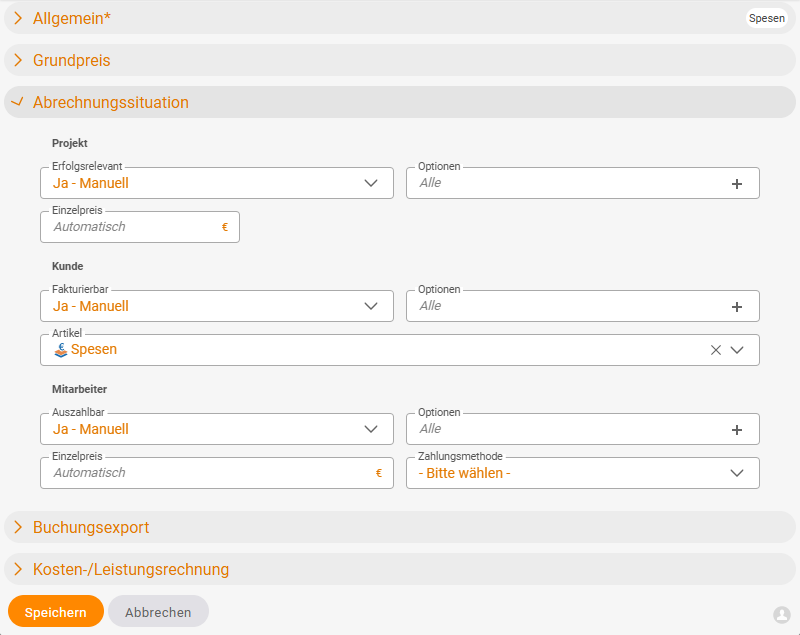
Billing situationaccordion, set the three account switches – each a drop-down withYes – <price source>(e.g.Yes - Manual,Yes - Cost element,Yes - Order item) orNo:- Project →
P&L-relevant: whether the type charges the project, - Customer →
Billable: whether the type may be recharged to the customer, - Employee →
Payable: whether the employee can be reimbursed for it.
- Project →
If one of these switches is set to No, the corresponding row appears greyed out in the document’s Billing situation – the clerk sees directly what’s what. Via the Options selector next to each switch (default All), you set the permitted price sources for the Billable amount (see Recharge costs to customers): if you don’t want to give the employee all four options, you enter e.g. only cost element here – then they have no other choice.
Some document types – meal allowance, supplement – only work if the associated rates (meal allowances per country, supplement rates) are stored. Without meal allowances, no additional subsistence expenses.
Document templates for incoming invoices
For the document type Expense invoice you need a document template:
- Open
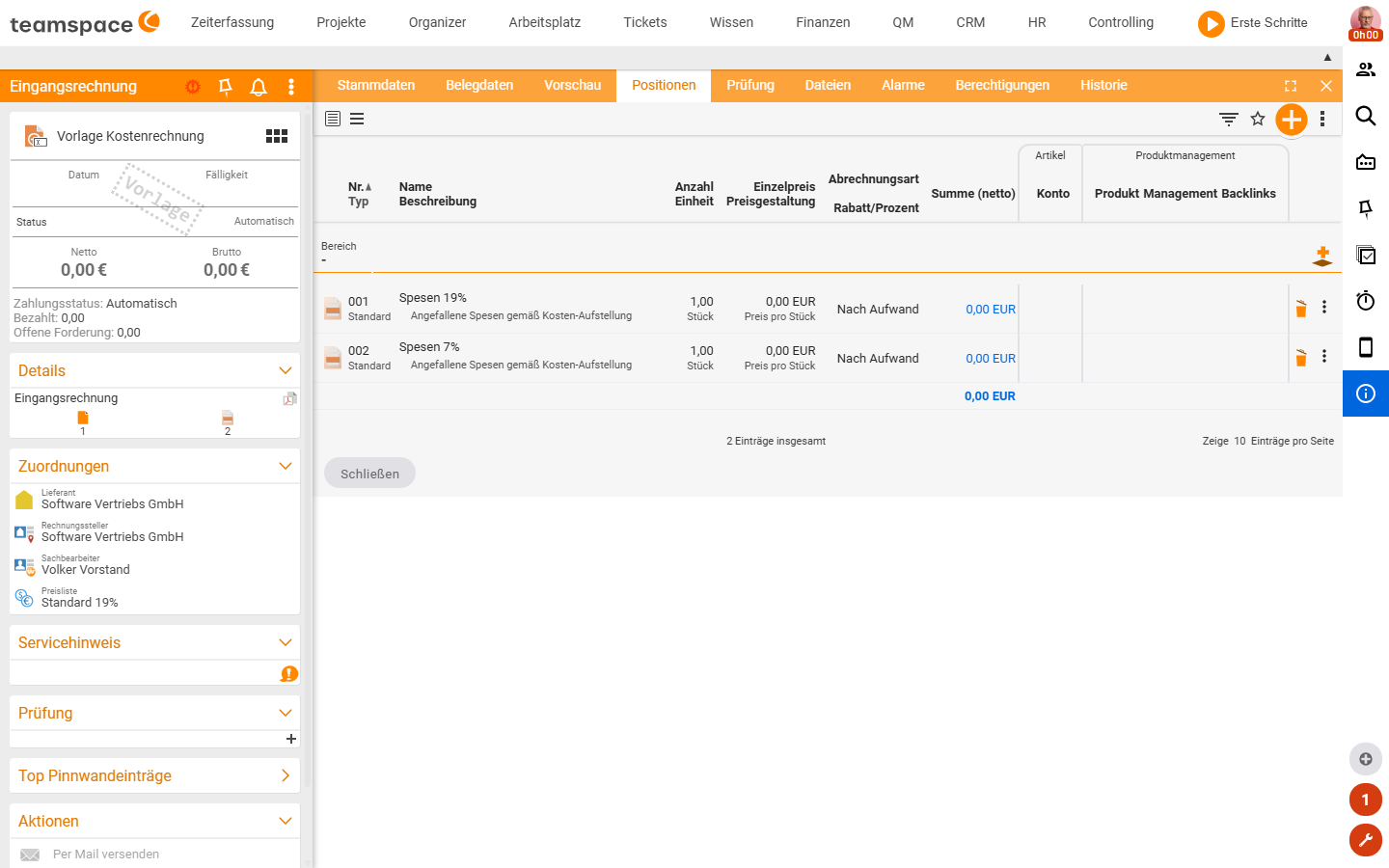
System configuration → Documents → Incoming invoice. - Create a template
Expense invoice. - Define the VAT compartments (typically a 19% and a 7% block – any number possible, copyable).
- Under
Master data, enter an anonymous collective contact as the recipient.
Without a template there are no predefined compartments when creating an expense invoice, and teamspace asks for the recipient for every invoice.
⚠ The anonymous collective contact suits small amounts (counter sales, mini-invoices). For larger invoices the real organisation has to be entered – otherwise the DATEV export rejects it.
Supplements for the month-end closing
For the month-end closing to generate Sunday, public holiday and night supplements, you need three places:
- Supplement rules.
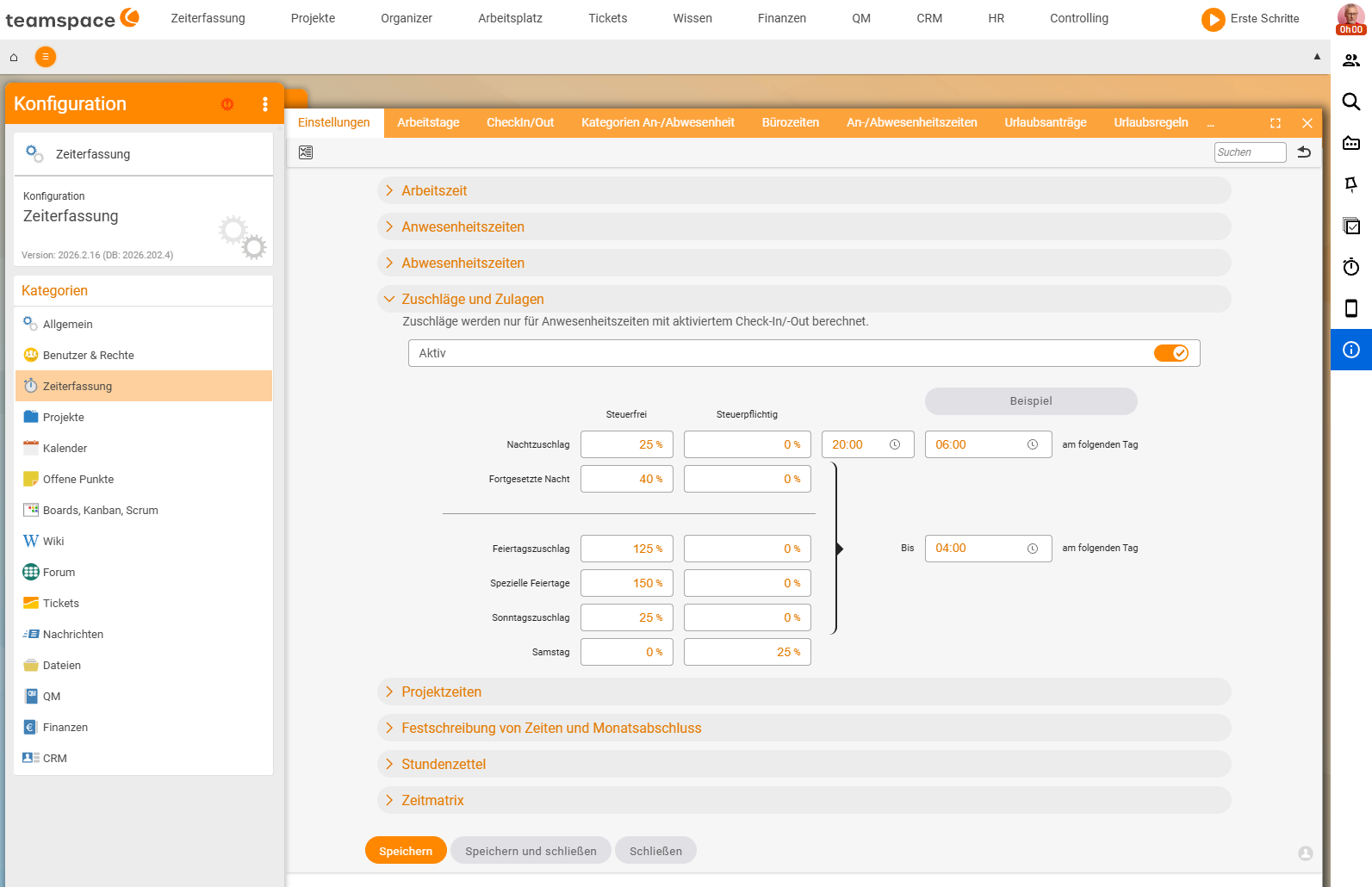
Configuration → Time tracking → Settings, accordionSupplements and allowances(switchActive). Here you define: the percentage perTax-free/Taxable, the time window for the night (e.g. 20:00–06:00 the following day) and the individual supplements (Night, Continued night, Public holiday, Special public holidays, Sunday, Saturday). Note in the dialog: supplements are only calculated for attendance times with check-in/out enabled. - Supplement cost types.
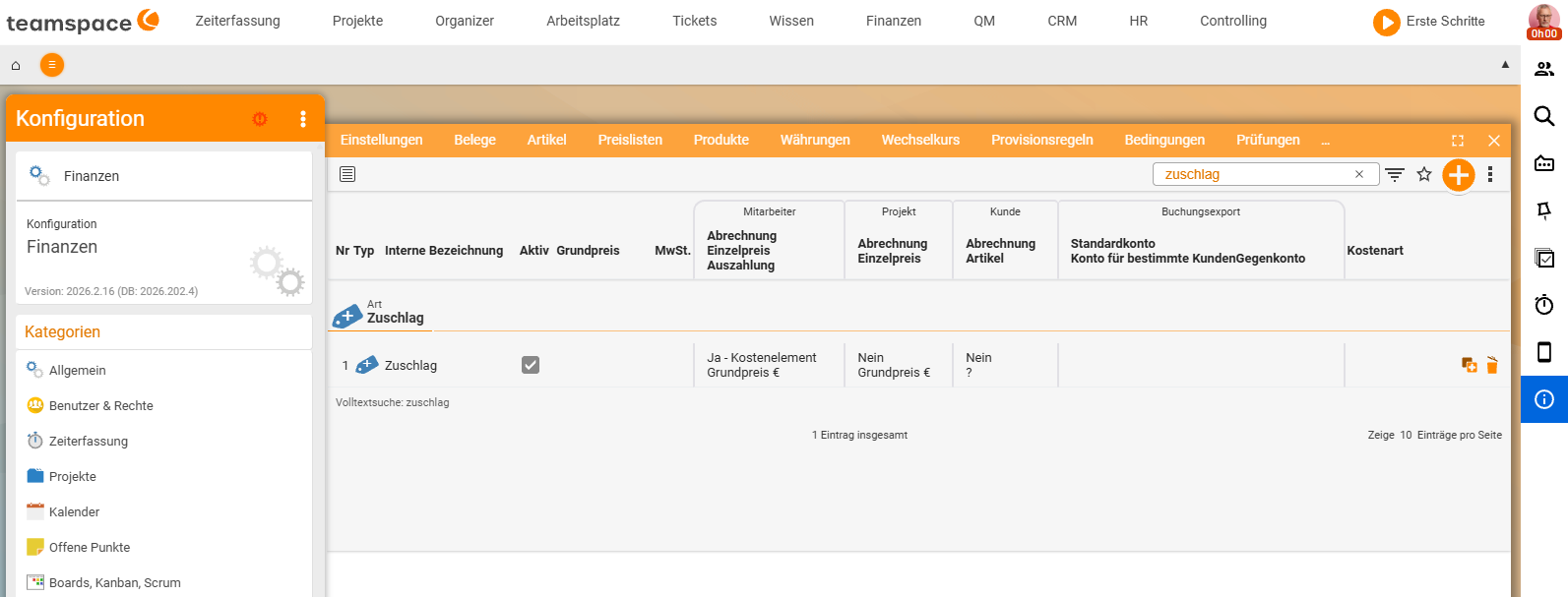
Configuration → Finance → Articles– one cost type of kindSupplementper supplement (Sunday supplement,Night supplement, …) and a separate type for the overtime payout. Via the billing switches you control that the supplement is paid to the employee as e.g.Yes - Cost elementbut not charged to the customer. - Linking.
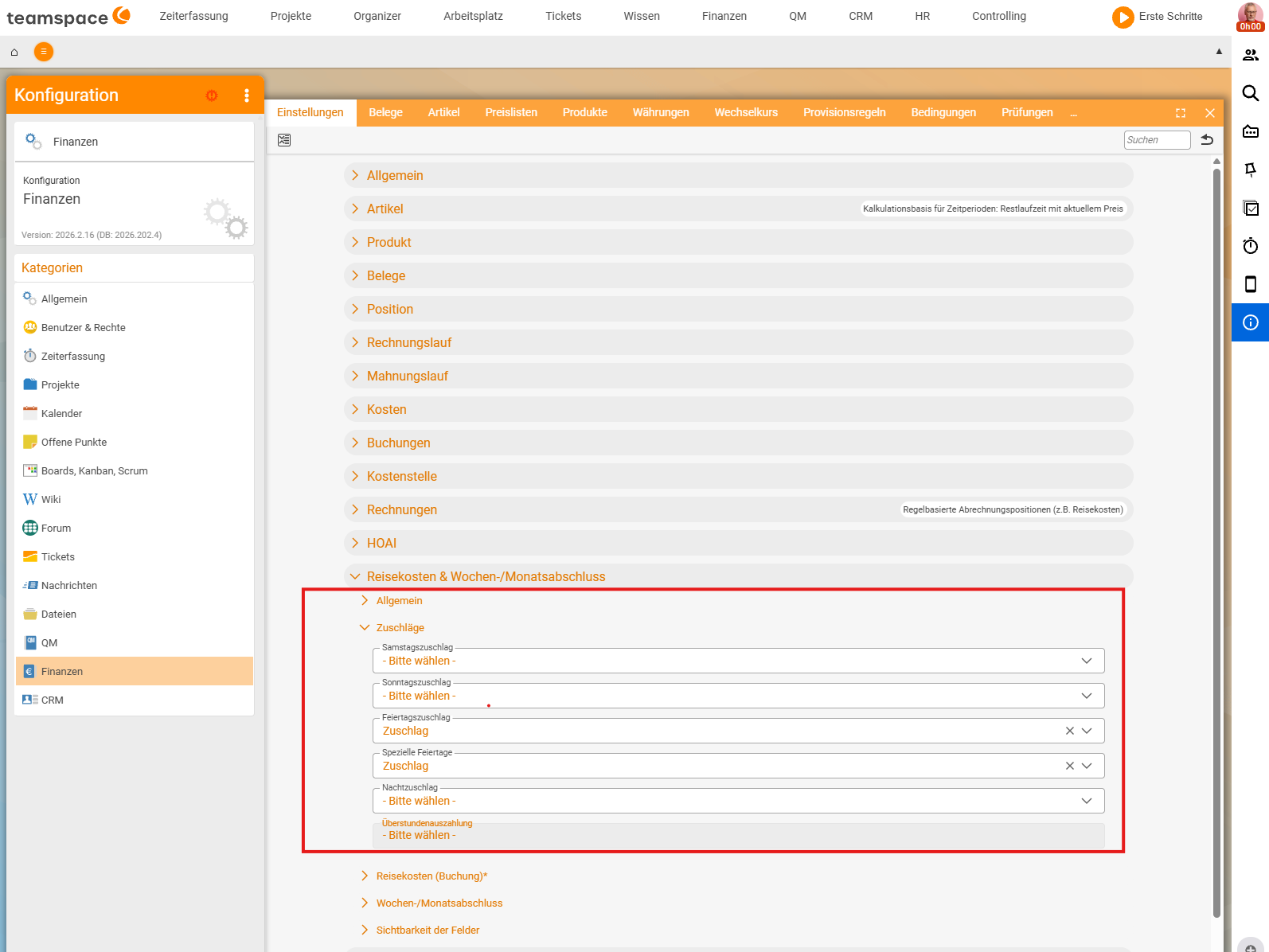
Configuration → Finance → Settings, accordionTravel expenses & weekly/monthly closing → Supplements– here you assign the cost type to each supplement kind (e.g. public holiday supplement → cost typeSupplement); kinds not yet linked are on- Please choose -.
Prerequisites on the employee (HR portal)
The configuration from the steps above isn’t enough yet – for the month-end closing to generate and pay out supplements for an employee at all, two things have to be right on their HR record:
- Time-tracking type
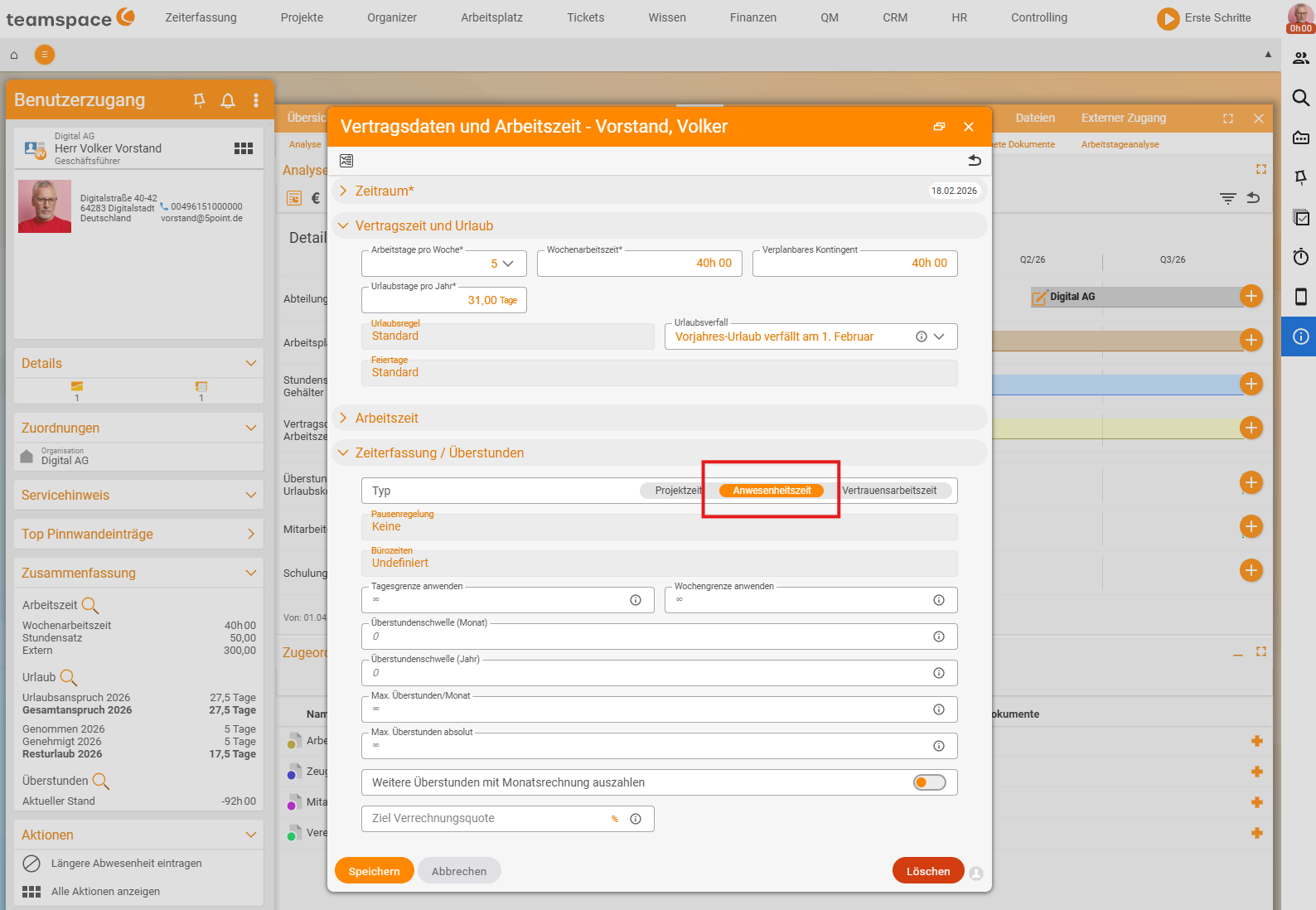
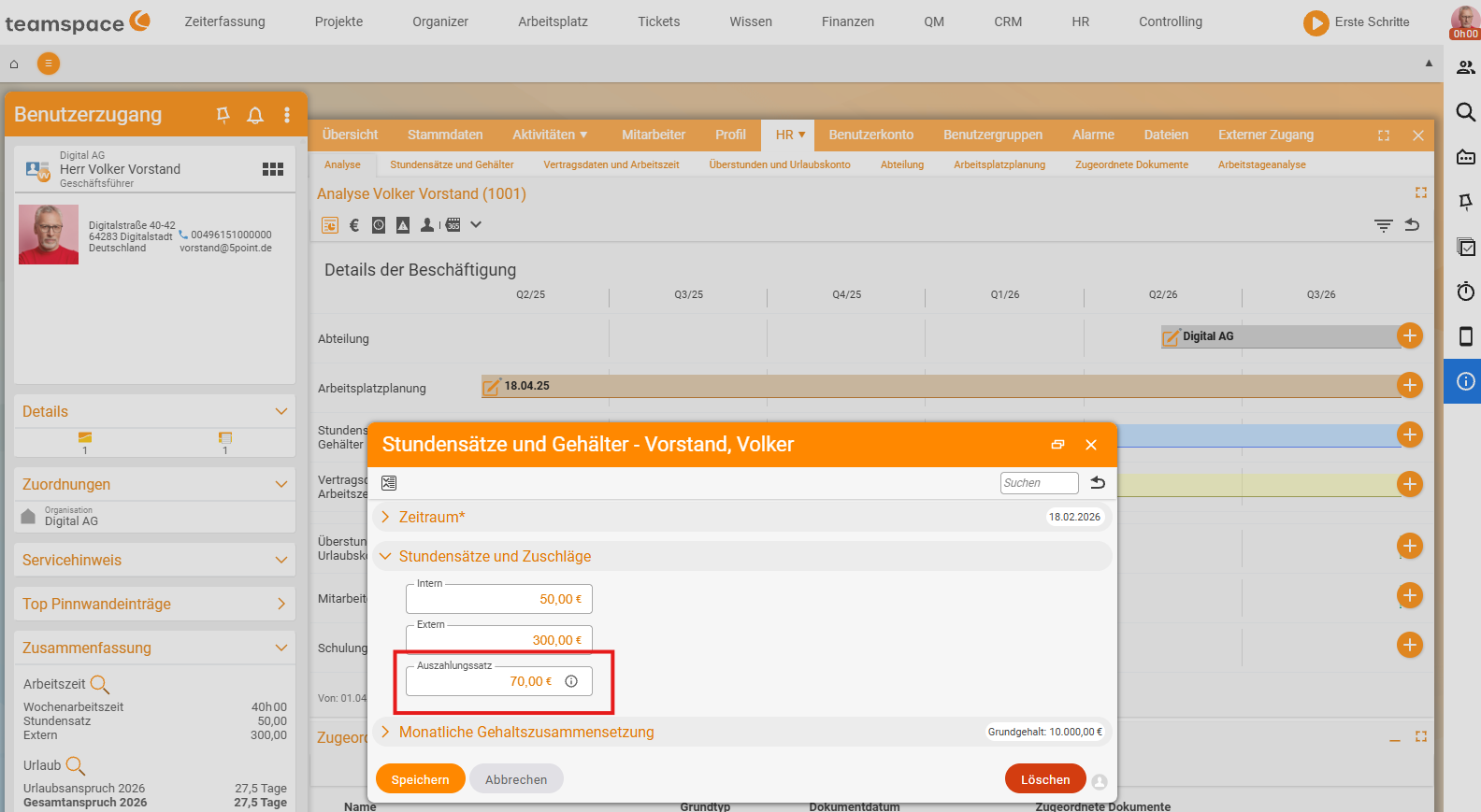
Attendance. Supplements only arise from real attendance times with check-in/out. In the HR portal, open the employee,Contract data and working hours, accordionTime tracking / Overtime– there,Attendancemust be enabled as theType. If the employee only records project time, no supplement-eligible times arise. - Payout rate. How much is paid out per supplement or overtime hour is calculated by teamspace from the employee’s payout rate. You enter it under
Hourly rates and salaries. Since rates change over time, you can store any number of dated rates – without a stored rate the payout amount stays empty.
Cost accounting (KLR)
If your tenant has cost accounting (KLR) enabled, every cost element carries the fields cost category, cost centre and cost object in the Cost accounting accordion. teamspace pre-fills them rule-based in a fixed order – configurable per element type. Example for cost elements:
- Cost category: 1. expense type,
- Cost object: 1. project,
- Cost centre: 1. employee, 2. customer.
If the employee has no fixed cost centre, the customer applies as a fallback. In lists (e.g. project times) cost category, cost centre and cost object can be shown and filtered as columns. Limits: teamspace doesn’t support internal activity allocation via secondary costs and no overhead distribution – it’s about assigning primary costs.
Common questions & needs
| You want to … | How to |
|---|---|
| Enable a missing document type | Finance → Cost types, create the type, set the switches. |
| Prevent a type from being charged to the customer | Switch billable to No. |
| Incoming invoices without a mandatory recipient | Create a document template with an anonymous collective contact. |
| Generate supplements at the month-end closing | Set up rules + cost types + linking in all three places. |
| Payout amounts per employee | In HR, maintain the payout rate under Hourly rates and salaries. |
| An employee gets no supplements | Check whether they use Attendance as their time-tracking type and have a payout rate stored (HR portal). |
| Evaluate costs by cost centre | Enable KLR and set the pre-fill rules per element type. |