


In Costs you record everything that arises in a project besides staff hours – material, travel costs, hotel documents, meal allowances, commissions, overtime payouts. Every item carries three accounts at the same time: what it charges to the project, what the customer pays, what you as an employee get reimbursed. Loose items become a closed folder through a travel expense report, a collective statement or a month-end closing – which then enters the review and payout flow.
Where the module lives
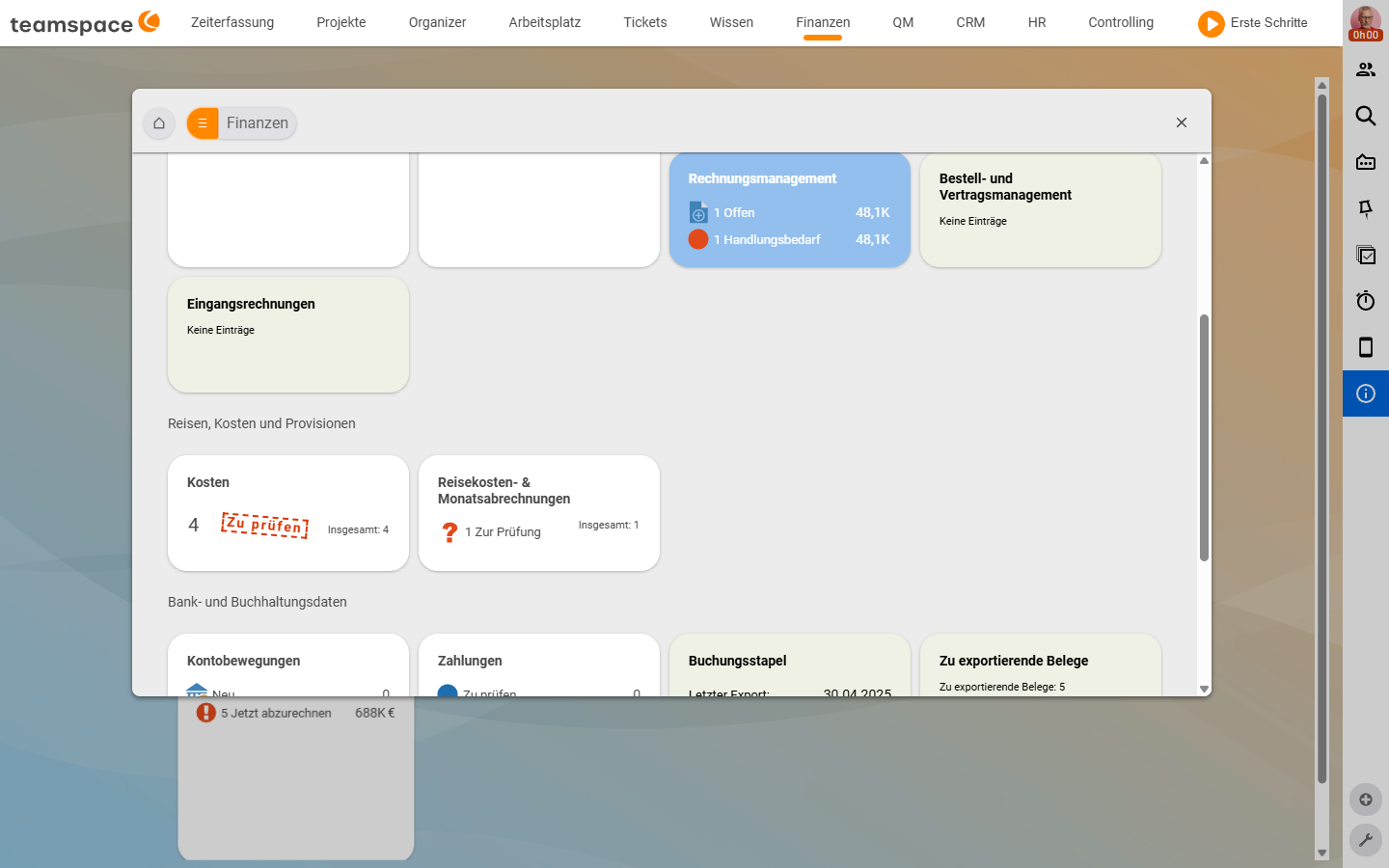
Costs sits under Finance in the main menu. In the bookmarks area three tiles carry the module – the first two in the Travel, costs and commissions section, the third (Incoming invoices) in the block above:
- Costs: the list of all individual documents – meal allowances, travel costs, expense receipts, material. This is where you review and release.
- Travel expense & month-end statements: the folders that bundle individual documents. A travel expense report for a business trip, a collective statement for everything without a trip context, a month-end closing to close a month.
- Incoming invoices: the inbox for e-invoices – PDF in, values out, cost element ready.
An employee without access to Finance records their travel expenses in Time tracking via the My travel expenses tile. Reviewing and paying out still happens in Finance.
Three accounts per cost element
Every cost item carries three rows in the Billing situation accordion:
- Project costs – how the project is charged. Without this row, the project manager can’t see the contribution margin.
- Billable amount – what the customer pays. Can be a different amount from the real costs – material often runs with a mark-up, travel costs usually 1:1.
- Employee reimbursement – what you as an employee get back. Depends on who paid: private means money back, company credit card means nothing back.
So one document creates three paths: the project sees the real costs immediately, the customer eventually gets an invoice with a cost statement, you get your money via employee payroll. The mental model behind this is in Understanding cost elements.
Five stages – from entry to payout
A cost item runs through the statuses Draft → To review → For billing → billed (the last applies once the project, customer and employee are all served). The five typical stages:
- Record. The employee creates a document – via quick entry in the project, in the bookmarks area or straight from the travel expense report. You drag e-invoices in as a reference document, the rest is read out.
- Bundle (optional). Several documents belong to one trip, one month or one collective process. You put them into a travel expense report or a collective statement.
- Review. The reviewer opens the
Costslist with the sidebar filterTo review, or the whole statement, and releases withRelease for billing. - Customer billing. From the order you bill the billable amounts in the next invoice – the process and special cases are in Recharge costs to customers.
- Employee payout. In the HR module,
employee payrollbrings together all outstanding reimbursements for an employee.
Three bundles for documents
You can also bill loose documents individually. Bundles make reviewing easier and carry their own context:
- Travel expense report: the envelope around a specific business trip. Meal allowances, hotel, travel costs – all under one title with a period and a from/to address. Prints a PDF as a cover letter.
- Collective statement: the free bundle. No trip context, any documents land in it – the “shoebox”.
- Month-end closing: closes a calendar month. After that, no more attendance times can be booked in that month. Automatically generates supplements for Sunday, public holiday and night work and pushes them into employee payroll.
What rules and e-invoices generate automatically
Two ways that save a lot of typing:
- Cost rules automatically generate flat rates from booked times – a travel flat rate per on-site day, a hotel allowance from six hours, a travel flat rate per travel day. The rule is attached to the order and is triggered when the invoice is created.
- E-invoices go the other way: a PDF with XML data in, teamspace pulls the values and automatically creates an expense receipt or an expense invoice.
Who records, reviews and bills costs
Tom Kraus, service technician, was at a customer’s site. He opens Travel expense & month-end statements, creates a new travel expense report, enters the period and addresses. teamspace generates the meal allowances automatically, Tom attaches his hotel receipt as an expense receipt (paid privately, wants money back) and sends the bundle for review.
Anna Müller, clerk, reviews. She opens the Costs list, filters on To review and goes through item by item. Where the Billing situation is right, she clicks Release for billing; for a doubtful document, Return for editing.
Volker Vorstand, managing director, bills. He opens the order; in the Costs tab the billable amounts are open. Create an invoice, all cost elements are taken along, cost statement activated – Tom gets his reimbursement via employee payroll, the customer gets the invoice with a cost breakdown.