


Every cost item belongs to a base type. The type determines which fields you see in the detail manager, how the amount is formed and how the document is treated for tax. The downstream process towards project, customer and employee is the same for all of them – that’s in Understanding cost elements. This page is the reference list of the types.
The types at a glance
| Type | What for | Amount basis | Create |
|---|---|---|---|
| Expense receipt | receipt with one item, one VAT rate | gross/net single amount | New expense (quick entry) / New expense |
| Expense invoice | incoming invoice with several items, mixed VAT | line-item table | New costs → document type Expense invoice |
| Travel costs | distance instead of a flat rate | distance km × price/km | New costs / from a travel expense report |
| Material | consumption & flat rates, often with a mark-up | quantity × price | New material costs |
| Meal allowance | tax-deductible additional subsistence expenses | flat rate 8h/24h, country | usually automatic in a travel expense report |
| Employee commission | variable remuneration | manual or commission rule | manual / rule on the order |
| Overtime payout | payout instead of time off | payout rate (HR) | starts in HR / month-end closing |
| Supplement | Sunday, public holiday, night supplement | config rule | month-end closing only |
Expenses – expense receipt or expense invoice
Both are classic expense documents: you’ve paid for something, you want it back, and usually the customer should pay for it too. The difference lies in the number of items and VAT rates.
- Expense receipt: like a receipt. One item, one VAT rate, one field each for gross and net. Taxi receipt, train ticket, fuel receipt. There’s a teamspace app for the expense receipt – photograph the receipt and the document is in the system.
- Expense invoice: like an invoice. Any number of items, each with its own VAT rate, the full incoming-invoice mechanics with a payment instruction. Hotel invoice with overnight stay (7%) and breakfast (19%), caterer with mixed rates.
If one item and one rate are enough, take the expense receipt – quicker to enter. As soon as the rates diverge or there are several items, the expense invoice is the right one. Creating both: Record expenses & material. Both can also be created from an e-invoice.
Travel costs
Travel costs bill distance, not flat amounts. In the detail manager you enter distance kilometres and price per kilometre – the amount follows. If the employee uses their private car and receives mileage, teamspace handles the tax aspects automatically. Card header: Travel costs. Create via New costs or straight from a travel expense report.
Material
Material is everything you consume in the project and invoice to the customer – consumables, spare parts, licence costs. A mark-up over the real costs is the rule, not the exception. Classic flat rates that you promise the customer in the order also run through material – travel and accommodation flat rates. You create them under the cost type, the price is in the order, and when booking the order price is pulled. Create via New material costs.
Meal allowance
Meal allowances are the tax-deductible flat rates for additional subsistence expenses: €14 for eight hours away, €28 for 24 hours, other rates abroad. If your employer pays more, teamspace automatically splits tax-free and taxable.
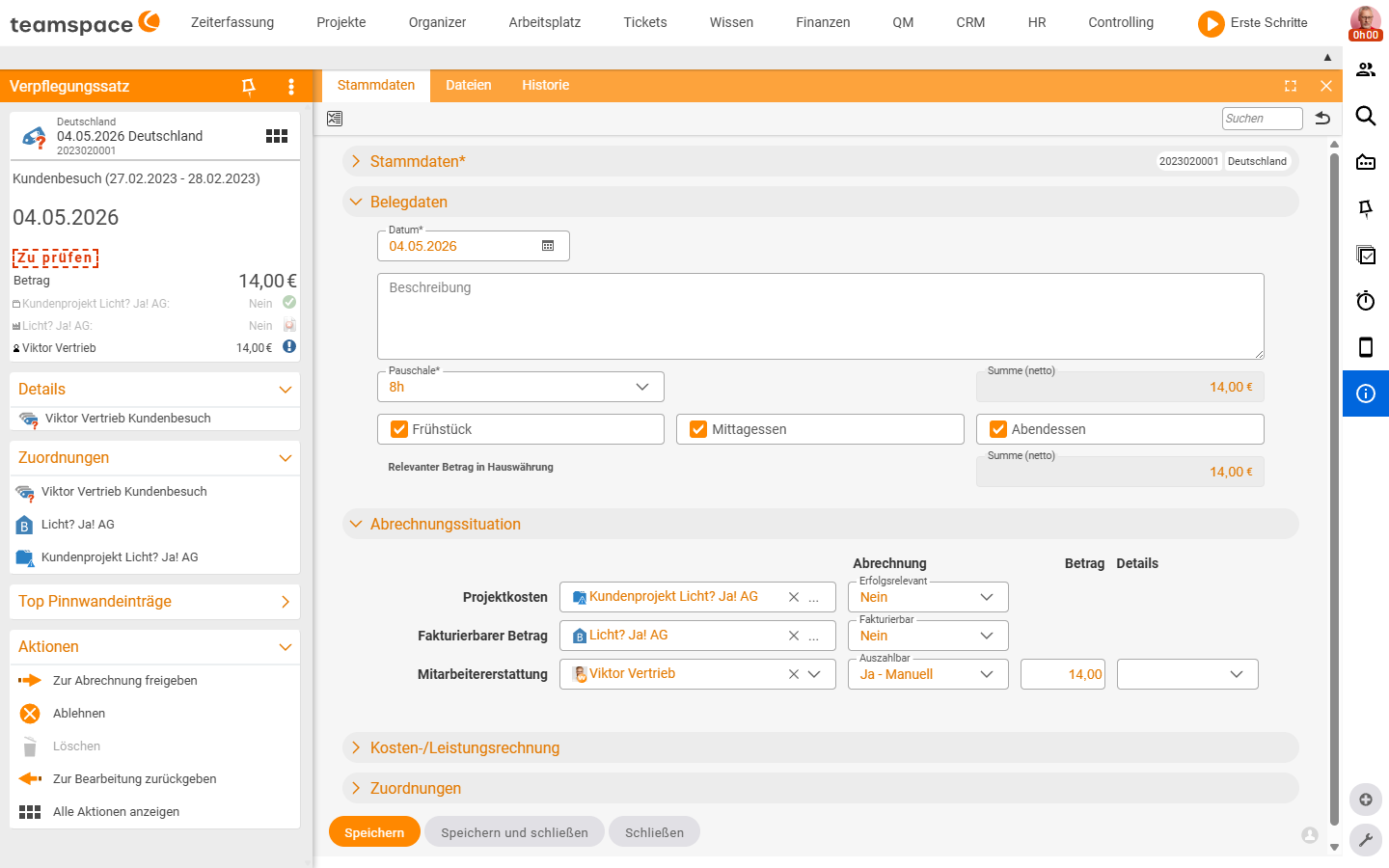
Card header Meal allowance, type display e.g. Germany. The Document data accordion carries the date, the Flat rate* field (e.g. 8h) and the three checkboxes Breakfast / Lunch / Dinner. If breakfast was included in the hotel price, that reduces the meal allowance for that day proportionally. teamspace checks the entry: only one flat rate per day, times correct, tax aspects considered. You usually don’t create meal allowances individually – they arise automatically in a travel expense report when the Create meal allowances toggle is on.
Employee commission
Commissions are the tool for variable remuneration – sales commissions, completion bonuses, referral bonuses. You can create them individually or have them generated automatically via commission rules: when item X is sold, the employee gets e.g. 5% of the sales price or gross profit. If such a rule is attached to the order, teamspace automatically creates the commission element when invoicing; the employee gets a notification and sees it in their next employee payroll. Commission rules follow the same switches as flat-rate rules – see Generate flat rates automatically with rules.
Overtime payout
If your company wants to pay out overtime (rather than only crediting it as time off), this is done via this document type. The process starts in HR – you release the payout there, and the result is cost elements of type Overtime payout. Daily payouts are possible, or a single collected element at the end of the month. This lets a flexitime model, in which overtime is normally taken as time off, be supplemented by selective payouts.
Supplement
Supplements run automatically – and only in connection with the month-end closing. You book your times as usual, close the month at the end, and teamspace calculates the supplements from the booked times according to the stored rules: Sunday supplement, public holiday supplement, night supplement. A few Sunday hours in the month → one Sunday supplement element at closing → it lands in employee payroll as payable.
⚠ Supplements arise exclusively at the month-end closing. A travel expense report and a collective statement do not generate them. They require the supplement rules in the configuration – see Collective statement & month-end closing and Set up cost types, supplements & document templates.
Which types you have
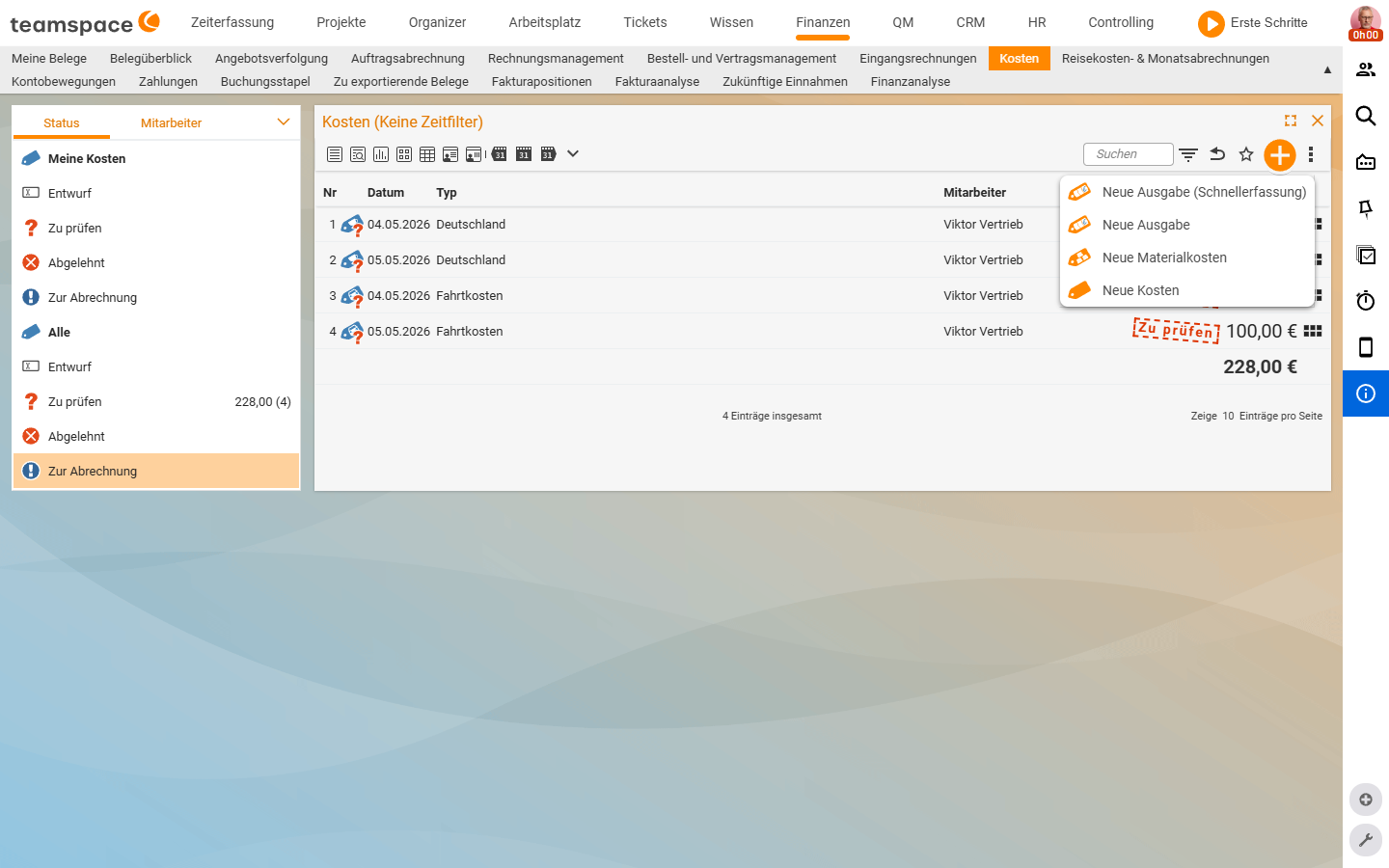
Which cost types can be created depends on your tenant’s configuration. If a document type is missing from the plus button drop-down – Expense invoice is the typical candidate – it hasn’t yet been created in the system configuration. How to add it (path System configuration → Finance → Cost types, plus the switches “billed to project”, “billable”, “payable”) is in Set up cost types, supplements & document templates.