



Maintenance fees, licences, subscriptions, rents – anything that recurs monthly or yearly at a fixed fee runs in teamspace through time-duration items. You create the item once in the order, and from then on the system writes the next invoice automatically every period – with the correct time range and price. The order stays open; with each new period, a further amount becomes billable.
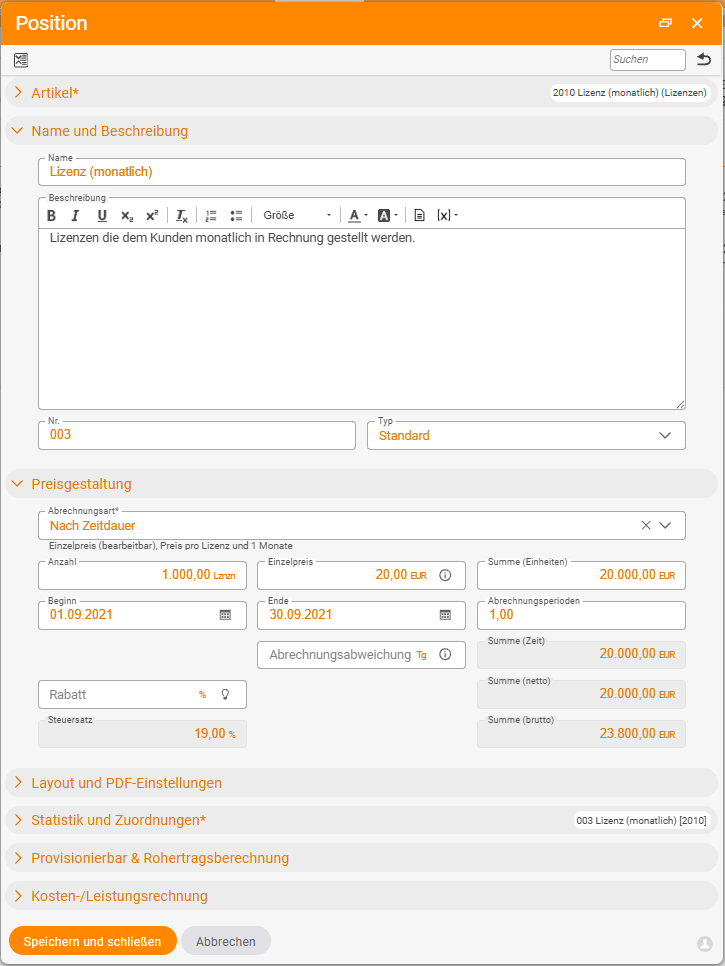
Create a time-duration item
A time-duration item needs two properties on the article: the By time duration billing method and the cycle (under Pricing: 1 month = monthly, 3 months = quarterly, 1 year = yearly).
ℹ The cycle is fixed once created. A monthly article does not become a yearly one. If you need the same thing with a different cycle, create a second article. In the line item, only the unit price, quantity and discount remain open.
The line item you create also needs:
Start– the start date of the period. If it is missing, the order shows in red that the item cannot be billed. If the start lies in the past, one or more periods are immediately billable.End(optional) – the contract end; after that, the item becomes inactive.
ℹ End known, but still bill monthly? If you enter an end date, the system initially wants to bill the entire range. Instead, switch on the
Bill only commenced periodstoggle (verified live on 25 June 2026) – then each month still falls due one by one, even though the end is fixed.
Periodic fields in the PDF – placeholders
The description text can carry the billing range dynamically – via two placeholders:
xStartx– the period start.xBisx– the period end.
If you write Licence fee xStartx to xBisx in the description, the PDF shows, for example, Licence fee 01/11/2026 to 30/11/2026. Maintain the text directly in the article – then it flows automatically into each new line item.
Control the billing date – the billing offset
By default, a period becomes billable on the day the period starts. Using the Billing offset (on the article or on the line item), you shift the moment:
- 0 days – billing on the period start.
- −10 days – billing 10 days before the period start (advance licence, advance maintenance).
- +30 days – billing 30 days after the period start (in arrears).
You only control when the invoice is created – the billing range remains the period itself. An invoice on 27/10 for the period 01/11–30/11 is a perfectly normal advance invoice.
Change price or quantity – the clean way
Once the line item has already produced invoices, you must not overwrite the price or quantity directly – the system would recalculate retroactively, and a warning would appear. The clean way: in the line item, via the three-dots menu → Adjust price and size, then choose the date from which the new value applies. The system sets an end date on the old line item and creates a new line item from that date – both continue to live in parallel. For many orders at once there is a bulk action: see Adjust prices in ongoing contracts.
Several time-duration items & merging
You can have any number of time-duration items with different cycle, start and price values in a single order – each becomes billable individually. Two items with the same periodicity (for instance two annual licences with different start dates) can be combined into a single summary item via the three-dots menu with Merge two identical items from a chosen date.
ℹ When merging, you decide on which line item you open the menu, which determines the start date from which the new summary item runs. Open it on the line item with the desired start date.
Tidy up the order
In long-running orders, completed line items accumulate. From Finance → Orders, the multi-select Tidy up action runs – finished line items move into an Archive area. You maintain the name once under Configuration → Finance → Documents → Default group for tidying up.
Common questions & needs
| You want to … | How to |
|---|---|
| Bill monthly/yearly automatically | A time-duration item with a cycle in the article + a start date in the line item. |
| Show the licence period on the invoice | The xStartx/xBisx placeholders in the description text (ideally in the article). |
| Invoice even before the period begins | Set the Billing offset to a negative value (e.g. −10 days). |
| Increase the price for the next period | Three-dots menu → Adjust price and size from a date. |
| Bill monthly despite a fixed end | The Bill only commenced periods toggle. |
| Bundle two licences onto one invoice | Three-dots menu → Merge two identical items. |
Related topics
- Maintenance fee with free allowance (with video) Invoicing How-to
- Adjust prices in ongoing contracts Invoicing How-to
- The six billing methods Invoicing Concept
- Cumulative invoices