


An e-invoice in line with EN 16931 consists of around 150 Business Terms (BT) – individual data fields, from the invoice number (BT-1) to the line-item description. If a recipient rejects an invoice and names a field (“BT-11 is not filled”), you find the meaning here. In teamspace you see the fields on the document on the Invoice data tab – broken down into the sections Document data, Other document data, Supplier (invoice issuer), Customer (invoice recipient) and Placeholders (verified live on 25 June 2026); with e-invoicing active, the fields additionally carry their BT numbers. Setting up and checking is described in Set up and use e-invoicing.
ℹ Whether a field is mandatory depends on the context. “Mandatory” sometimes applies only when the parent group (BG) is used. Conditional fields (e.g. the buyer’s VAT ID) are only mandatory under certain conditions. The binding source is the KoSIT specification (see below).
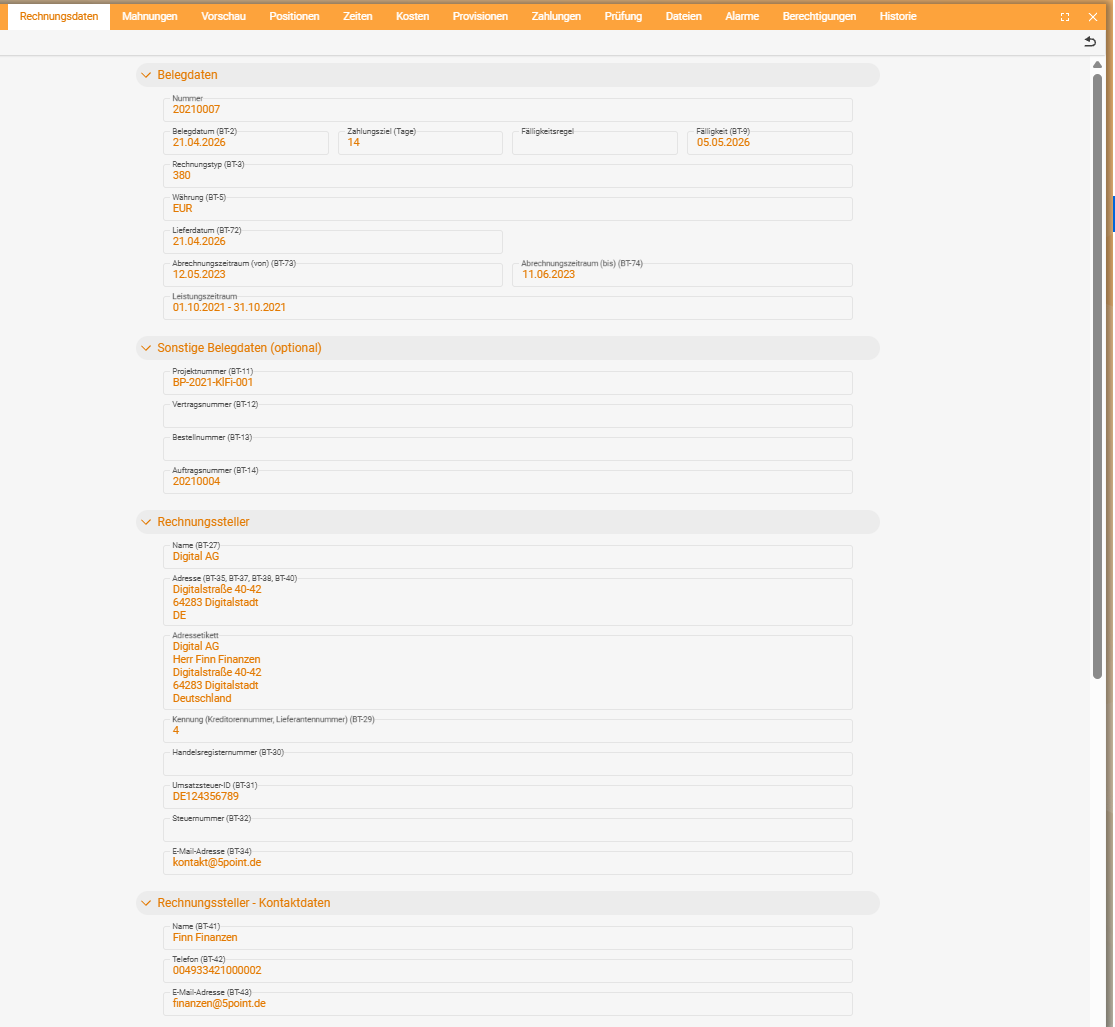
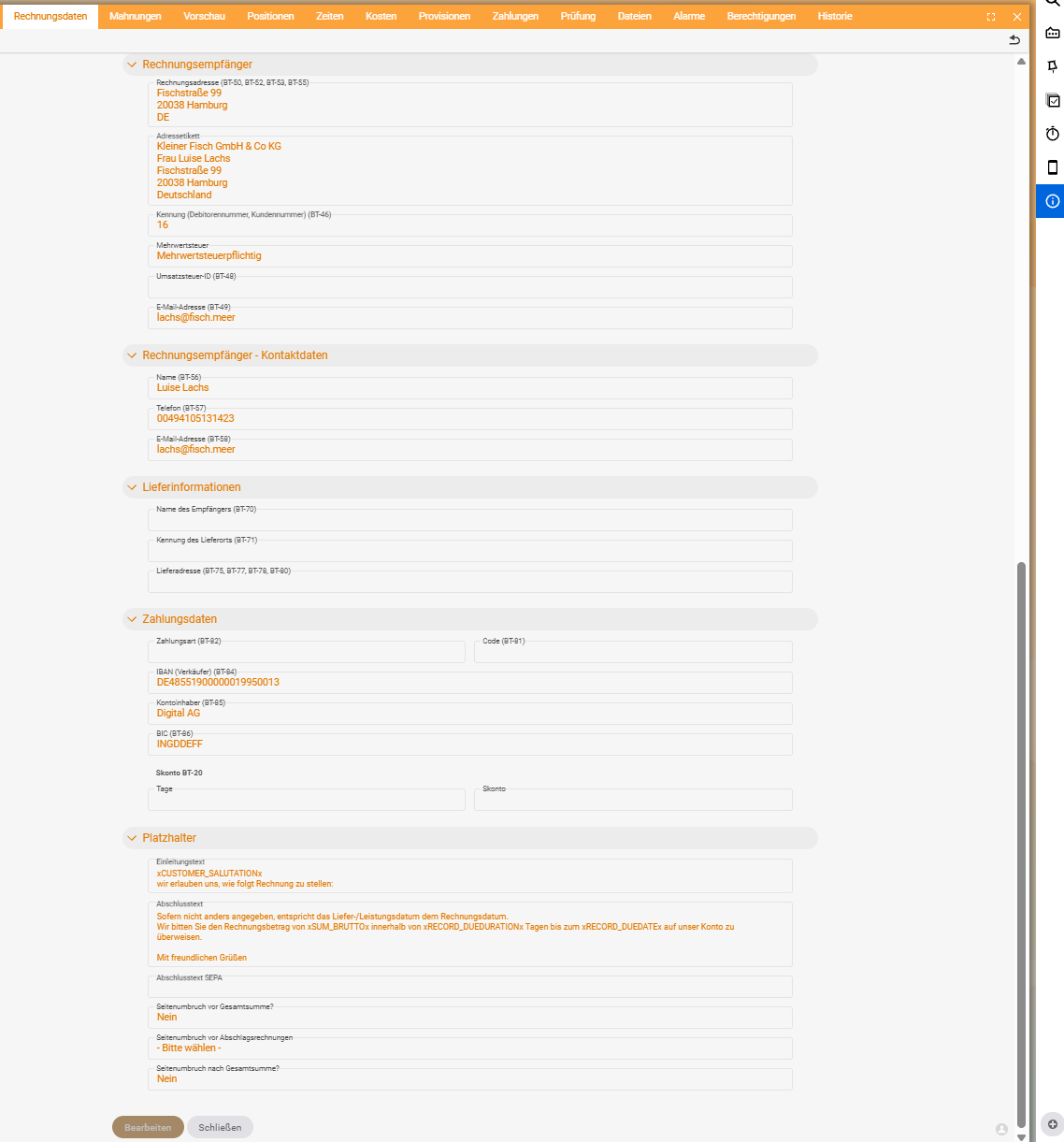
General invoice data
| BT | Meaning | Description | Mandatory |
|---|---|---|---|
| BT-1 | Invoice number | Unique identifier of the invoice | Yes |
| BT-2 | Invoice date | Date of issue | Yes |
| BT-3 | Invoice type (code) | Type of invoice document | Yes |
| BT-5 | Invoice currency | Currency indicator of the amounts | Yes |
| BT-9 | Due date | Due date of the invoice amount | No |
| BT-10 | Buyer reference / routing ID (Leitweg-ID) | Reference for internal routing (public authorities) | No¹ |
| BT-13 | Order number | Buyer’s order number | No |
| BT-22 | Remark | Further information about the invoice | No |
| BT-23 | Business process | Context of the business process | Yes |
| BT-24 | Specification identifier | Identifier of the semantic rule set | Yes |
¹ As a rule mandatory for invoices to the public administration.
Seller (BG-4)
| BT | Meaning | Mandatory |
|---|---|---|
| BT-27 | Seller name | Yes |
| BT-31 | Seller VAT identification number | No¹ |
| BT-35–40 | Address (street, city, postcode, region, country) | Yes² |
¹ Mandatory as soon as VAT is shown. ² Country (BT-40) is mandatory.
Buyer (BG-7)
| BT | Meaning | Mandatory |
|---|---|---|
| BT-44 | Buyer name | Yes |
| BT-48 | Buyer VAT ID | conditional |
| BT-50–55 | Address (street, city, postcode, region, country) | Yes² |
² Country (BT-55) is mandatory.
Payment & totals
| BT | Meaning | Mandatory |
|---|---|---|
| BT-84 | IBAN (payment account) | No¹ |
| BT-106 | Sum of the net line amounts | Yes |
| BT-109 | Total amount without VAT | Yes |
| BT-112 | Total amount with VAT | Yes |
¹ For a bank transfer effectively required so that the payment can be allocated.
Invoice line items
| BT | Meaning | Mandatory |
|---|---|---|
| BT-129 | Quantity of the invoiced service | No |
| BT-146 | Net price of the item (incl. discount) | Yes |
| BT-153 | Article / line-item name | Yes |
How to use the table
- The recipient names a field (e.g. “BT-31 is missing”).
- Look up the meaning here (seller VAT ID).
- Maintain the value at the source – usually in the CRM master data record of your own company or of the recipient (see Set up and use e-invoicing).
- Create the invoice anew and check it – to verify, visualise the file via the ELSTER service elster.de/eportal/e-rechnung.
Related topics
- Set up and use e-invoicing (with video) Invoicing Configuration
- Incoming documents: purchase orders, expenses & incoming letters Invoicing How-to
- EN 16931 / XRechnung standard (KoSIT)